

There are many times when developing an extension for Business Central that we have data that needs to be kept secret. We may need to keep data secret from the user, other extensions, and even from the debugger.
We look at the concept of secret values in our implementation of Azure OpenAI where the API Key represents a secret value that must not be made public, else there are financial implications. We use Isolated Storage to store data and keep it secret.
We are going to need to generate secrets that extend into Custom Controls and JSON data for API Authentication. We may not event want the debugger able to snoop on some of this communication. This is where the SecretText variable comes into play.
Let us create a JSON object for authentication into a service of some sort.
{
    "type": "Some Secret Type",
    "api_key": "SuperSecretKey",
    "secret_salt": "SuperSecretSalt"
}
Here is a quick and dirty JSON object generation using the Text variable we already know and love.
procedure CreateBody(APIKey: text; SecretSalt: text): text
var
    JObject: JsonObject;
    Results: text;
begin
    JObject.add('type', 'Some Secret Type');
    JObject.add('api_key', APIKey);
    JObject.add('secret_salt', SecretSalt);

    JObject.WriteTo(Results);
    exit(Results);
end;
When I run this in a debugger, I can snoop on everything.
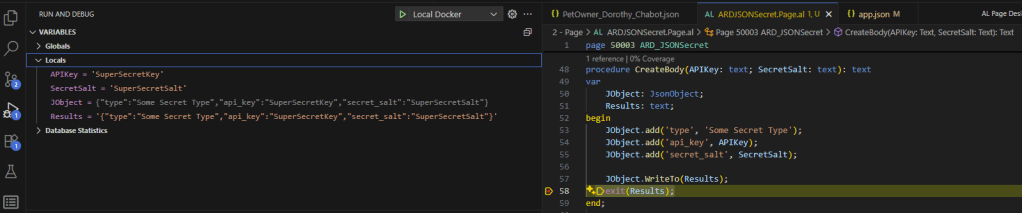
There they are! All my secrets, for the world to see! Even if this was a local procedure, hidden away, if someone attaches a debugger, or if I had to pass this string into another procedure it could easily be snooped!
Here is a snippet of AL Code that creates a JSON text can’t be snooped on.
procedure CreateSecretBody(APIKey: SecretText; SecretSalt: SecretText): SecretText
var
    JObject: JsonObject;
    Secrets: Dictionary of [Text, SecretText];
    Results: SecretText;
begin
    JObject.add('type', 'Some Secret Type');
    JObject.add('api_key', 'placeholder_api_key');
    JObject.add('secret_salt', 'placeholder_secret_salt');

    Secrets.add('$.api_key', APIKey);
    Secrets.add('$.secret_salt', SecretSalt);

    JObject.WriteWithSecretsTo(Secrets, Results);
    exit(Results);
end;
There are some very interesting things happening in this snippet of code. There is a lot of SecretText variables floating around in here. There are also a few special handling processes. Let’s break it down.
Line 8 and 9 add the api_key and api_secret value to the JSON but only provide it with place hold text. This text can be anything, we just need to create the entry in the JSON Object.
Line 11 and 12 are populating a Dictionary of [Text, SecretText] values. The Text is the path to the values and the SecretText is the value to replace. The Root, or starting point, of a JSON Object is denoted with the $. We then use a dot (.) to specify the child element.
We can see that “$.api_key” points to the api_key value from the Root of the JSON Object.
Lastly the JObject.WriteWithSecretsTo procedure takes the Dictionary of Secrets and replaces the placeholder values with the secret text while writing it into another SecretText variable.
When I look at this with my debugger all the SecretText values are displayed as HiddenValues. No snooping for me! As added security, I can’t even display them on the screen.
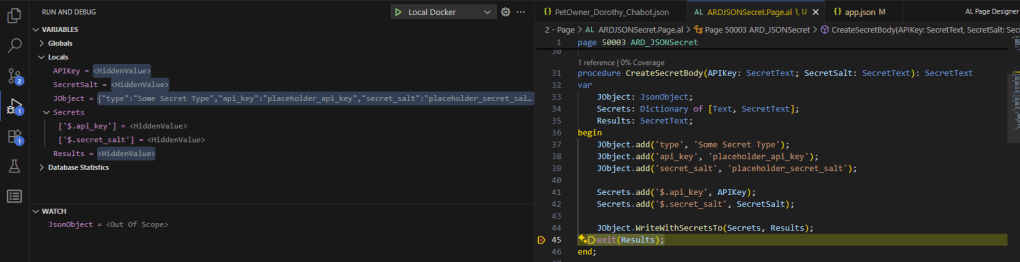
The SecretText conversion is one way. A plain text value can be used to populate a SecretText. A SecretText can’t be converted to a Plain Text and cannot be used in procedure that expect a plain text.
Where can I use the SecretText variables if I can never see what is inside?
We can pull data from Isolated Storage or an Azure Vault directly into a SecretText variable, never revealing it to the debugger. The Get and Set of an IsolatedStorage value supports SecretText.
The HTTPClient object uses the SecretText:
- Creating an authentication header for the request with the credential.
- Adding the credential to the body of a request for the initial sign in.
- Adding an API key to the parameters of a request
Lastly, the Azure OpenAI authentication will accept SecretText for the oh so valuable API key.
As you can see Business Central AL has a robust means to manage data that we must keep secret. This is commonly used in a write once/reveal never system. This allows you to enter an API Key once, but it is never retrieved outside of a SecretText variable. Never to be seen by human eyes again.
Use SecretText with control add-ins and in JSON objects | Microsoft Learn
Protecting sensitive values with the SecretText data type – Business Central | Microsoft Learn
SecretText data type – Business Central | Microsoft Learn
If you have any questions or comments, please feel free to share them below.




 Aardvark Labs
Leave a comment