

We have taken a look at the Page Scripting tool a few times and with the release of Business Central 2025 Wave 2 we have a few important improvements.
Review the previous posts if you need.
In the original release managing the script generated could be a real challenge. In many cases if there was an error or a change in the script the best / only option was to re-record the entire script.
If you were willing to edit the script by hand, then none of this was an issue. Editing the scripts by hand was difficult and time consuming.
Problem 1: If you make a mistake while creating a script, you have to start over.
Solution: You can delete arbitrary steps.

Problem 2: If you want to add steps to an existing process, you must re-record the process.
Solution: You can insert steps by placing the Red Insert line at the starting point and record additional steps.
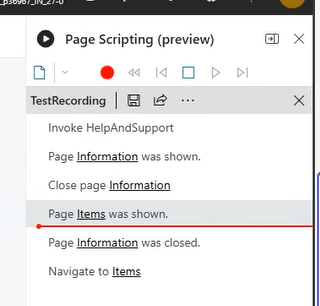
Problem 3: Steps are out of order.
Solution: Drag and Drop rearrangement of steps.
Problem 4: Script should have parameters. The only way to add these is through editing the YAML file.
Solution: Ability to add parameters in the UI.
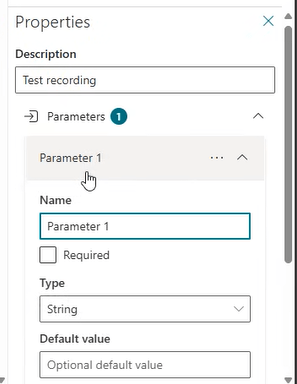
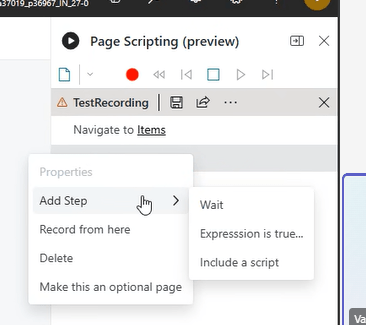
Problem 5: My script is getting very long and complex, I would really like to create sub-scripts / a suite of scripts.
Solution: Previously generated scripts can be included through the UI. You can pass parameters between scripts. You can also edit the imported script in the UI.
I had to lean further into the Learn article than normally. The deployment of all these new features is rolling out slowly, and my demo environment had not gotten all the new features yet. If you don’t see them in your Business Central 27.0 release yet, don’t stress out, they will roll out as they become ready in your region.
Record and edit easier with enhanced page scripting tool | Microsoft Learn
Let me know if you have been making use of the Page Scripting tool. If you are, are these features going to help you out? If not, will these new features help you get started?




 Aardvark Labs
Leave a comment