

Lab Notes #2
A recent post from Tonya Bricco-Meske about an Event Subscription Page hidden in BC reminded me of a similar series of pages for Business Event Subscriptions that came in handy.
You can read Tonya’s post here: #HumpDayHacks: Event Subscriptions Page in BC – BC Development Notebook
I posted about how to implement Business Events and access them with Power Automate a while ago in this post:
That all works great, but Business Events are basically Web Hooks and they can be accessed from other platforms, not just Power Automate. When everything works great, it is magical, but when it doesn’t, we need more tools.
There are several pages in Business Central that can help you debug your Business Events. The first page is the “Business Event Subscriptions” page.
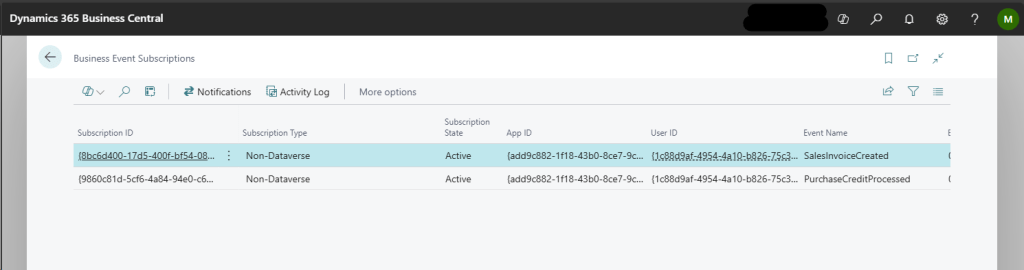
This page provides a list of subscriptions, events, and notification URLs. If you don’t see your Notification URL in this list, then you did not successfully subscribe to the event. If you are attempting to subscribe and it just isn’t working, check that your user has the “EXT. EVENTS – SUBSCR” permission set. The following pages can be drilled down to from the button at the top of the Business Event Subscriptions page.
The next page to review is the “Business Event Activity Log”.
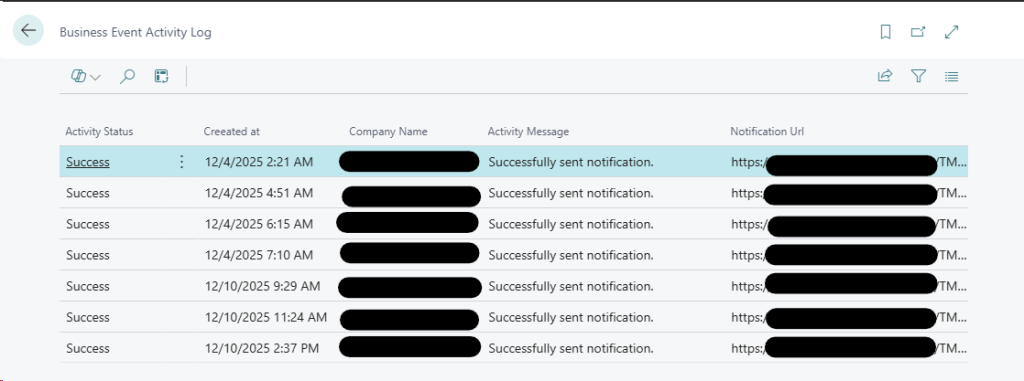
This page will display the attempts to send the notifications. Business Central will retry sending the notification 10 times. Too many failures will result in the subscription being canceled. Checking this page will inform you if the events are being sent and if a 200 or 210 is received back to the server.
The last page is the “Business Event Notifications” page.

This page is a little simple, but it shows that an event was sent and how many retries it had.
I hope this helps you debug your Business Central Business Event Subscriptions. Let me know if you have any questions in the comments. If you find this kind of thing useful, please let me know and subscribe for the latest updates.




 Aardvark Labs
Leave a comment