

Lab Notes #3
There have been a few instances where I wanted to start development on a Business Central extension, but the client system isn’t ready. You need to download Business Central symbols, so where do you go?
I could go grab symbols from another project or point to another Business Central environment. There is another option in Business Central AL 17.0: You can download symbols from the Global NuGet feeds.
In your .VSCode/Settings.json file add the al.symbolsCountryRegion value with your Country Region code.
{
    "al.enableCodeAnalysis": true,
    "al.codeAnalyzers":[
      "${codeCop}",
      "${PerTenantExtensionCop}",
      "${UICop}"
    ],
    "al.ruleSetPath": "./.codeAnalysis/thisproject.ruleset.json",
    "al.symbolsCountryRegion": "us",
    "al.rootNamespace": "AardvarkLabs"
  }
You can see in line 9 I have specified “us”.
Now in Visual Studio Code we have another option for Downloading Symbols: “AL: Download symbols from global sources”
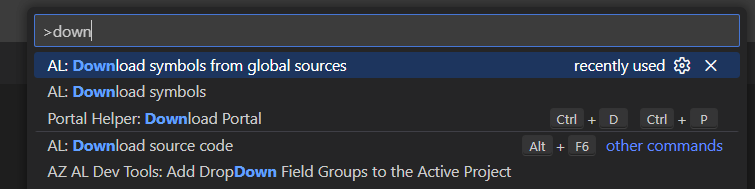
This will download the symbols from NuGet.
No need to log into a Business Central environment, no accidentally copying old resources from an old project.
Complete change log can be found here: https://marketplace.visualstudio.com/items/ms-dynamics-smb.al/changelog




 Aardvark Labs
Leave a comment