

A while back I was approached by Ben Cole and Dave Wheat on an AI concept that was novel and would demonstrate a use case within Business Central. They just needed a mad scientist to create the demo. I had already said yes before the explained what they wanted. You had me at “mad scientist”.
If this is your first AI Project, you may want to read the introduction article here:
The use case is that the company would like to generate marketing campaigns that target regions of the USA based on current events or environmental factors. If a sale is made in that region, then a free sample is to be added to the Sales Order. For example, if they are selling outdoors gear, they want to add a free sample of Bear Spray to people purchasing products in a region that is known to have bears.
As we are using Bear Spray as an example here, I would like to quickly reference BearWise.Org Bear spray is an effective deterrent. Learn how to use it safely:
Bear spray doesn’t work like bug repellent. Never spray yourself, your tent, campsite, belongings or surroundings.
Okay, enough preamble, how are we going to architect an AI Based Solution.
Our goal will be to generate a list of postal codes representing the regions we want the campaign to focus on. When a sales order is released, we check if the ship to address is in the postal code list and add the sample to the order.
To identify postal codes, we need a system where a user can describe in natural language a scenario for which they want to find impacted regions. We need to search and find postal codes that represent those regions. We then need to process those postal codes into some working data system that Business Central can use during the sales order release event.
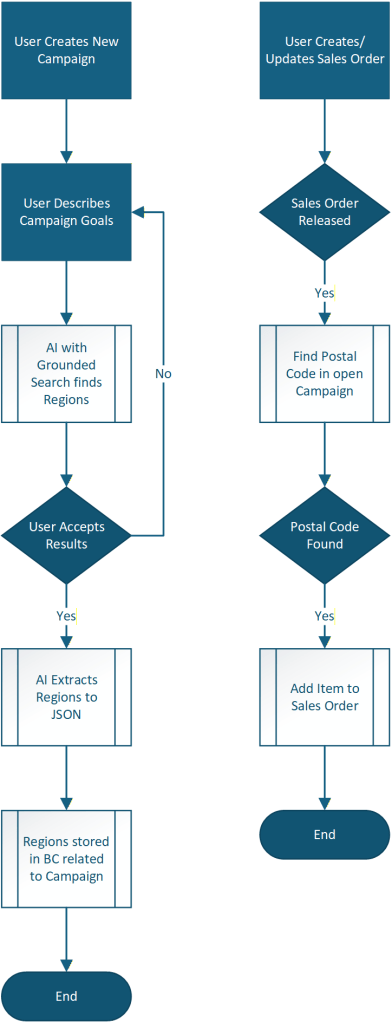
Unlike our previous AI Examples, we are going to run two AI Agents. One to take the natural language input from the user and use a grounded search to get the values and return a natural language result. The second agent will take the natural language result, pull the postal codes out, and return them in JSON format for Business Central to store and utilize as part of the larger campaign workflow.
AI is only used in creating the campaign, Business Central processes and native AL code is used for the campaign management. This saves a lot of cost in AI processing.
Let’s take a look at how it runs.
We start by generating an AI Campaign. This is a series custom Business Central Pages and Tables created for this example.
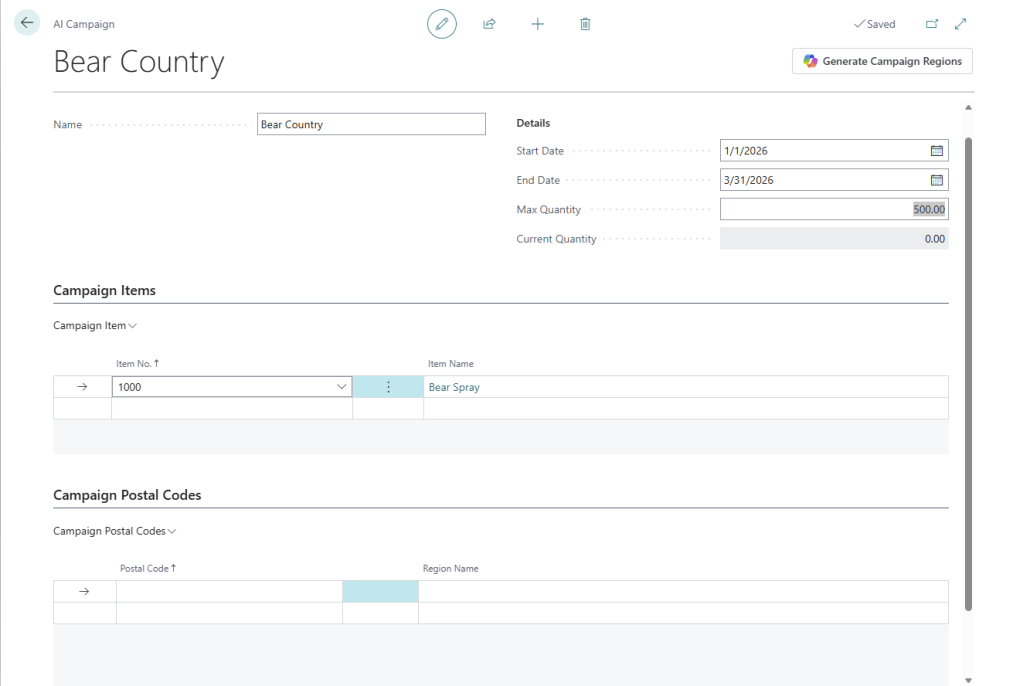
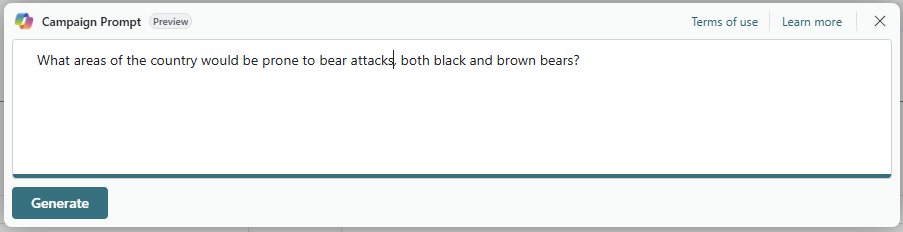
Clicking on the “Generate Campaign Regions” button bring up the Copilot prompting system we have all become familiar with. We can fill this in with a natural language question that should result in an answer that includes regional data.
When we click generate, we get a natural language response in the first text block, the second box is included for debugging and shows the output from the second AI process which pulls the Postal Codes from the first response into a JSON data object.
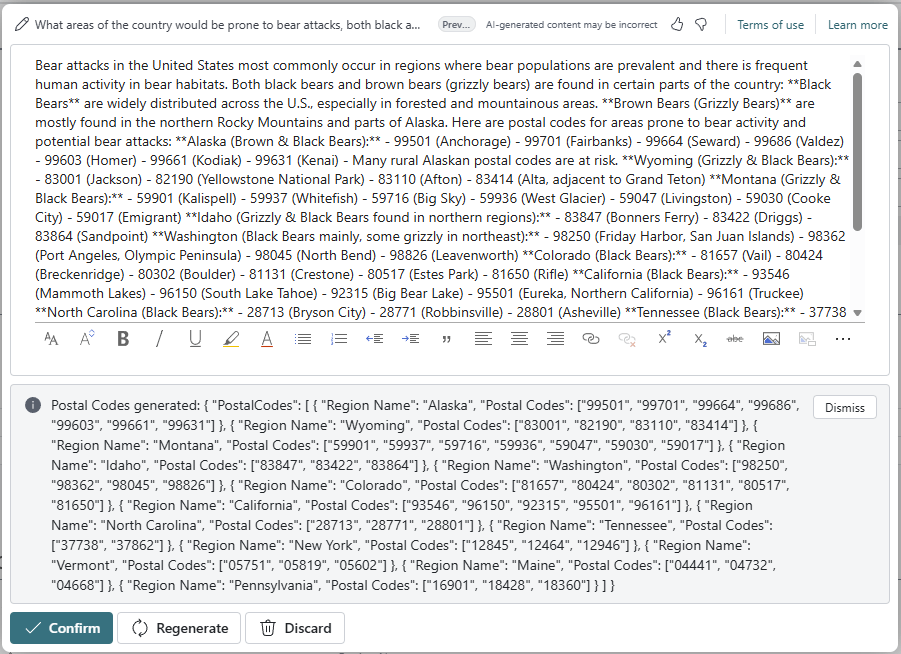
In normal operation we wouldn’t run the second AI process to extract the Postal Codes until the user accepts the results of the first process. Running it for each request waists request tokens if the user doesn’t accept the first response. For demo and debug, this worked fine.
We accept the recommendations, and we can see the Postal Codes in the table.
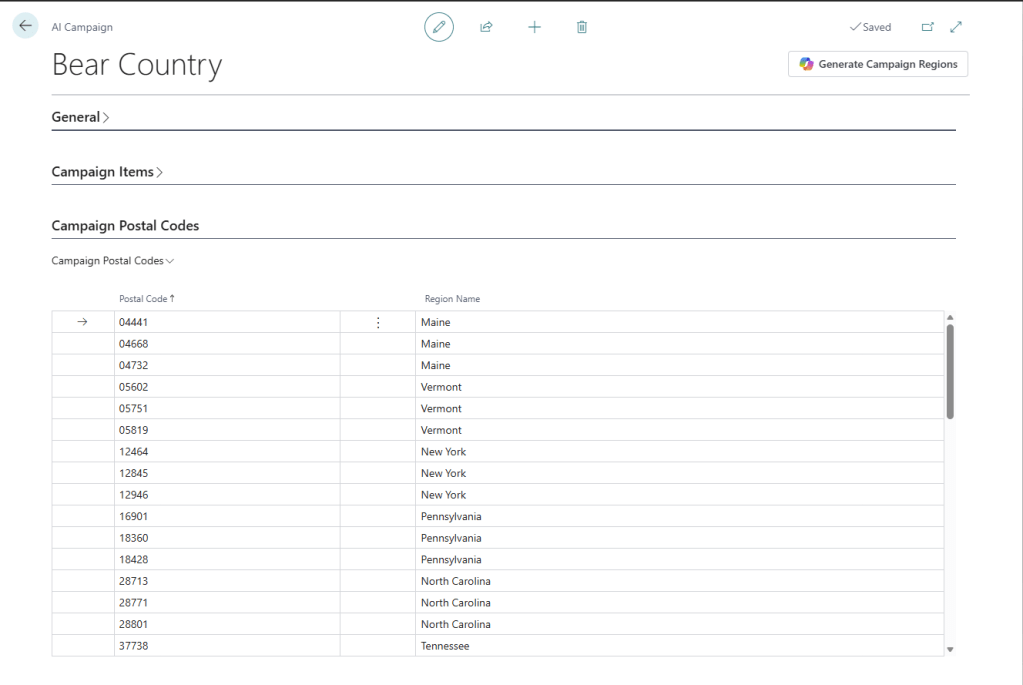
The first AI search, which I named “Big AL” is using the Managed Resource connection so that we can make use of the AI capacity within Business Central. The stock OpenAI system can’t return data on bear attacks, it doesn’t have access to up-to-date information. For up-to-date information you need Grounded Search capabilities, which can be complex to configure and expensive to operate. The good news is that the managed AI resource in Business Central includes BING Grounded Search.
For more information about the difference between Managed vs Unmanaged AI capabilities:
At this point we know that the core to any AI system is prompt management. In this case we have to manage the interaction between two prompts. The prompt for Big AL is shockingly short. I suspect it will get longer with some tuning.
SystemPrompt := @'You are an AI assistant that helps people find the location of important events in the United States of America.
        The goal is to identify postal codes for affected areas. Please provide as many postal codes as possible based on the user prompt.';
The second AI extracts the postal codes from the first AI response and generates the JSON object. This AI also uses the Managed Resource. I had to be aware that it also has access to grounded search and if the prompt isn’t carefully created it may go out and search the internet for more data, and I don’t want that. I named it “Jimmy the Fish” as both a Dr. Who reference and because it fishes out the postal codes.
The prompt here is a little more complex as we have expectations on the output.
SystemPrompt := @'You are an AI assistant that helps people find Postal Codes in a response to a user prompt.
        Please return the Postal Codes in the format of a JSON Object named "PostalCodes" with an array containing objects of: Region Name, array of Postal Codes. Break any postal code regions into individual postal codes.
        If no Postal Codes are found, return a default message indicating that no Postal Codes were found.';
Now on to the Sales Order. I’ve created one for our friends at Adatum and change the postal code on the shipping address to 04441. When I release the order the Bear Spray is added with “Free Item:” prefixed to the description.
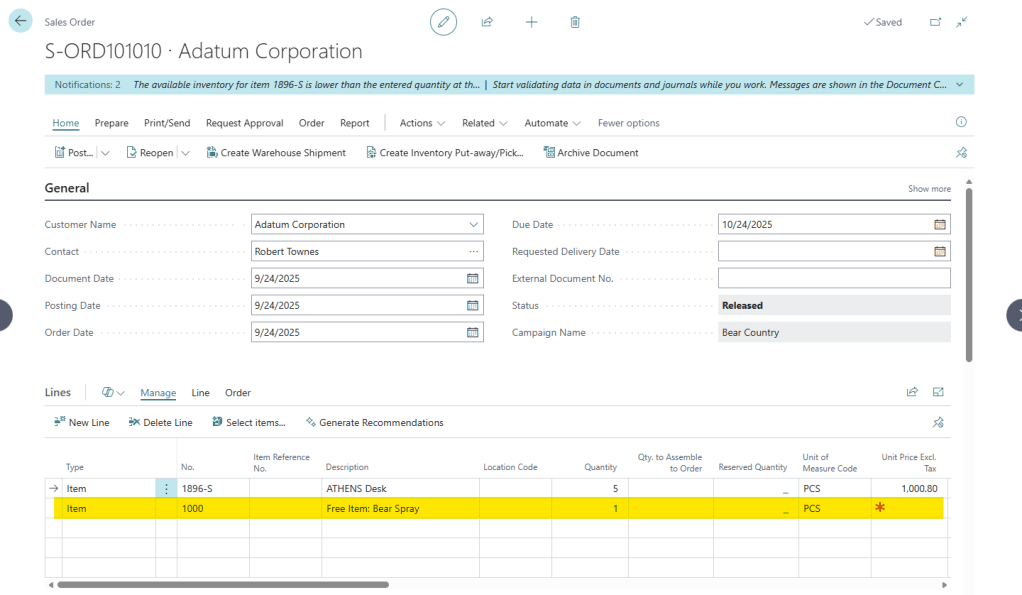
This isn’t AI, this an extension listening to the OnBeforeReleaseSalesDoc event and running some AL code to lookup the campaign.
In the end this serves as an example of how multiple AI systems can work together to provide a service to the user. Neither AI system had to be overly complex, and each was able to be tuned and adjusted without overly impacting the other.
The other take-away from this system is how to efficiently implement an AI process. In a busy system this Campaign may be run against thousands of sales orders, but I only ran two AI processes. The day-to-day operations do not incur AI costs.
This is the most important take-away. I could have used AI on the release of each sales order to check if the postal code was in the region described by each prompt. If I asked OpenAI with Bing Grounded Search “Have there been any bear attacks in or around postal code 04441” it would have answered “yes”. However, that would be rather expensive, and it would have a large performance hit. This system trades a tiny bit of BC storage for a huge AI savings and performance handling.
You can find all the source code for this example in my GitHub.
If you found this helpful, please consider subscribing. If you have questions, please feel free to comment below.



 Aardvark Labs
Leave a comment