

BC AL Journey #34
When working in Business Central we use what traditional programmers would call “Strongly Typed” objects. In this post we are going to explore “Weakly Typed” objects and a few use-cases that exemplify them.
Let’s go a little deeper into defining a strongly typed object in Business Central. These are objects that have their properties known at compile time. As a general rule, if you can give it a name, it is a strongly typed object.
- Record Customer
- Codeunit “Sales-Post”
- Page “Item Card”
- Enum “Document Type”
- Query “Open Customer Invoices”
There are huge benefits to having strongly typed objects.
- Compiler-time validation of fields, procedures, properties
- IntelliSense that knows what members exist in the object
- Safer refactoring as the compiler can catch mismatches
- AI Assisted Development it is how it intuits what new objects can do
- Better performance because AL doesn’t need to resolve types dynamically
In short strongly typed objects are objects that we know what is inside them. When we introduce inheritance and interfaces, we can know what is in part of an object by knowing what is in its strongly typed parents.
History lesson: One of the first programming languages to support a strongly typed design was ALGOL 68 from 1968. ALGOL 68 was a huge influence on the design and development of Pascal. If you have developed in Pascal, then there is no hiding that Business Central AL has its roots in Pascal.
The last things we need to cover is where does this magical strong typing come from? Some of it is in the core of the AL language. A Table Field will always have a “validate” procedure, that comes from the object that all Fields inherit from.
The other place is in the Dependencies. We have stock dependencies like the Microsoft_Base Application file or the dependencies we add to the App.JSON of our extensions to support ISV or VAR developed extensions. We are adding strongly typed object as we create our extensions.
With all these advancements, why would we want to use a “Weakly Typed” object? Fantastic question hypothetical reader! In a word, flexibility.
- Dynamic access to tables, fields, or other objects
- Late binding where things are resolved at runtime
- Flexible generic code, such as logging, auditing, or import frameworks
A while back in the very first Lab Note I covered a use case where I didn’t know if an VARs dependency was going to be installed in the user’s system.
That example was based on a very specific user case, let’s take a look at the fundamental blocks of a weakly typed structure. When we decide to turn our backs on nearly 60 years of software development and go weakly typed, there are a few strongly typed objects to help us navigate the waters.
These objects are the Reference objects: RecordRef and FieldRef. If you look at the properties and procedure available to these reference objects, they will be familiar as they are the common properties and procedures we see if ALL strongly typed objects. These are the minimal versions of the objects we know and love.
Let’s do something with this information!
Here is a use-case. You have a list of Sales Headers and Sales Invoice Headers and you are asked to SUM the Amount field from both lists into a single value.
We could write a code unit with 2 procedures:
procedure SumTotalAmount(SalesHeader: Record "Sales Header"; var TotalAmount: Decimal)
begin
    SalesHeader.CalcFields(Amount);
    TotalAmount += SalesHeader.Amount;
end;

procedure SumTotalAmount(SalesInvHeader: Record "Sales Invoice Header"; var TotalAmount: Decimal)
begin
    SalesInvHeader.CalcFields(Amount);
    TotalAmount += SalesInvHeader.Amount;
end;
This simple example works just fine. We were even able to use an overloaded procedure signature to have the same named procedure take either a Sales Header or Sales Invoice Header. The code inside is nearly identical!
Alternately, we could create a single procedure that took a RecordRef of either a Sales Header or Sales Invoice Header and worked with FieldRefs to get the data. The Sales Header and Sales Invoice Header field id’s are nearly identical. So much so that if we had a reference to either one, we could get the data we needed and we don’t care which record it actually is.
procedure SumTotalAmountByRef(SalesHeader: Record "Sales Header"; var TotalAmount: Decimal)
var
    SalesRecordsRef: RecordRef;
begin
    SalesRecordsRef.GetTable(SalesHeader);
    SumTotalAmount(SalesRecordsRef, TotalAmount);
end;

procedure SumTotalAmountByRef(SalesHeader: Record "Sales Invoice Header"; var TotalAmount: Decimal)
var
    SalesRecordsRef: RecordRef;
begin
    SalesRecordsRef.GetTable(SalesHeader);
    SumTotalAmount(SalesRecordsRef, TotalAmount);
end;

procedure SumTotalAmount(SalesRecordsRef: RecordRef; var TotalAmount: Decimal)
var
    AmountFieldRef: FieldRef;
    TempDecimal: Decimal;
begin
    AmountFieldRef := SalesRecordsRef.Field(60); // Assuming field 60 is the Amount field
    AmountFieldRef.CalcField();
    Evaluate(TempDecimal, AmountFieldRef.Value());
    TotalAmount += TempDecimal;
end;
Here is the Codeunit in GitHub: ARDByRefExample.CodeUnit.al
Here we can see that on line 17 we get a RecordRef called SalesRecordsRef. From that RecordRef we populate a FieldRef called AmountFieldRef with the field number 60 from the RecordRef. Field 60 is the Amount field in both tables. We Evaluate that value into a Decimal, do our Sum and we are done!
The procedures before the SumTotalAmount get the RecordRef of a record. In this case I’m taking a strongly typed record and converting it to its weakly typed primitive record. Think of this as moving from the Specific to the Generic.
Now this example only grabs one value from the table, if it was 20 values, you can see how this would save some code. All the Sales Header tables (Sales History, Sales Credit Memo, and so on) all have the same structure, so this pattern can save a lot of code if you are working across all the Sales Header record types.
Now there are risks here. What if Microsoft refactors the Amount field to something other than field Id 60? What if they move a table? We are at risk that Microsoft or an ISV changes their extension and breaks our references.
Let’s go for a bigger example. One of the main uses of the Record Ref is data logging. You want to be able to send whatever to the log and have it stored. Here is an example of a code unit that will take ANY record set and kick it out to Excel.
namespace AardvarkLabs;
using System.IO;

codeunit 50005 ARD_ToExcelByRef
{
    Procedure ToExcelByRef(RecRef: RecordRef)
    var
        TempExcelBuffer: Record "Excel Buffer" temporary;
        FieldRef: FieldRef;
        FileName: Text;
        i: Integer;
    begin
        // --- Add headers dynamically ---
        for i := 1 to RecRef.FieldCount do begin
            FieldRef := RecRef.FieldIndex(i);
            TempExcelBuffer.AddColumn(
                FieldRef.Caption, // Column header
                false, '', true, false, false, '',
                TempExcelBuffer."Cell Type"::Text
            );
        end;

        //Add a new row after adding headers
        TempExcelBuffer.NewRow();

        // --- Add data rows dynamically ---
        if RecRef.FindSet() then
            repeat
                for i := 1 to RecRef.FieldCount do begin
                    FieldRef := RecRef.FieldIndex(i);
                    FieldRef.Value := RecRef.Field(FieldRef.Number);
                    TempExcelBuffer.AddColumn(
                        Format(FieldRef.Value),
                        false, '', false, false, false, '',
                        TempExcelBuffer."Cell Type"::Text
                    );
                end;
                TempExcelBuffer.NewRow();
            until RecRef.Next() = 0;

        // --- Create and download Excel file ---
        FileName := Format(RecRef.Name) + '_Export.xlsx';
        TempExcelBuffer.CreateNewBook('Export');
        TempExcelBuffer.WriteSheet('Data', CompanyName, UserId);
        TempExcelBuffer.CloseBook();
        TempExcelBuffer.SetFriendlyFilename(FileName);
        TempExcelBuffer.OpenExcel();

        RecRef.Close();
    end;
}
We start with a RecordRef of a data set sent in.
Line 14-21 loop through the fields in the RecordRef and using the field index we get the FieldRef and its caption to use it as the column header. In our previous example we got the FieldRef from the Field Id number, the index allows us to identify fields by their position in the table.
Line 29-39 loop record by record in the set, using the same index method pull the values out of each RecordRefs FieldRef. All these values are added to a TempExcelBuffer.
Lastly we use the RecordRefs name to create the Excel workbook and send it to the user.
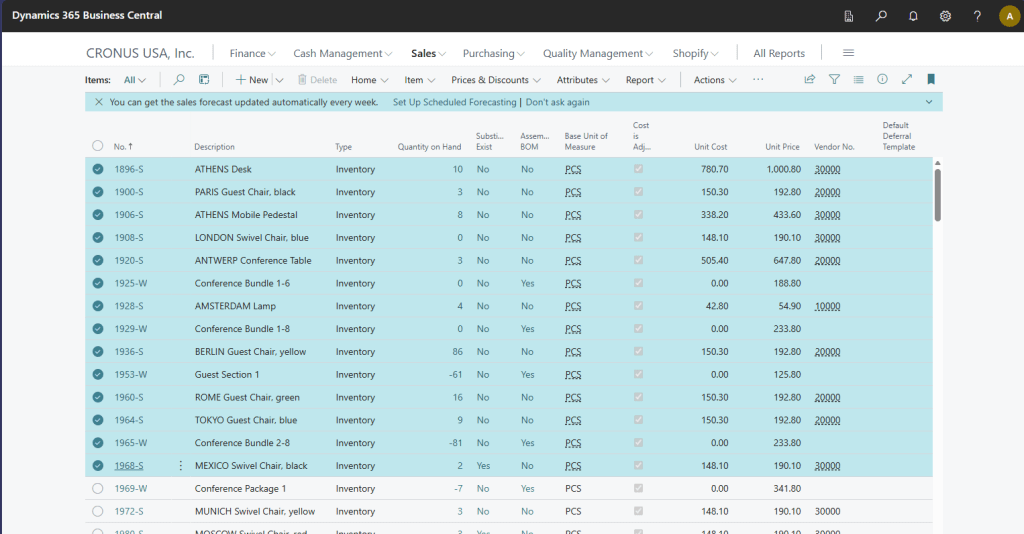
Here are some selected Items:
Here is the Excel:
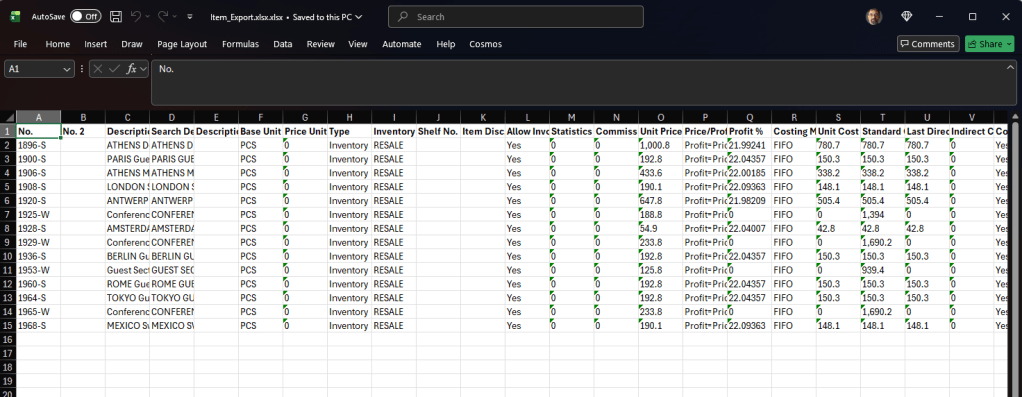
What makes this so powerful is that I could call this with a RecordRef of Customers, and it would work. The Codeunit doesn’t know what the source of the RecordRef is, it just churns through it.
On the Item List card I’ve added an Action to Export To Excel.
action("ExportToExcel")
{
    ApplicationArea = All;
    Caption = 'Export to Excel by Ref';
    Image = Export;

    trigger OnAction()
    var
        SelectedItems: Record "Item";
        RecRef: RecordRef;
        ARDToExcelByRef: Codeunit ARD_ToExcelByRef;
    begin
        Currpage.SetSelectionFilter(SelectedItems); // Get the selected records from the page
        RecRef.GetTable(SelectedItems); // Get the record reference from the selected items
        ARDToExcelByRef.ToExcelByRef(RecRef); // Call the codeunit to export to Excel
    end;
}
We start with a SelectedItems Item Record. We use the Currpage.SetSelectionFilter to set the record sets filter to the currently selected items. We then use the RecordRef.GetTable and pass it the record set. Last we pass the RecordRef to the codeunit.
I hope this gives you some idea of how powerful the Record and Field Reference can be and how you can use them in your extensions. While it is a Weakly Typed object, it doesn’t mean it isn’t powerful and with a definite use case.
Let me know if you have ever dabbled with the Reference objects. Subscribe to Aardvark Labs for further updates.
All source code in GitHub.



 Aardvark Labs
Leave a comment