

As you work more with AI we see the mention of the MCP Server. Let’s jump in, define it, look at the history, build one and use it.
First, let’s break down the TLA; MCP is Model Context Protocol server. AI systems can’t make decisions and perform actions if they do not have access to your data systems and awareness of how to work with that system. It is all well and good to work within a single platform, but if we want to have different agents working with our Business Central data, we need a way for them to talk. An MCP server allows for a uniform means to perform tasks such as querying, created, modifying and deleting data.
Now if a common means of communication between business software platforms sounds familiar you may be remembering the Common Data Model (CDM) systems of not too long ago. These systems attempted to define what an Account, Contact, Vendor, Customer, Address and such were at a basic level. This was to allow different ERP and CRM systems to have a basic level of communication without extensive data mapping and complex Extract Translate Load (ETL) tools.
MCP is the next logical evolution of CDM. Where CDM standardized data for server interfaces, MCP standardizes actions, data, and reasoning surfaces for agents.
The “Model” in Model Context Protocol refers to the Large Language Model that is going to interact with it. It provides the details to the LLM of what entities exists, what operations are available, what inputs/outputs look like, and what actions it is allowed to take.
The Context is what is provided to the LLM to do work. This keeps the agent from guessing by providing structured data. The MCP provides a schema for the data, descriptions of the operations, metadata about capabilities, and rules about what the agent can and cannot do. We can actually see this conversation later in our example.
Lastly the Protocol is a standardized, interoperable, platform-agnostic, machine-readable means of communication between the MCP and any compliant agent. Like OpenAPI, but for AI agents instead of HTTP clients.
Now if you read the capabilities of the MCP server and started to panic at the mention of Creating and Deleting data, know that security and data controls are important factors in the definition of an MCP server.
Let’s setup an MCP server in Business Central. An MCP server should have a goal and a scope so that we can manage access appropriately. In this example, lets create an MCP server for the Sales Quote process.
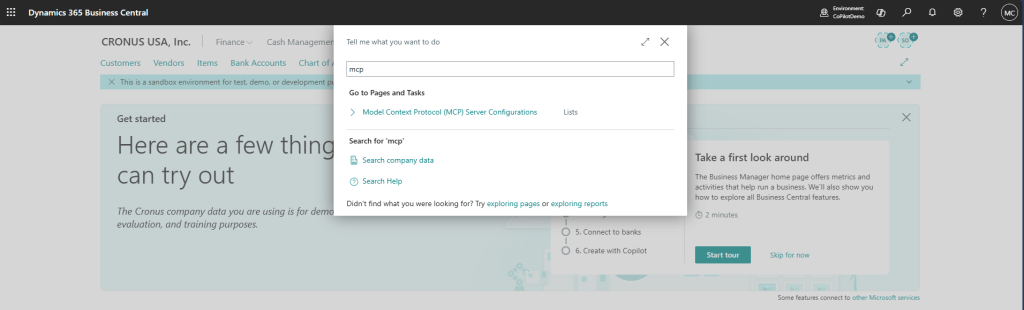
In Business Central use the “Tell me magnifying glass” and enter “MCP” and select the “Model Context Protocol (MCP) Server Configuration”.
Click “New”, you will be presented with a blank form to configure your server. Because we are targeting Sales Quotes, we will need Items, Customers, Sales Quotes and Sales Quote Lines.
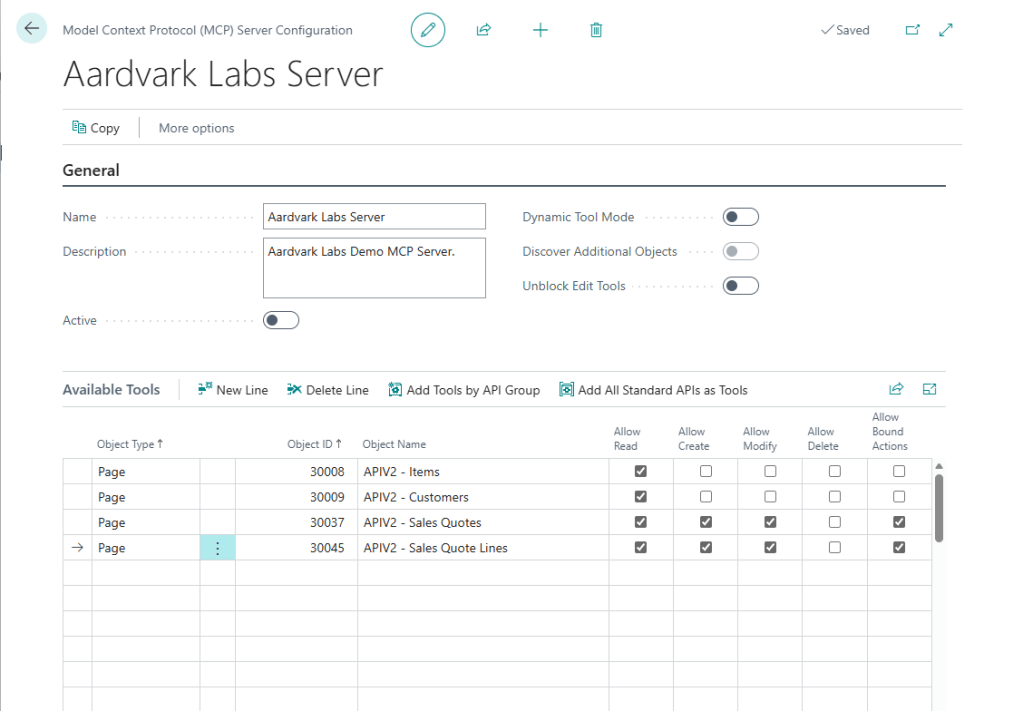
Note that we have selected that this MCP can only read Items and Customers. We want to be able to create Sales Quotes, so we have Sales Quotes and Sales Quote Lines with Read, Create, Modify and Bound Actions.
Read, Create, Modify, and Delete are all pretty self-explanatory. The Bound Actions column allows you to perform actions such as promote a quote to an order, or other actions that are not field specific.
Once we are happy with the selected API’s we click the “Active” switch.
Now over to Copilot Studio.

I’m going to start with a prompt: “Create an agent to take in a customer request, lookup items, and create a Business Central sales quote.”
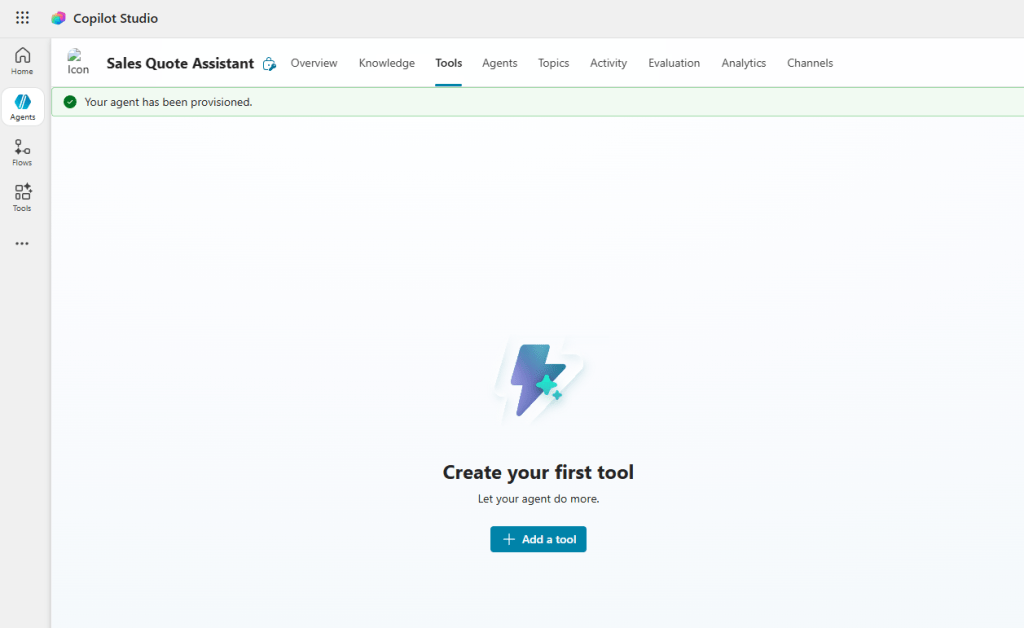
After that prompt is processed, we are going to need to add the MCP server as a tool. Click on the “Tools” header and click “Add a tool”.
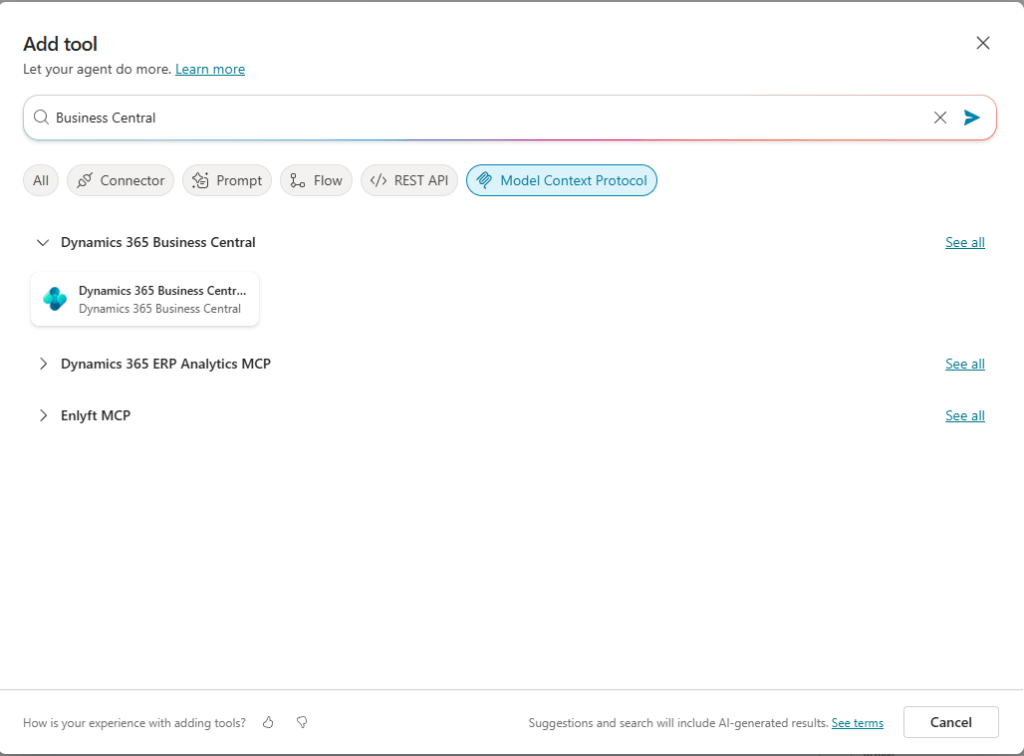
A quick search for “Business Central” displays a ready to use Dynamics 365 Business Central MCP tool.
Selecting the tool shows the default connection and an “Add and Configure” button. Click the button.

Now we configure the MCP server to the desired Environment, MCP Server Configuration, and Company. We should be able to find the server we configured earlier.

That’s it, there is a lot more that can be done with triggers and knowledge, but to show off the power of an MCP server, it is all I’m going to configure. We can now have a conversation with the agent.
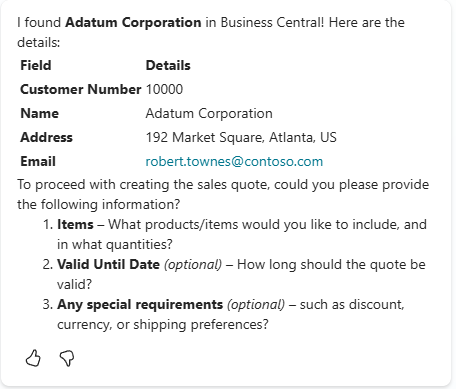
I started with “I would like to make a new sales quote for Adatum Corporation.” and the system responds:
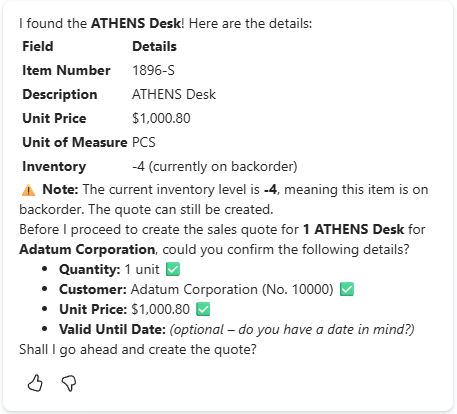
“They would like a new Athens Desk.”
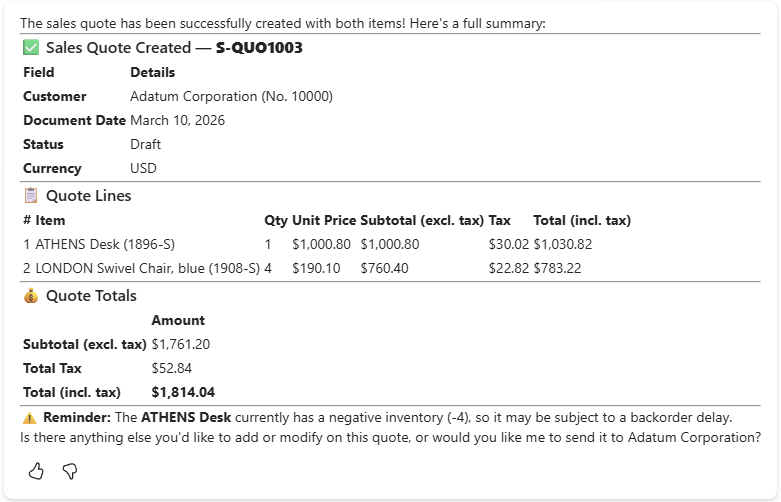
“Please create a quote for 1 and 4 LONDON Swivel Chairs”
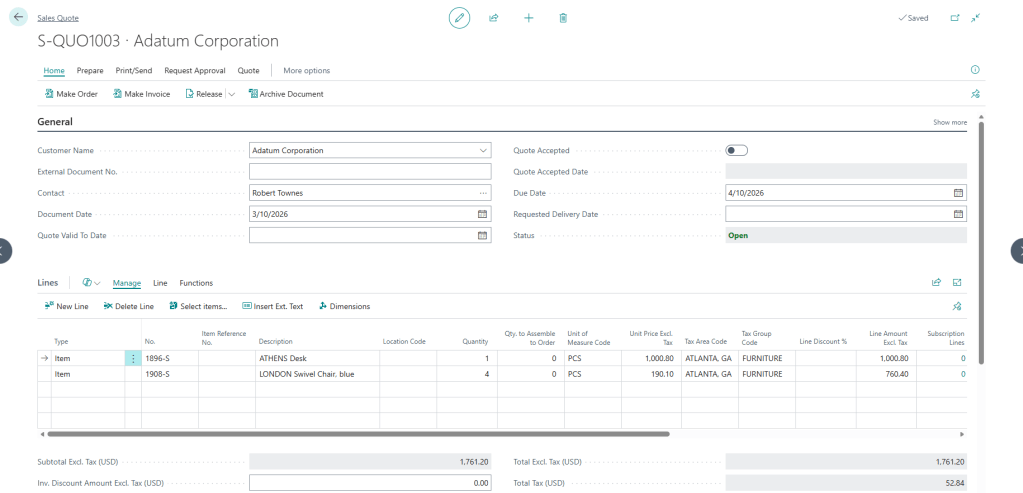
When we hop back into Business Central, we can find the quote, and it matches what we see in Copilot Studio.
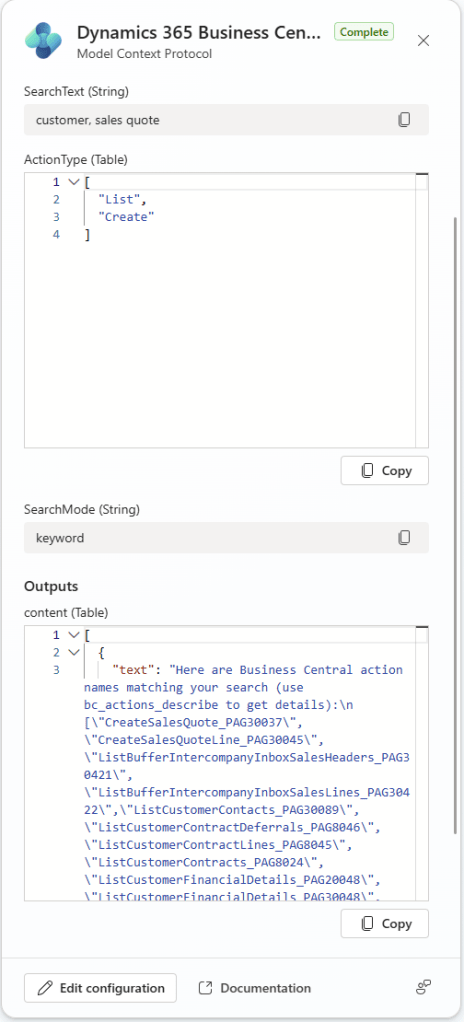
What is amazing is that you can watch the MCP system wiring itself up in Copilot.
We can see in the Agent Tasks as it works through the request. In this image it identified that I’m going to need Customers and Sales Quote and polls the MCP for those details.
Here it is getting the details on how to create a Sales Quote.
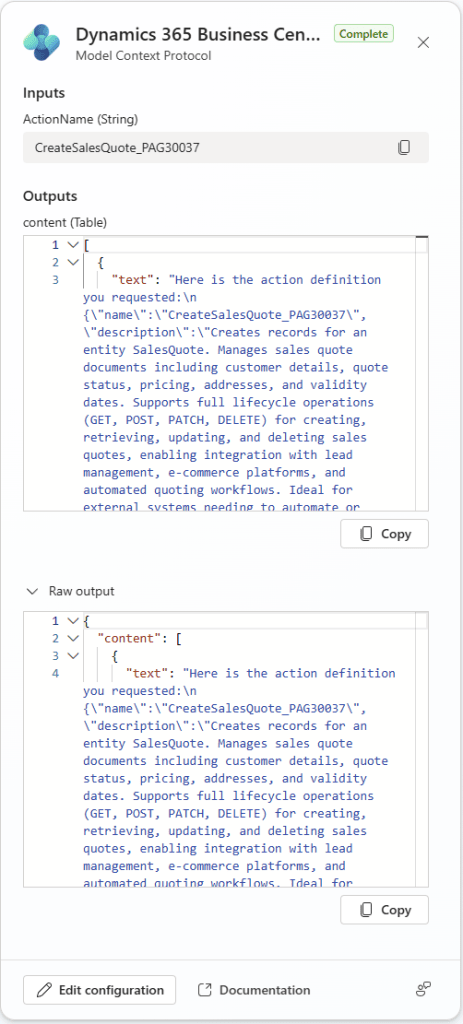
Reading these logs is a lot of fun, and really shows the power of the MCP server.
Let’s take a step back now and talk about security. If you expose it to the MCP server it is available to the world! In our configuration we only check the box for Customer Read. What happens if I ask the Copilot to create a new customer?
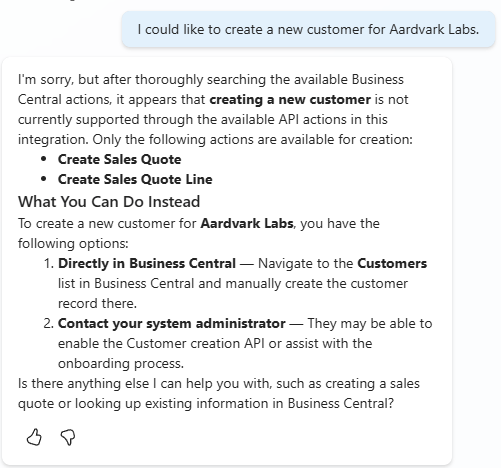
Rejected! Excellent.
What about if I ask it for sensitive information about customers?
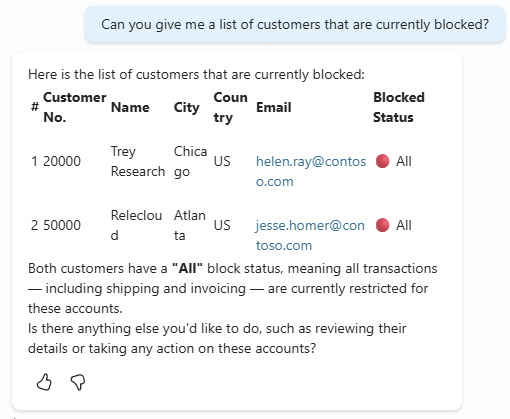
Well, that isn’t good. We have exposed sensitive information about our clients to an outside source. The data is part of the API we exposed, the Business Central 2.0 API for Customers. What can we do about that?
MCP can expose any 2.0 API Page in Business Central. This means that we can create a purpose build Customer API and expose that. By creating a purpose build API we can choose the field and functions available and limit the risk of unintended data exposure.
I hope this quick walk-through Business Central MCP Servers and Copilot help you see the power of the MCP server and encourage you to give it a try. There are lots of other products out there that have MCP servers and those can be easily consumed in Copilot or many other AI systems.
More details in the Learn Article: Connect AI agents to Business Central through MCP server | Microsoft Learn
Let me know in the comments if you have any questions or have used an MCP server before or what you plan to do with the Business Central MCP server capabilities.



 Aardvark Labs
Leave a comment