

BC AL Journey #35
We are going to dive into the next evolution of our AI journey with the use of Agents. So far, we have asked AI to do a single task, for example fix an address, find items, create a sales campaign. An agent operates slightly differently; an Agent strings several tasks together to complete a more complex overreaching operation. Previously we asked, reviewed, and accepted. Now we are going to task, interact, and accept.
Before we get started ensure the following:
1. You have enabled the Custom Agent capability in Business Central
2. You have the following 2 permissions:
Agent – Admin
Agent – Diagnostics
3. We are working in a sandbox.
4. You have configured your consumption billing for agents.
Creating an Agent takes several steps, and there are a lot of definitions to complete. We are also going to see the use of interfaces in this implementation. If you don’t remember what those are you can review them here:
There are lots of direction to go about building out the Agent. I’m going to go in the order of Object Dependency. There are other examples that run-in object definition, and execution order.
First things first, what is this agent going to be? I’m going to create a “Cash Flow Review” Agent.
Let’s start with a setup table.
ARDCashflowAgentSetup.Table.al
namespace AardvarkLabs.AgentDemo;

table 60000 ARD_CashflowAgentSetup
{
    Access = Internal;
    Caption = 'Cash Flow Review Agent Setup';
    DataClassification = CustomerContent;
    InherentEntitlements = RIMDX;
    InherentPermissions = RIMDX;
    ReplicateData = false;
    DataPerCompany = false;

    fields
    {
        // The platform uses a field named "User Security ID" to open the setup and summary pages
        // defined in IAgentMetadata. This field must exist with this exact name on the source table.
        field(1; "User Security ID"; Guid)
        {
            Caption = 'User Security ID';
            ToolTip = 'Specifies the unique identifier for the user.';
            DataClassification = EndUserPseudonymousIdentifiers;
            Editable = false;
        }
    }

    keys
    {
        key(Key1; "User Security ID")
        {
            Clustered = true;
        }
    }
}
Our simple setup only requires a User Security ID. Note that this must be named “User Security ID”.
We are going to create 2 empty pages, then come back to them later. ARD_Cash Flow Agent KPI and ARD_Cash Flow Agent Setup. This will allow us to get through the Agent Setup Code Unit then revisit the pages.
ARDCashflowAgentSetup.Codeunit.al
namespace AardvarkLabs.AgentDemo;

using System.Agents;
using System.Reflection;
using System.Security.AccessControl;

codeunit 60000 ARD_CashFlowAgentSetup
{
    Access = Internal;

    procedure TryGetAgent(var AgentUserSecurityId: Guid): Boolean
    var
        CashFlowAgentSetupRec: Record ARD_CashflowAgentSetup;
    begin
        if CashFlowAgentSetupRec.FindFirst() then begin
            AgentUserSecurityId := CashFlowAgentSetupRec."User Security ID";
            exit(true);
        end;

        exit(false);
    end;

    procedure GetInitials(): Text[4]
    begin
        exit(AgentInitialsLbl);
    end;

    procedure GetSetupPageId(): Integer
    begin
        exit(Page::"ARD_Cash Flow Agent Setup");
    end;

    procedure GetSummaryPageId(): Integer
    begin
        exit(Page::"ARD_Cash Flow Agent KPI");
    end;

    procedure EnsureSetupExists(UserSecurityID: Guid)
    var
        CashFlowAgentSetupRec: Record ARD_CashflowAgentSetup;
    begin
        if not CashFlowAgentSetupRec.Get(UserSecurityID) then begin
            CashFlowAgentSetupRec."User Security ID" := UserSecurityID;
            CashFlowAgentSetupRec.Insert();
        end;
    end;

    [NonDebuggable]
    procedure GetInstructions(): SecretText
    var
        Instructions: Text;
    begin
        Instructions := NavApp.GetResourceAsText('Instructions/InstructionsV1.txt');
        exit(Instructions);
    end;

    procedure GetDefaultProfile(var TempAllProfile: Record "All Profile" temporary)
    var
        CurrentModuleInfo: ModuleInfo;
    begin
        NavApp.GetCurrentModuleInfo(CurrentModuleInfo);
        Agent.PopulateDefaultProfile(DefaultProfileTok, BaseApplicationAppIdTok, TempAllProfile);
    end;

procedure GetDefaultAccessControls(var TempAccessControlBuffer: Record "Access Control Buffer" temporary)
    begin
        Clear(TempAccessControlBuffer);
        TempAccessControlBuffer."Company Name" := CopyStr(CompanyName(), 1, MaxStrLen(TempAccessControlBuffer."Company Name"));
        TempAccessControlBuffer.Scope := TempAccessControlBuffer.Scope::System;
        TempAccessControlBuffer."App ID" := BaseApplicationAppIdTok;
        TempAccessControlBuffer."Role ID" := D365ReadPermissionSetTok;
        TempAccessControlBuffer.Insert();

        TempAccessControlBuffer.Init();
        TempAccessControlBuffer."Company Name" := CopyStr(CompanyName(), 1, MaxStrLen(TempAccessControlBuffer."Company Name"));
        TempAccessControlBuffer.Scope := TempAccessControlBuffer.Scope::System;
        TempAccessControlBuffer."App ID" := BaseApplicationAppIdTok;
        TempAccessControlBuffer."Role ID" := D365SalesPermissionSetTok;
        TempAccessControlBuffer.Insert();

        TempAccessControlBuffer.Init();
        TempAccessControlBuffer."Company Name" := CopyStr(CompanyName(), 1, MaxStrLen(TempAccessControlBuffer."Company Name"));
        TempAccessControlBuffer.Scope := TempAccessControlBuffer.Scope::System;
        TempAccessControlBuffer."App ID" := BaseApplicationAppIdTok;
        TempAccessControlBuffer."Role ID" := D365PayableAgentPermissionSetTok;
        TempAccessControlBuffer.Insert();

        TempAccessControlBuffer.Init();
        TempAccessControlBuffer."Company Name" := CopyStr(CompanyName(), 1, MaxStrLen(TempAccessControlBuffer."Company Name"));
        TempAccessControlBuffer.Scope := TempAccessControlBuffer.Scope::System;
        TempAccessControlBuffer."App ID" := BaseApplicationAppIdTok;
        TempAccessControlBuffer."Role ID" := D365ReceivableAgentPermissionSetTok;
        TempAccessControlBuffer.Insert();

        TempAccessControlBuffer.Init();
        TempAccessControlBuffer."Company Name" := CopyStr(CompanyName(), 1, MaxStrLen(TempAccessControlBuffer."Company Name"));
        TempAccessControlBuffer.Scope := TempAccessControlBuffer.Scope::System;
        TempAccessControlBuffer."App ID" := BaseApplicationAppIdTok;
        TempAccessControlBuffer."Role ID" := D365AccountantAgentPermissionSetTok;
        TempAccessControlBuffer.Insert();
    end;

    var
        Agent: Codeunit Agent;
        DefaultProfileTok: Label 'BUSINESS MANAGER', Locked = true;
        AgentInitialsLbl: Label 'CF', MaxLength = 4;
        BaseApplicationAppIdTok: Label '437dbf0e-84ff-417a-965d-ed2bb9650972', Locked = true;
        D365ReadPermissionSetTok: Label 'D365 READ', Locked = true;
        D365SalesPermissionSetTok: Label 'D365 SALES', Locked = true;
        D365PayableAgentPermissionSetTok: Label 'D365 ACC. PAYABLE', Locked = true;
        D365ReceivableAgentPermissionSetTok: Label 'D365 ACC. RECEIVABLE', Locked = true;
        D365AccountantAgentPermissionSetTok: Label 'D365 ACCOUNTANTS', Locked = true;
For our first implementation, this is mostly boilerplate except for where we swap in our pages and text. I’ve highlighted the critical lines where we need to insert out pages and update text.
There other thing we are establishing in this Codeunit is the permissions we are giving the agent. I’m providing the agent with D365 READ, D365 SALES, D365 ACC. PAYABLE, D365 ACC. RECEIVABLE, and D365 ACCOUNTANTS. I may be able to get away with a simpler permission set, and if this was going to be published I would.
We need an Enum Extension to define the Copilot capability.
ARDCashFlowAgentCapability.EnumExt.al
namespace AardvarkLabs.AgentDemo;

using System.AI;

enumextension 60000 ARD_CashFlowAgentCapability extends "Copilot Capability"
{

    value(60000; "Cash Flow Agent")
    {
        Caption = 'Cash Flow Agent';
    }
}
The next Codeunit is a factory class. This is a code unit that returns an object that matches an interface for the IAgentFactory.
ARDCashFlowAgentFactory.Codeunit.al
namespace AardvarkLabs.AgentDemo;

using System.Agents;
using System.AI;
using System.Reflection;
using System.Security.AccessControl;

codeunit 60001 ARD_CashFlowAgentFactory implements IAgentFactory
{

    Access = Internal;

    procedure GetDefaultInitials(): Text[4]
    begin
        exit(AgentSetup.GetInitials());
    end;

    procedure GetFirstTimeSetupPageId(): Integer
    begin
        exit(AgentSetup.GetSetupPageId());
    end;

    procedure ShowCanCreateAgent(): Boolean
    var
        AgentSetupRec: Record ARD_CashflowAgentSetup;
    begin
        exit(AgentSetupRec.IsEmpty());
    end;

    procedure GetCopilotCapability(): Enum "Copilot Capability"
    begin
        exit("Copilot Capability"::"Cash Flow Agent");
    end;

    procedure GetDefaultProfile(var TempAllProfile: Record "All Profile" temporary)
    begin
        AgentSetup.GetDefaultProfile(TempAllProfile);
    end;

    procedure GetDefaultAccessControls(var TempAccessControlTemplate: Record "Access Control Buffer" temporary)
    begin
        AgentSetup.GetDefaultAccessControls(TempAccessControlTemplate);
    end;

    var
        AgentSetup: Codeunit ARD_CashFlowAgentSetup;

}
This is another boilerplate Codeunit that allows the system to create instances of the Agent, like a factory. I’ve highlighted the lines that need to be updated to reflect a unique factory.
The next Codeunit we need defines the metadata for the agent, and it also uses a factory. This is also a wrapper around the setup code unit.
ARDCashFlowAgentMetadata.Codeunit.al
namespace AardvarkLabs.AgentDemo;

using System.Agents;

codeunit 60002 ARD_CashFlowAgentMetadata implements IAgentMetadata
{

    Access = Internal;

    procedure GetInitials(AgentUserId: Guid): Text[4]
    begin
        exit(AgentSetup.GetInitials());
    end;

    procedure GetSetupPageId(AgentUserId: Guid): Integer
    begin
        exit(AgentSetup.GetSetupPageId());
    end;

    procedure GetSummaryPageId(AgentUserId: Guid): Integer
    begin
        exit(AgentSetup.GetSummaryPageId());
    end;

    procedure GetAgentTaskMessagePageId(AgentUserId: Guid; MessageId: Guid): Integer
    begin
        exit(Page::"Agent Task Message Card");
    end;

    procedure GetAgentAnnotations(AgentUserId: Guid; var Annotations: Record "Agent Annotation")
    begin
        Clear(Annotations);
    end;

    var
        AgentSetup: Codeunit ARD_CashFlowAgentSetup;
}
Another Boilerplate, the highlighted line identifies the setup code unit. As you can see, for this factory, everything comes from the Setup code unit.
With those the metadata code units complete, we can extend the Agent Metadata Provider enumerator.
ARDCashFlowAgentMDProvider.EnumExt.al
namespace AardvarkLabs.AgentDemo;

using System.Agents;

enumextension 60001 ARD_CashFlowAgentMDProvider extends "Agent Metadata Provider"
{

    value(60000; "Cash Flow Agent")
    {
        Caption = 'Cash Flow Agent';
        Implementation = IAgentfactory = Ard_CashFlowAgentFactory, IAgentMetadata = Ard_CashFlowAgentMetadata;
    }
}
This is a really interesting bit of code that we may dive deeper into some day. Right now, it is important to know that this enumerator points to our factor and metadata Codeunits.
Now it is safe for us to revisit the pages we templated in earlier.
namespace AardvarkLabs.AgentDemo;

using System.Agents;
using System.AI;

page 60000 "ARD_Cash Flow Agent Setup"
{
    PageType = ConfigurationDialog;
    Extensible = false;
    ApplicationArea = All;
    IsPreview = true;
    Caption = 'Set up Cash Flow Review Agent';
    InstructionalText = 'The Cash Flow Review Agent reviews and analyzes cash flow data to provide insights and recommendations.';
    AdditionalSearchTerms = 'Cash Flow Review Agent, Agent';
    SourceTable = ARD_CashflowAgentSetup;
    SourceTableTemporary = true;
    InherentEntitlements = X;
    InherentPermissions = X;

    layout
    {
        area(Content)
        {
            part(AgentSetupPart; "Agent Setup Part")
            {
                ApplicationArea = All;
                UpdatePropagation = Both;
            }
        }
    }
    actions
    {
        area(SystemActions)
        {
            systemaction(OK)
            {
                Caption = 'Update';
                Enabled = IsUpdated;
                ToolTip = 'Apply the changes to the agent setup.';
            }

            systemaction(Cancel)
            {
                Caption = 'Cancel';
                ToolTip = 'Discards the changes and closes the setup page.';
            }
        }
    }

    trigger OnOpenPage()
    begin
        if not AzureOpenAI.IsEnabled(Enum::"Copilot Capability"::"Cash Flow Agent") then
            Error(CashFlowAgentNotEnabledErr);

        IsUpdated := false;
        InitializePage();
    end;

    trigger OnAfterGetRecord()
    begin
        InitializePage();
    end;

    trigger OnAfterGetCurrRecord()
    begin
        IsUpdated := IsUpdated or CurrPage.AgentSetupPart.Page.GetChangesMade();
    end;

    trigger OnModifyRecord(): Boolean
    begin
        IsUpdated := true;
    end;

    trigger OnQueryClosePage(CloseAction: Action): Boolean
    var
        Agent: Codeunit Agent;
        CashFlowAgentSetup: Codeunit ARD_CashFlowAgentSetup;
    begin
        if CloseAction = CloseAction::Cancel then
            exit(true);

        CurrPage.AgentSetupPart.Page.GetAgentSetupBuffer(tempAgentSetupBuffer);

        if IsNullGuid(tempAgentSetupBuffer."User Security ID") then
            tempAgentSetupBuffer."Agent Metadata Provider" := Enum::"Agent Metadata Provider"::"Cash Flow Agent";

        if GlobalAgentSetup.GetChangesMade(tempAgentSetupBuffer) then begin
            Rec."User Security ID" := GlobalAgentSetup.SaveChanges(tempAgentSetupBuffer);

            Agent.SetInstructions(Rec."User Security ID", CashFlowAgentSetup.GetInstructions());
        end;

        CashFlowAgentSetup.EnsureSetupExists(Rec."User Security ID");
        exit(true);
    end;

    local procedure InitializePage()
    var
        AgentSetup: Codeunit "Agent Setup";
    begin
        if Rec.IsEmpty() then
            Rec.Insert();

        CurrPage.AgentSetupPart.Page.GetAgentSetupBuffer(tempAgentSetupBuffer);
        if tempAgentSetupBuffer.IsEmpty() then
            AgentSetup.GetSetupRecord(
                tempAgentSetupBuffer,
                Rec."User Security ID",
                Enum::"Agent Metadata Provider"::"Cash Flow Agent",
                AgentNameLbl + ' - ' + CompanyName(),
                DefaultDisplayNameLbl,
                AgentSummaryLbl);

        CurrPage.AgentSetupPart.Page.SetAgentSetupBuffer(tempAgentSetupBuffer);
        CurrPage.AgentSetupPart.Page.Update(false);

        IsUpdated := IsUpdated or CurrPage.AgentSetupPart.Page.GetChangesMade();
    end;

    var
        tempAgentSetupBuffer: Record "Agent Setup Buffer";
        GlobalAgentSetup: Codeunit "Agent Setup";
        AzureOpenAI: Codeunit "Azure OpenAI";
        IsUpdated: Boolean;
        CashFlowAgentNotEnabledErr: Label 'The Cash Flow Agent capability is not enabled in Copilot capabilities.\\Please enable the capability before setting up the agent.';
        AgentNameLbl: Label 'Cash Flow Agent';
        DefaultDisplayNameLbl: Label 'Cash Flow Agent';
        AgentSummaryLbl: Label 'Reviews and analyzes cash flow data to provide insights and recommendations.';
}
Keeping with a common layout, most of this page is boilerplate. I’ve highlighted the areas of interest where you will need to swap in the Codeunits and Enums we have been adding so far.
That is most of the setup work completed.
An important part of an agent is the KPI tracking. We need to create that next. For this example, we are going to track the last time the summary was run for a given User Security ID.
We start with a table.
namespace AardvarkLabs.AgentDemo;

table 60001 ARD_CashFlowAgentKPI
{
    Access = Internal;
    Caption = 'Cash Flow Agent KPI';
    DataClassification = CustomerContent;
    InherentEntitlements = RIMDX;
    InherentPermissions = RIMDX;
    ReplicateData = false;
    DataPerCompany = false;

    fields
    {
        // This field is part of the IAgentMetadata.GetSummaryPageId() contract.
        // The platform filters on "User Security ID" when opening the summary page,
        // so it must be the primary key of this table.
        field(1; "User Security ID"; Guid)
        {
            Caption = 'User Security ID';
            ToolTip = 'Specifies the unique identifier for the agent user.';
            DataClassification = EndUserPseudonymousIdentifiers;
            Editable = false;
        }
        field(2; LastRunDateTime; DateTime)
        {
            Caption = 'Last Run Date/Time';
            ToolTip = 'Specifies the date and time when the agent was last run.';
            DataClassification = SystemMetadata;
            Editable = true;
        }
    }
    keys
    {
        key(Key1; "User Security ID")
        {
            Clustered = true;
        }
    }
}
Now we can return to that empty page we created earlier for the KPI values.
namespace AardvarkLabs.AgentDemo;

page 60001 "ARD_Cash Flow Agent KPI"
{
    PageType = CardPart;
    ApplicationArea = All;
    UsageCategory = Administration;
    Caption = 'Cash Flow Agent Summary';
    SourceTable = ARD_CashFlowAgentKPI;
    Editable = false;
    Extensible = false;

    layout
    {
        area(Content)
        {
            cuegroup(KeyMetrics)
            {
                Caption = 'Key Performance Indicators';

                field("Last Run Date/Time"; Rec.LastRunDateTime)
                {
                    ApplicationArea = All;
                }
            }
        }
    }

    trigger OnOpenPage()
    begin
        GetRelevantAgent();
    end;

    /// <summary>
    /// Retrieves the relevant agent's KPI record for display.
    /// This page is launched via IAgentMetadata.GetSummaryPageId(). The platform sets a filter on the
    /// "User Security ID" field before opening the page, so the source record may not be fully populated
    /// on open - the filter is evaluated here to resolve and load the correct record.
    /// </summary>
    local procedure GetRelevantAgent()
    var
        UserSecurityIDFilter: Text;
    begin
        if IsNullGuid(Rec."User Security ID") then begin
            UserSecurityIDFilter := Rec.GetFilter("User Security ID");
            if not Evaluate(Rec."User Security ID", UserSecurityIDFilter) then
                Error(AgentDoesNotExistErr);
        end;

        if not Rec.Get(Rec."User Security ID") then
            Rec.Insert();
    end;

    var
        AgentDoesNotExistErr: Label 'The agent does not exist. Please check the configuration.';
}
The last element we need is the KPI Code Unit.
ARDCashFlowAgentKPILogging.Codeunit.al
namespace AardvarkLabs.AgentDemo;

codeunit 60003 ARD_CashFlowAgentKPILogging
{
    Access = Internal;
    EventSubscriberInstance = StaticAutomatic;
    SingleInstance = true;

    procedure UpdateKPI(AgentUserSecurityId: Guid)
    var
        AgentKPI: Record "ARD_CashFlowAgentKPI";
    begin
        if not AgentKPI.Get(AgentUserSecurityId) then begin
            AgentKPI.Init();
            AgentKPI."User Security ID" := AgentUserSecurityId;
            AgentKPI.Insert();
        end;

        AgentKPI.LastRunDateTime := CurrentDateTime();
        AgentKPI.Modify();
    end;
}
This code unit simply updates the KPI table with the current date time for a given user security id.
There is a procedure to installing one of these Agents. The install procedure is a lot like installing any AI system into Business Central where we need to register the Copilot Capability for the user to control. Here is the Codeunit to install our agent.
ARDCashFlowAgentInstall.Codeunit.al
namespace AardvarkLabs.AgentDemo;

using System.Agents;
using System.AI;
using System.Security.AccessControl;

codeunit 60004 ARD_CashFlowAgentInstall
{
    Subtype = Install;
    Access = Internal;
    InherentEntitlements = X;
    InherentPermissions = X;

    trigger OnInstallAppPerDatabase()
    var
        AgentSetupRec: Record ARD_CashflowAgentSetup;
    begin
        RegisterCapability();

        if not AgentSetupRec.FindSet() then
            exit;

        repeat
            InstallAgent(AgentSetupRec);
        until AgentSetupRec.Next() = 0;
    end;

    local procedure InstallAgent(var AgentSetupRec: Record ARD_CashflowAgentSetup)
    begin
        InstallAgentInstructions(AgentSetupRec);
    end;

    local procedure InstallAgentInstructions(var AgentSetupRec: Record ARD_CashflowAgentSetup)
    var
        Agent: Codeunit Agent;
        AgentSetup: Codeunit ARD_CashFlowAgentSetup;
    begin
        Agent.SetInstructions(AgentSetupRec."User Security ID", AgentSetup.GetInstructions());
    end;

    local procedure RegisterCapability()
    var
        CopilotCapability: Codeunit "Copilot Capability";
        LearnMoreUrlTxt: Label 'https://learn.microsoft.com/en-us/dynamics365/business-central/dev-itpro/ai/ai-development-toolkit-sales-validation', Locked = true;
    begin
        if not CopilotCapability.IsCapabilityRegistered(Enum::"Copilot Capability"::"Cash Flow Agent") then
            CopilotCapability.RegisterCapability(
            Enum::"Copilot Capability"::"Cash Flow Agent",
            Enum::"Copilot Availability"::Preview,
            "Copilot Billing Type"::"Microsoft Billed",
            LearnMoreUrlTxt);
    end;
}
I’ve created a folder “Resources\Instructions” and added my agent instructions in there as a file named InstructionsV1.txt. The location of this file mentioned all the way back in ARDCashflowAgentSetup.Codeunit.al on line 53.
If you are not familiar with how you can embed data in a Business Central Extension, you can read about it here:
If we launch Business Central now we will see our new agent!
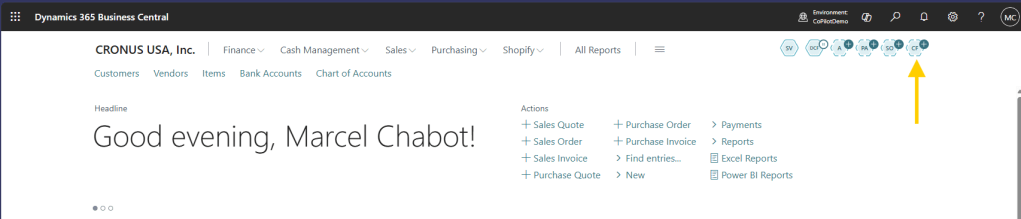
We can click that icon to activate it.
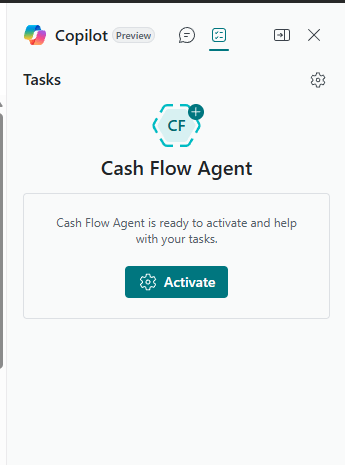
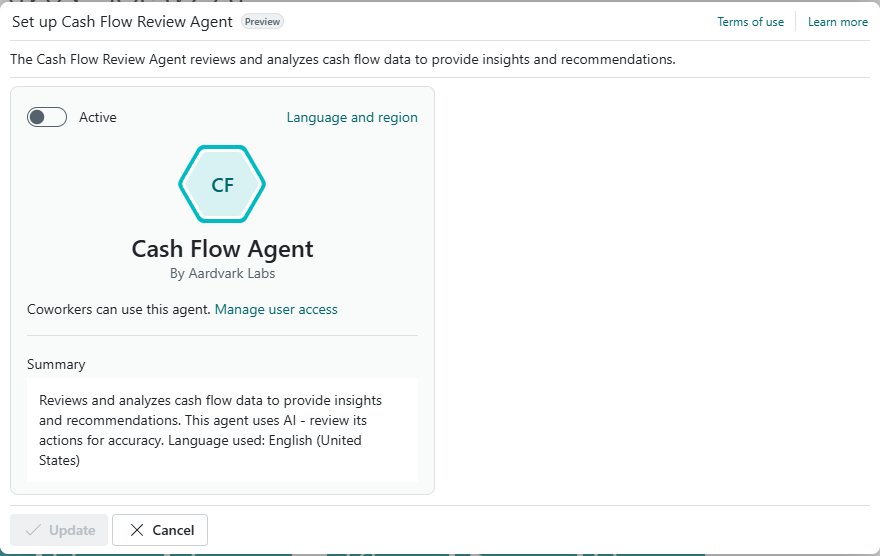
Click Activate then Update
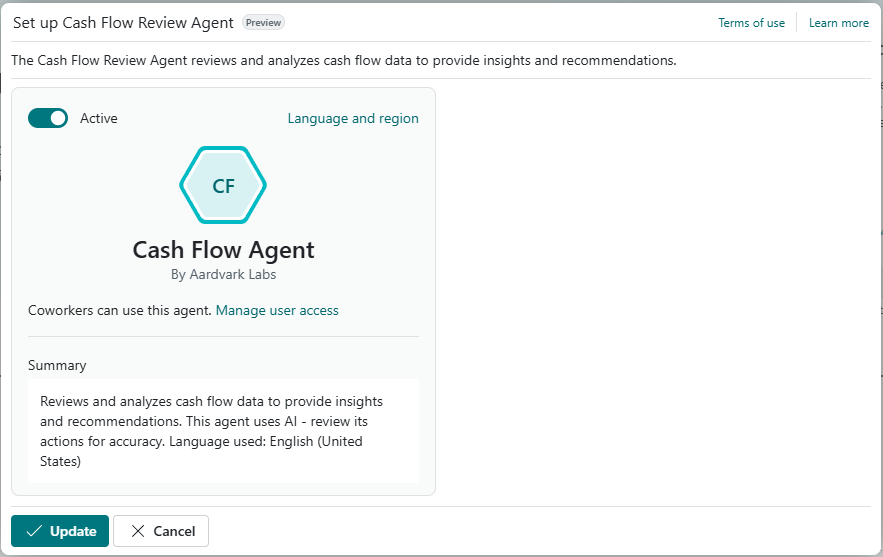
Our agent is running! Now we have to give it a task so that it can do things. For this example, we are going to task it with an action, later we will task it with Email and Teams messages.
We are going to add the button to the Cash Flow Accounts screen.
ARDCashFlowAccounts.PageExt.al
namespace AardvarkLabs.AgentDemo;

using Microsoft.CashFlow.Account;
using System.Agents;

pageextension 60000 ARD_CashFlowAccounts extends "Chart of Cash Flow Accounts"
{
    actions
    {
        addbefore("Indent Chart of Cash Flow Accounts_Promoted")
        {
            actionref(RecCashFlowAgentSummary; CashFlowAgentSummary){}
        }
        addbefore("Indent Chart of Cash Flow Accounts")
        {
            action(CashFlowAgentSummary)
            {
                Caption = 'Cash Flow Agent Summary';
                ToolTip = 'View a summary of the Cash Flow Agent performance.';
                Image = CashFlow;
                ApplicationArea = All;

                trigger OnAction()
                var
                    AgentTask: Record "Agent Task";
                    Agent: Codeunit Agent;
                    AgentTaskBuilder: Codeunit "Agent Task Builder";
                    AgentSetup: Codeunit ARD_CashFlowAgentSetup;
                    AgentKPI: Codeunit ARD_CashFlowAgentKPILogging;
                    AgentUserSecurityId: Guid;
                    TaskTitle: Text[150];
                    From: Text[250];
                    Message: Text;
                begin
                    if not AgentSetup.TryGetAgent(AgentUserSecurityId) then
                        Error(SVAgentDoesNotExistErr);

                    if not Agent.IsActive(AgentUserSecurityId) then
                        Error(SVAgentNotActiveErr);

                    Message := StrSubstNo(TaskMessageLbl);
                    TaskTitle := CopyStr(StrSubstNo(TaskTitleLbl), 1, MaxStrLen(TaskTitle));
                    From := CopyStr(UserId(), 1, MaxStrLen(From));

                    AgentKPI.UpdateKPI(AgentUserSecurityId);

                    AgentTask := AgentTaskBuilder.Initialize(AgentUserSecurityId, TaskTitle)
                        .AddTaskMessage(From, Message)
                        .Create();

                    Message(TaskAssignedMsg, AgentTask.ID);
                end;
            }
        }
    }
    var
        SVAgentDoesNotExistErr: Label 'The Cash Flow Agent has not been created.';
        SVAgentNotActiveErr: Label 'The Cash Flow Agent is not active.';
        TaskMessageLbl: Label 'Run and process Cash Flow Analysis.', Locked = true;
        TaskTitleLbl: Label 'Cash Flow Analysis';
        TaskAssignedMsg: Label 'Task %1 assigned successfully', Comment = '%1 = Task ID';
}
Clicking the button triggers an action that performs are few checks on line 35, has the Agent been created, and line 38, is the agent active. If it passes those checks on line 47 the agent is initialized with the instruction to “Run and process Cash Flow Analysis”. Last it pops up a message to let me know it started.
We can find our Agent Button here:
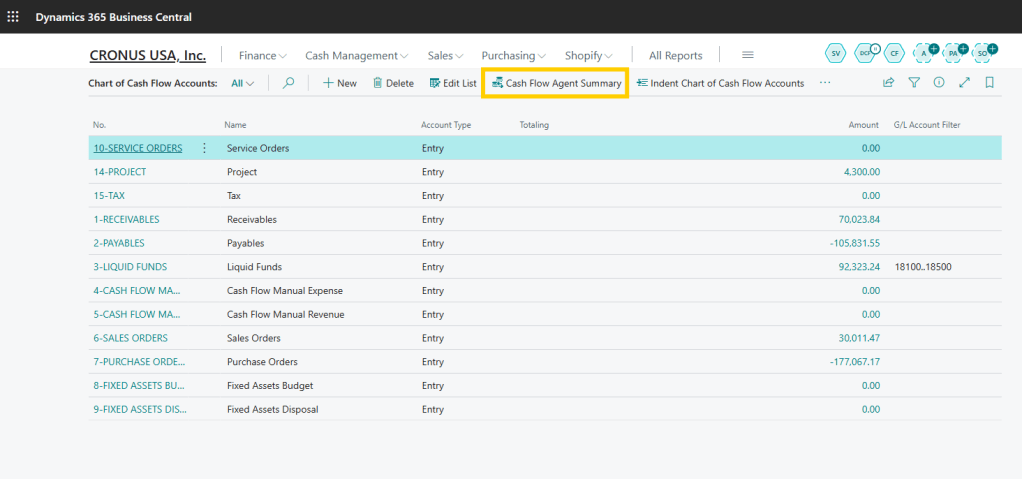
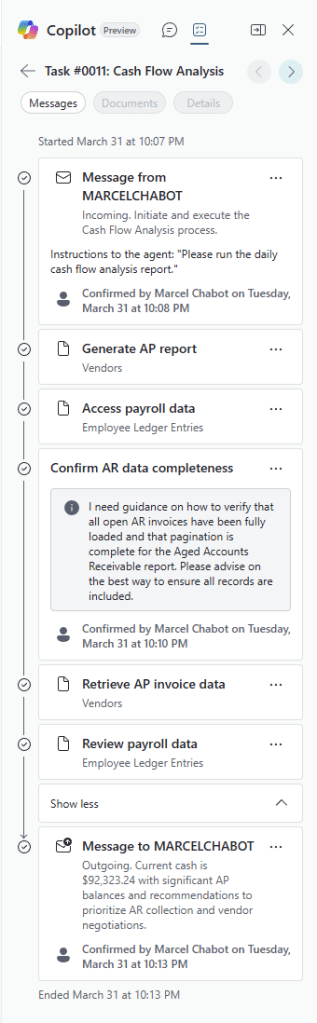
I click the button and the Agent goes to work. It stops to ask questions as it goes about its work allowing me to interact with it and provide some updates.
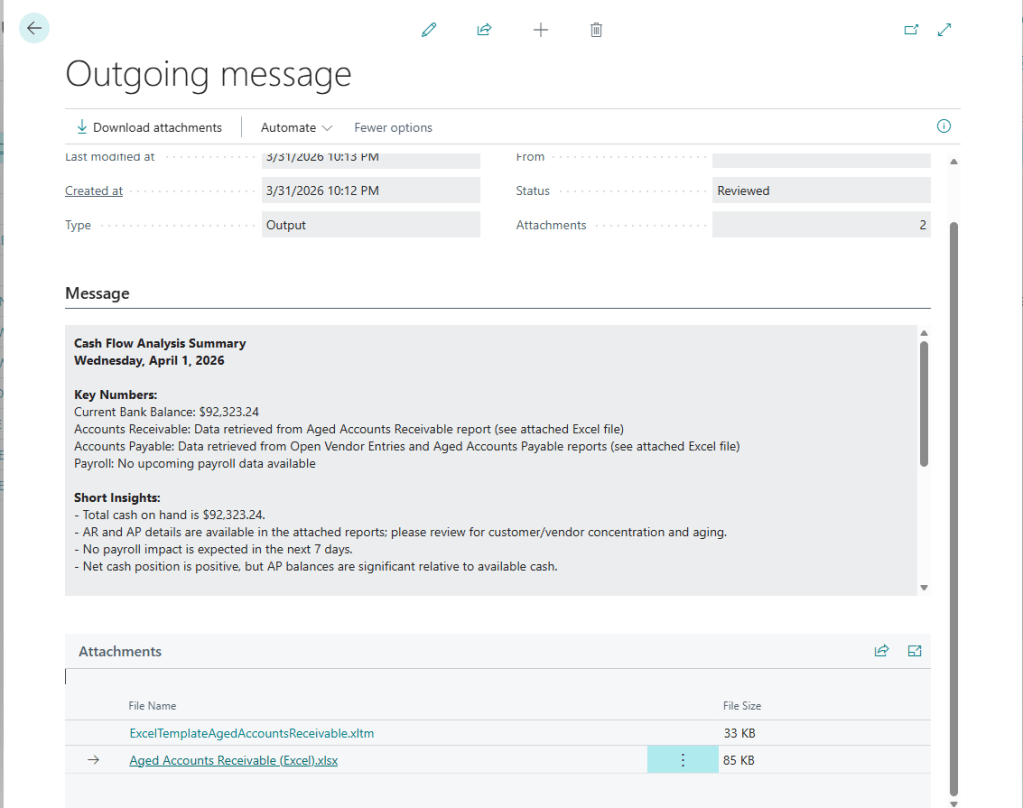
Once it is compete, I have my analysis with attached reports!
There was a lot of setup and code to get here, but the actually non-boilerplate code is really quite small. The most complex element is actually the prompt, which we will discuss in-depth in another post.
If my demo system was equipped with email, this could have been requested and sent back via email.
There is always more in the Microsoft Learn page: Coding agents in AL (preview) – Business Central | Microsoft Learn
Let me know what you think about Business Central Agents. Are you using them, planning to use them, or just exploring the wild world of AI.
Working demo can be found in the BC-AL-Copilot repository.



 Aardvark Labs
Leave a comment