

BC AL Journey #35 (Part 2)
This is a part 2 to the Step-by-Step agent implementation post. I intend to dive a little deeper into the process and security implementation of an agent so that we can create safer, smarter agents.
If you have not read part 1, here is the link.
Let’s start with a bit on how Agents work in Business Central.
Agents work much the same as how users work. They navigate pages and interpret the metadata like captions, tool tips, field types, linked tables, and flow fields. Using the page navigation data and the prompt the agents move through Business Central collecting data, updating fields, and generating responses.
If it acts like a user, then we need to treat it like a user. We can restrict it like it was a user with Profiles and Permissions. At this stage in the Agent development, we are going to treat them with the least amount of trust as possible, like an intern.
Let’s review the security hole I left in the initial release. The issue is in the ARDCashflowAgentSetup.Codeunit.al file.
namespace AardvarkLabs.AgentDemo;

using System.Agents;
using System.Reflection;
using System.Security.AccessControl;

codeunit 60000 ARD_CashFlowAgentSetup
{
    Access = Internal;

    procedure TryGetAgent(var AgentUserSecurityId: Guid): Boolean
    var
        CashFlowAgentSetupRec: Record ARD_CashflowAgentSetup;
    begin
        if CashFlowAgentSetupRec.FindFirst() then begin
            AgentUserSecurityId := CashFlowAgentSetupRec."User Security ID";
            exit(true);
        end;

        exit(false);
    end;

    procedure GetInitials(): Text[4]
    begin
        exit(AgentInitialsLbl);
    end;

    procedure GetSetupPageId(): Integer
    begin
        exit(Page::"ARD_Cash Flow Agent Setup");
    end;

    procedure GetSummaryPageId(): Integer
    begin
        exit(Page::"ARD_Cash Flow Agent KPI");
    end;

    procedure EnsureSetupExists(UserSecurityID: Guid)
    var
        CashFlowAgentSetupRec: Record ARD_CashflowAgentSetup;
    begin
        if not CashFlowAgentSetupRec.Get(UserSecurityID) then begin
            CashFlowAgentSetupRec."User Security ID" := UserSecurityID;
            CashFlowAgentSetupRec.Insert();
        end;
    end;

    [NonDebuggable]
    procedure GetInstructions(): SecretText
    var
        Instructions: Text;
    begin
        Instructions := NavApp.GetResourceAsText('Instructions/InstructionsV1.txt');
        exit(Instructions);
    end;

    procedure GetDefaultProfile(var TempAllProfile: Record "All Profile" temporary)
    var
        CurrentModuleInfo: ModuleInfo;
    begin
        NavApp.GetCurrentModuleInfo(CurrentModuleInfo);
        Agent.PopulateDefaultProfile(DefaultProfileTok, BaseApplicationAppIdTok, TempAllProfile);
    end;

procedure GetDefaultAccessControls(var TempAccessControlBuffer: Record "Access Control Buffer" temporary)
    begin
        Clear(TempAccessControlBuffer);
        TempAccessControlBuffer."Company Name" := CopyStr(CompanyName(), 1, MaxStrLen(TempAccessControlBuffer."Company Name"));
        TempAccessControlBuffer.Scope := TempAccessControlBuffer.Scope::System;
        TempAccessControlBuffer."App ID" := BaseApplicationAppIdTok;
        TempAccessControlBuffer."Role ID" := D365ReadPermissionSetTok;
        TempAccessControlBuffer.Insert();

        TempAccessControlBuffer.Init();
        TempAccessControlBuffer."Company Name" := CopyStr(CompanyName(), 1, MaxStrLen(TempAccessControlBuffer."Company Name"));
        TempAccessControlBuffer.Scope := TempAccessControlBuffer.Scope::System;
        TempAccessControlBuffer."App ID" := BaseApplicationAppIdTok;
        TempAccessControlBuffer."Role ID" := D365SalesPermissionSetTok;
        TempAccessControlBuffer.Insert();

        TempAccessControlBuffer.Init();
        TempAccessControlBuffer."Company Name" := CopyStr(CompanyName(), 1, MaxStrLen(TempAccessControlBuffer."Company Name"));
        TempAccessControlBuffer.Scope := TempAccessControlBuffer.Scope::System;
        TempAccessControlBuffer."App ID" := BaseApplicationAppIdTok;
        TempAccessControlBuffer."Role ID" := D365PayableAgentPermissionSetTok;
        TempAccessControlBuffer.Insert();

        TempAccessControlBuffer.Init();
        TempAccessControlBuffer."Company Name" := CopyStr(CompanyName(), 1, MaxStrLen(TempAccessControlBuffer."Company Name"));
        TempAccessControlBuffer.Scope := TempAccessControlBuffer.Scope::System;
        TempAccessControlBuffer."App ID" := BaseApplicationAppIdTok;
        TempAccessControlBuffer."Role ID" := D365ReceivableAgentPermissionSetTok;
        TempAccessControlBuffer.Insert();

        TempAccessControlBuffer.Init();
        TempAccessControlBuffer."Company Name" := CopyStr(CompanyName(), 1, MaxStrLen(TempAccessControlBuffer."Company Name"));
        TempAccessControlBuffer.Scope := TempAccessControlBuffer.Scope::System;
        TempAccessControlBuffer."App ID" := BaseApplicationAppIdTok;
        TempAccessControlBuffer."Role ID" := D365AccountantAgentPermissionSetTok;
        TempAccessControlBuffer.Insert();
    end;

    var
        Agent: Codeunit Agent;
        DefaultProfileTok: Label 'BUSINESS MANAGER', Locked = true;
        AgentInitialsLbl: Label 'CF', MaxLength = 4;
        BaseApplicationAppIdTok: Label '437dbf0e-84ff-417a-965d-ed2bb9650972', Locked = true;
        D365ReadPermissionSetTok: Label 'D365 READ', Locked = true;
        D365SalesPermissionSetTok: Label 'D365 SALES', Locked = true;
        D365PayableAgentPermissionSetTok: Label 'D365 ACC. PAYABLE', Locked = true;
        D365ReceivableAgentPermissionSetTok: Label 'D365 ACC. RECEIVABLE', Locked = true;
        D365AccountantAgentPermissionSetTok: Label 'D365 ACCOUNTANTS', Locked = true;
Looking at the highlighted lines, we can see that I’ve set the agent up as a “Business Manager” role, and the permissions from D365 Read, D365 Sales, D365 Acc. Payable, D365 Acc. Receivable, and D365 Accountants.
The issue is that the Agent gets the ability to see all the pages available to the Business Manager, with all the rights to read and write data associated with all the permission sets. That is a huge amount of permissions, and the ability to do a lot of things that do not relate to the instructions we are giving the Agent.
Remember, during the Agent processing flow, users interact with the Agent. They can make additional requests and inject instructions into the process. We have to assume that if the Agent can do something the agent will do that thing. It is like Murphy’s Law.
We are going to break down security into two fronts, Profiles and Permissions. Profile restriction prevents the Agent from seeing things it should not see, and Permissions prevents it from doing things it should not do. Let’s fix this Agent.

Profiles
We are going to need to assemble a Profile, Page Customizations and Role Center together to create a restricted access system. Profiles and their associated Page Customizations allow us to limit what fields on the pages are exposed to the user. The Agent isn’t allowed to use the “Tell Me” Magnifying glass to leave the bounds of the pages made available in the profile and role center.
If you don’t remember how page customizations work, you can refresh your memory here.
The benefit of running the system with open security like we have, is that we can see the steps in the process and tune the security from there.
Here is one of our successful test runs with the open security.
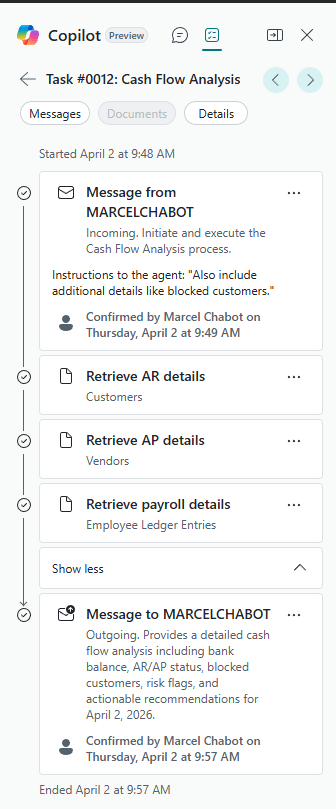
We can see the three steps it performed, Retrieve AR Details, Retrieve AP Details, and Retrieve Payroll Details.
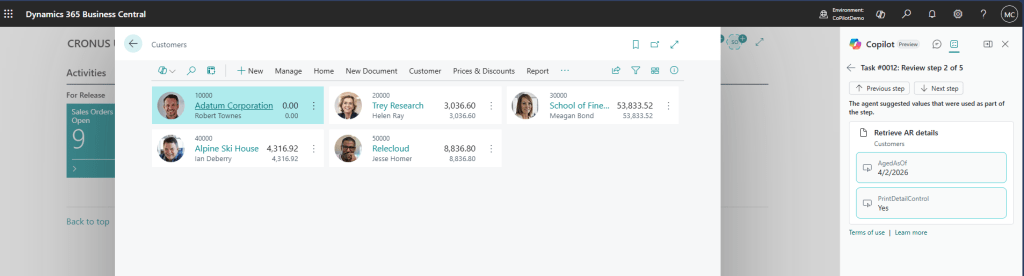
When we click on Retrieve AR Details, we can see what page it accessed.
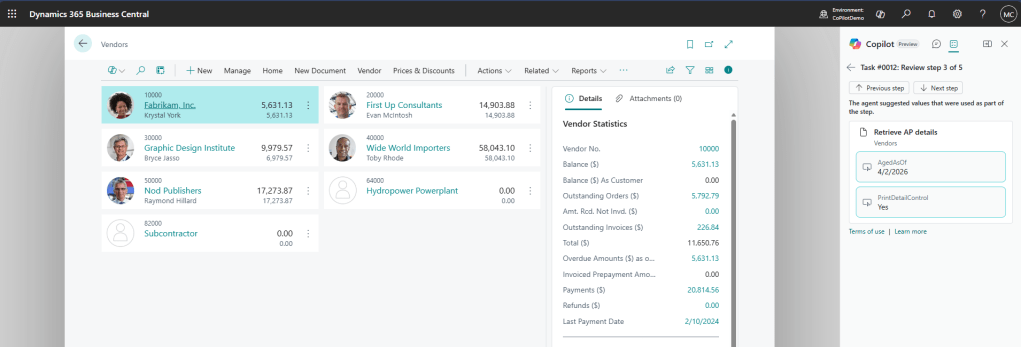
Clicking to the next step, Retrieve AP Details we can see that it went for the vendor list page.
Lastly Retrieve Payroll Details goes out to the Employee Ledger Entries. We don’t have any in my sample data set.
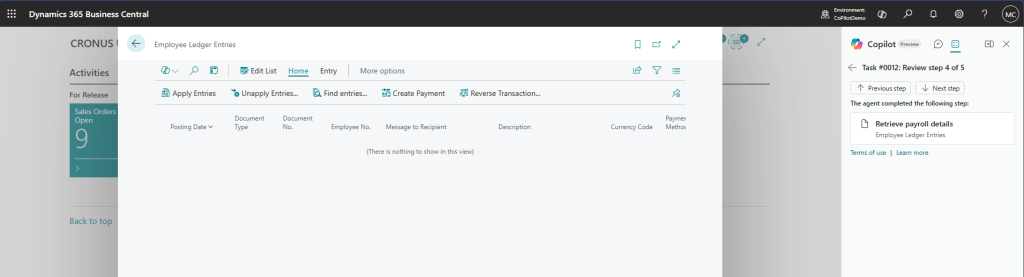
This our chance to disagree with the data collection methods and tune the model or take into account the pages used and provide access to something else. In this case I’m going to agree with the data collection methods.
The page customizations should be simple, display only the fields that the agent should have access too. Here is what I have for the Customer List.
namespace AardvarkLabs.AgentDemo;

using Microsoft.Sales.Customer;

pagecustomization ARD_CustomerList customizes "Customer List"
{
    ClearLayout = true;
    ClearActions = true;

    AboutText = 'This page shows the customers relevant to the cash flow agent.';
    Description = 'Customer List';

    layout
    {
        modify("No.")
        {
            Visible = true;
        }
        modify(Name)
        {
            Visible = true;
        }
        modify("Balance (LCY)")
        {
            Visible = true;
        }
    }
}
ClearLayout and ClearActions sets the page customization to start from a blank page, no layout, no actions. All we do in the customization is show the elements we want to agent to have access to.
The vendor list is nearly identical.
namespace AardvarkLabs.AgentDemo;
using Microsoft.Purchases.Vendor;

pagecustomization ARD_VendorList customizes "Vendor List"
{
    ClearLayout = true;
    ClearActions = true;

    AboutText = 'This page shows the vendors relevant to the cash flow agent.';
    Description = 'Vendor List';

    layout
    {
        modify("No.")
        {
            Visible = true;
        }
        modify(Name)
        {
            Visible = true;
        }
        modify("Balance (LCY)")
        {
            Visible = true;
        }
    }
}
Last is the Employee Ledger Entries
ARDEmployeeLedgerEntries.pagecust.al
namespace AardvarkLabs.AgentDemo;
using Microsoft.HumanResources.Payables;

pagecustomization ARD_EmployeeLedgerEntries customizes "Employee Ledger Entries"
{
    ClearLayout = true;
    ClearActions = true;

    AboutText = 'This page shows the employee ledger entries relevant to the cash flow agent.';
    Description = 'Employee Ledger Entries';

    layout
    {
        modify("Employee No.")
        {
            Visible = true;
        }
        modify("Posting Date")
        {
            Visible = true;
        }
        modify("Amount")
        {
            Visible = true;
        }
        modify("Remaining Amount")
        {
            Visible = true;
        }
    }
}
Everyone, including Agents, start at a Role Center. We can use an existing role center, but for ultimate control, we will create our own.
ARDCashFlowAgentRoleCenter.Page.al
namespace AardvarkLabs.AgentDemo;

using Microsoft.HumanResources.Payables;
using Microsoft.Purchases.Vendor;
using Microsoft.Sales.Customer;

page 60002 ARD_CashFlowAgentRoleCenter
{
    ApplicationArea = All;
    Caption = 'Cash Flow Agent Role Center';
    PageType = RoleCenter;

    actions
    {
        area(Embedding)
        {
            action(ARD_Customers)
            {
                Caption = 'Customers';
                ToolTip = 'View customer list and details';
                Image = Customer;
                RunObject = page "Customer List";
            }
            action(ARD_Vendors)
            {
                Caption = 'Vendors';
                ToolTip = 'View vendor list and details';
                Image = Vendor;
                RunObject = page "Vendor List";
            }
            action(ARD_EmployeeLedgerEntries)
            {
                Caption = 'Employee Ledger Entries';
                ToolTip = 'View employee ledger entries';
                Image = Employee;
                RunObject = page "Employee Ledger Entries";
            }

        }
    }
}
We can now create a profile that includes our customizations.
namespace AardvarkLabs.AgentDemo;

using Microsoft.Finance.RoleCenters;

profile ARD_CashFlowAgent
{
    Caption = 'Cash Flow Agent';
    Description = 'Agent that reviews cash flow and provides recommendations to the user.';
    Enabled = true;
    RoleCenter = ARD_CashFlowAgentRoleCenter;
    Customizations =
        ARD_EmployeeLedgerEntries,
        ARD_CustomerList,
        ARD_VendorList;
}
Permissions
Limiting what the Agent can see if the first step, second, we need to limit what the agent can do. Limiting permissions to read or write and preventing execution of things we don’t want them to execute keeps the Agent from manipulating data even when prompted to by a user.
Here is a simple permission set that will keep the agent from editing records and keep the data access scope to the records we are interested in.
ARDCashFlowAgent.PermissionSet.al
namespace AardvarkLabs.AgentDemo;

using Microsoft.HumanResources.Payables;
using Microsoft.Purchases.Vendor;
using Microsoft.Sales.Customer;

permissionset 60000 ARD_CashFlowAgent
{
    Assignable = true;
    Caption = 'Cash Flow Agent Permissions', MaxLength = 30;
    Permissions =
        page "Customer List" = X,
        page "Vendor List" = X,
        page "Employee Ledger Entries" = X,
        page "ARD_Cash Flow Agent KPI" = X,
        page ARD_CashFlowAgentRoleCenter = X,
        codeunit ARD_CashFlowAgentSetup = X,
        codeunit ARD_CashFlowAgentMetadata = X,
        codeunit ARD_CashFlowAgentKPILogging = X,
        codeunit ARD_CashFlowAgentFactory = X,
        table ARD_CashFlowAgentKPI = X,
        tabledata ARD_CashFlowAgentKPI = RIMD,
        table ARD_CashflowAgentSetup = X,
        tabledata ARD_CashflowAgentSetup = RIMD,
        table Customer = X,
        tabledata Customer = R,
        table Vendor = X,
        tabledata Vendor = R,
        table "Employee Ledger Entry" = X,
        tabledata "Employee Ledger Entry" = R;
}
The final step is to update the agent setup with our new profiles and permission sets. We originally set this up in the ARDCashFlowAgentSetup.Codeunit.al.
namespace AardvarkLabs.AgentDemo;

using System.Agents;
using System.Reflection;
using System.Security.AccessControl;

codeunit 60000 ARD_CashFlowAgentSetup
{
    Access = Internal;

    procedure TryGetAgent(var AgentUserSecurityId: Guid): Boolean
    var
        CashFlowAgentSetupRec: Record ARD_CashflowAgentSetup;
    begin
        if CashFlowAgentSetupRec.FindFirst() then begin
            AgentUserSecurityId := CashFlowAgentSetupRec."User Security ID";
            exit(true);
        end;

        exit(false);
    end;

    procedure GetInitials(): Text[4]
    begin
        exit(AgentInitialsLbl);
    end;

    procedure GetSetupPageId(): Integer
    begin
        exit(Page::"ARD_Cash Flow Agent Setup");
    end;

    procedure GetSummaryPageId(): Integer
    begin
        exit(Page::"ARD_Cash Flow Agent KPI");
    end;

    procedure EnsureSetupExists(UserSecurityID: Guid)
    var
        CashFlowAgentSetupRec: Record ARD_CashflowAgentSetup;
    begin
        if not CashFlowAgentSetupRec.Get(UserSecurityID) then begin
            CashFlowAgentSetupRec."User Security ID" := UserSecurityID;
            CashFlowAgentSetupRec.Insert();
        end;
    end;

    [NonDebuggable]
    procedure GetInstructions(): SecretText
    var
        Instructions: Text;
    begin
        Instructions := NavApp.GetResourceAsText('Instructions/InstructionsV1.txt');
        exit(Instructions);
    end;

    procedure GetDefaultProfile(var TempAllProfile: Record "All Profile" temporary)
    var
        CurrentModuleInfo: ModuleInfo;
    begin
        NavApp.GetCurrentModuleInfo(CurrentModuleInfo);
        Agent.PopulateDefaultProfile(DefaultProfileTok, CurrentModuleInfo.Id, TempAllProfile);
    end;

    procedure GetDefaultAccessControls(var TempAccessControlBuffer: Record "Access Control Buffer" temporary)
    var
        CurrentModuleInfo: ModuleInfo;
    begin
        NavApp.GetCurrentModuleInfo(CurrentModuleInfo);
        Clear(TempAccessControlBuffer);
        TempAccessControlBuffer."Company Name" := CopyStr(CompanyName(), 1, MaxStrLen(TempAccessControlBuffer."Company Name"));
        TempAccessControlBuffer.Scope := TempAccessControlBuffer.Scope::System;
        TempAccessControlBuffer."App ID" := CurrentModuleInfo.Id;
        TempAccessControlBuffer."Role ID" := D365ReadPermissionSetTok;
        TempAccessControlBuffer.Insert();
    end;

    var
        Agent: Codeunit Agent;
        DefaultProfileTok: Label 'ARD_CashFlowAgent', Locked = true;
        AgentInitialsLbl: Label 'CF', MaxLength = 4;
        D365ReadPermissionSetTok: Label 'ARD_CashFlowAgent', Locked = true;
We can now see in the highlighted lines we assigned the default profile to ARD_CashFlowAgent, and the default permission set to ARD_CashFlowAgent.
Even with all this effort, you must still test your agents. Can they be “tricked” into misbehaving? Can it access out of scope data? Can it modify records it should not modify?
I hope this give you the tools and confidence to setup appropriate security for your Business Central AI Agents. I know it may look like a lot, and in a complex agent it can be a challenge. It is worth it to know that your agent will be operating within the boundaries you’ve set. These rules ensure that your Agent returns quality data and performs the scoped actions in your environment.
As always, the source code is available in GitHub.com/AardvarkMan


 Aardvark Labs
Leave a comment