

When creating a Business Central Extension there may be need to include additional information in your APP. This might be data or even image files. With the release of Business Central 25.2 and runtime 14.2 we can actually embed information inside an extension and utilize that data inside Business Central.
We can store any kind of data we want assuming that it fits in a 1024 Kb file, max of 256 resources, and a total size of 16 MB. Also note that resources are only accessible within the scope of the extension.
For this example, I’m going to create a series of Customer records, but this could be a default Chart of Accounts, Items, system configurations, really anything.
The first things we need to do is add a Resource folder to the root of the project as well as data and images subfolders. We also need to update our App.JSON to reflect these changes. I’ve also changed the runtime to 14.2.
{
  "id": "776d940f-fc7f-4a22-8901-3c34407df048",
  "name": "Aardvark Labs Basic Customizations",
  "publisher": "Aardvark Labs",
  "brief": "Aardvark Labs Customizations.",
  "description": "Customizations provided by Aardvark Labs",
  "version": "1.25.0.0",
  "privacyStatement": "http://aardvarklabs.blog",
  "EULA": "http://aardvarklabs.blog",
  "help": "http://aardvarklabs.blog",
  "contextSensitiveHelpUrl": "http://aardvarklabs.blog",
  "url": "http://aardvarklabs.blog",
  "logo": "./AardvarkLabsIcon.jpg",
  "supportedLocales": ["en-US"],
  "features": [ "TranslationFile", "GenerateCaptions" ],
  "dependencies": [],
  "screenshots": [],
  "resourceFolders": ["Resources"],
  "platform": "25.0.0.0",
  "application": "25.0.0.0",
  "resourceExposurePolicy": {
    "allowDebugging": true,
    "allowDownloadingSource": true,
    "includeSourceInSymbolFile": false
  },
  "target": "Cloud",
  "idRanges": [
    {"from": 50000, "to": 59999}
  ],
  "runtime":"14.2"
}
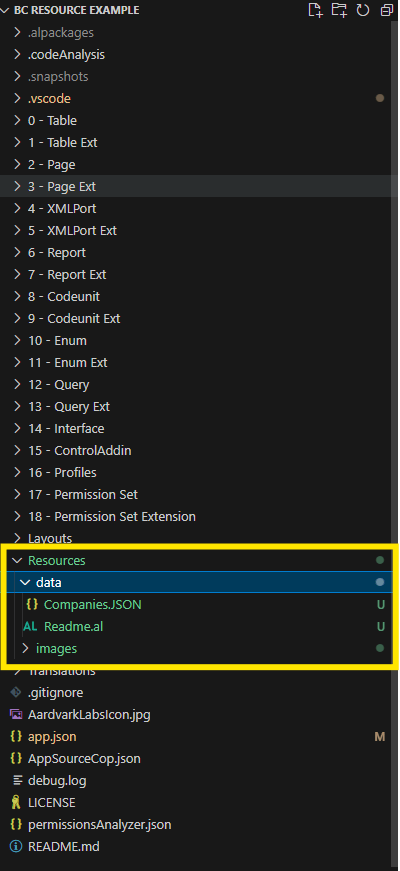
I’ve also generated a JSON file with three companies of data, thanks Copilot.
{
    "companies": [
      {
        "name": "Tech Innovators Inc.",
        "industry": "Technology",
        "founded": 2010,
        "employees": 500,
        "city": "San Francisco",
        "state": "CA"
      },
      {
        "name": "Green Earth Solutions",
        "industry": "Environmental Services",
        "founded": 2005,
        "employees": 200,
        "city": "Portland",
        "state": "OR"
      },
      {
        "name": "HealthFirst Medical",
        "industry": "Healthcare",
        "founded": 1998,
        "employees": 1000,
        "city": "Boston",
        "state": "MA"
      }
    ]
  }
To process this data into Customer records I’ve chosen to do this in a Code Unit, but it could be in any other object that support procedures.
The data is stored in JSON, so I’m going to do a little JSON parsing. The mechanics of JSON Parsing in AL is an entirely different discussion deserving of its own post (foreshadowing). For the moment, don’t let the complexity of JSON parsing bog you down.
codeunit 50000 ARD_ProcessCustomerJSON
{
    internal procedure ProcessCustomerJSON()
    var
        CompaniesJSON: JsonObject;
        CompaniesAryJT: JsonToken;
        CompanyJT: JsonToken;
    begin
        CompaniesJSON := NavApp.GetResourceasJson('data/Companies.JSON');

        if CompaniesJSON.Get('companies', CompaniesAryJT) then
            foreach CompanyJT in CompaniesAryJT.AsArray() do
                ProcessCompany(CompanyJT);

    end;

    local procedure ProcessCompany(CompanyJT: JsonToken)
    var
        CustomerRec: Record Customer;
        JObject: JsonObject;
        Name: Text;
        tmpText: Text;
    begin
        JObject := CompanyJT.AsObject();
        if GetText(JObject, 'name', Name) then begin
            CustomerRec.SetFilter(Name, '%1', Name);
            if CustomerRec.IsEmpty() then begin
                CustomerRec.Init();
                CustomerRec.Name := CopyStr(Name, 1, 100);

                if GetText(JObject, 'city', tmpText) then
                    CustomerRec.City := CopyStr(tmpText, 1, 30);

                if GetText(JObject, 'state', tmpText) then
                    CustomerRec."Country/Region Code" := CopyStr(tmpText, 1, 10);

                CustomerRec.Insert(true);
            end;
        end;
    end;

    [TryFunction]
    local procedure GetText(JsonObject: JsonObject; ObjKey: Text; var Val: Text)
    var
        Token: JsonToken;
        Value: JsonValue;
    begin
        JsonObject.Get(ObjKey, Token);
        Value := Token.AsValue();
        Val := Value.AsText();
    end;
}
The highlighted lines is where we read the resource from the Extension into a JSON object for processing. The rest of the code is AL JSON Object handling.
A resource can be read in as JSON or Text if you wanted a CSV or other text file. If it is not a text file, you can read it directly into an InStream object.
Lastly to run this example I added a menu to the Customer List page as a Page Extension.
pageextension 50000 ARD_CustomerList extends "Customer List"
{
    actions
    {
        addafter(ApplyTemplate)
        {
            action(ard_ProcessCustomerJSON)
            {
                ApplicationArea = All;
                Caption = 'Process Customer JSON';
                Image = Customer;
                ToolTip = 'Process Customer JSON';
                trigger OnAction()
                var
                    CustomerProcessor: CodeUnit ARD_ProcessCustomerJSON;
                begin
                    CustomerProcessor.ProcessCustomerJSON();
                end;
            }
        }
    }
}
When I open the Customer List, I can find the button under the Actions menu.

When I click it, I get my three Customers from the JSON file.
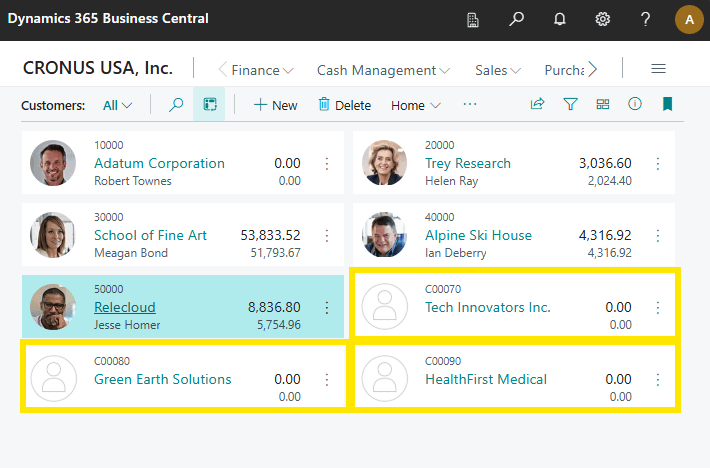
This use case is a little contrived, but it is easy to visualize. There is much more value in default setups, tables of configuration data, large imports used for a common customer vertical you may be developing for. It is a great feature, and I expect to find many uses for it.
The source code for this example can be found on GitHub here: AardvarkMan/BC-Resource-Example
Additional resources here: Adding and Accessing Resources in Business Central extensions – Business Central | Microsoft Learn
Stefano Demiliani has a great walk through of this as well: Dynamics 365 Business Central: using resources in AL extensions. – Stefano Demiliani
Also, thanks to my coworker Bill Vassas for helping with a quick demo.




 Aardvark Labs
Leave a comment