

While more common in older SOAP APIs, XML may still be encountered as a file format for data exchange. One of the most common I see in the Business Central space is the cXML (commerce eXtensible Markup Language) standard created back in 1999.
XML files differ from many others in that the XML file should be paired with a definition file. The concept in XML is that with a base set of rules you can create any number of standardized data sharing formats. If I can parse a cXML file from one source, I should be able to parse it from ANY source.
In practice, XML definitions were rarely adhered to. Each file source required data handling exceptions. If you can’t count of the ridged adherence to standards, then a file type like JSON is far more attractive.
Enough history and complaining! Let’s parse some XML!
I’m going to use Copilot to generate a cXML file with sample data from the basic sample data set.
<?xml version="1.0" encoding="UTF-8"?>
<!DOCTYPE cXML SYSTEM "http://xml.cxml.org/schemas/cXML/1.2.045/cXML.dtd">
<cXML payloadID="PO-2001@buyersystem.com" timestamp="2025-12-02T20:45:00-05:00">
  <Header>
    <From>
      <Credential domain="DUNS">
        <Identity>10000</Identity>
      </Credential>
    </From>
    <To>
      <Credential domain="DUNS">
        <Identity>123456789</Identity>
      </Credential>
    </To>
    <Sender>
      <Credential domain="NetworkID">
        <Identity>buyersystem</Identity>
        <SharedSecret>buyerSecret</SharedSecret>
      </Credential>
      <UserAgent>CopilotPOGenerator</UserAgent>
    </Sender>
  </Header>

  <Request>
    <OrderRequest>
      <OrderRequestHeader orderID="PO-2001" orderDate="2025-12-02" type="new">
        <Total>
          <Money currency="USD">1,150.00</Money>
        </Total>
        <ShipTo>
          <Address>
            <Name>Fabrikam, Inc.</Name>
            <PostalAddress>
              <Street>500 Sample Street</Street>
              <City>Seattle</City>
              <State>WA</State>
              <PostalCode>98101</PostalCode>
              <Country isoCountryCode="US">USA</Country>
            </PostalAddress>
          </Address>
        </ShipTo>
      </OrderRequestHeader>

      <ItemOut quantity="2" lineNumber="1">
        <ItemID>
          <SupplierPartID>1920-S</SupplierPartID>
        </ItemID>
        <ItemDetail>
          <UnitPrice><Money currency="USD">275.00</Money></UnitPrice>
          <Description xml:lang="en">ATHENS Desk</Description>
          <UnitOfMeasure>EA</UnitOfMeasure>
        </ItemDetail>
      </ItemOut>

      <ItemOut quantity="4" lineNumber="2">
        <ItemID>
          <SupplierPartID>1908-S</SupplierPartID>
        </ItemID>
        <ItemDetail>
          <UnitPrice><Money currency="USD">85.00</Money></UnitPrice>
          <Description xml:lang="en">BERLIN Guest Chair</Description>
          <UnitOfMeasure>EA</UnitOfMeasure>
        </ItemDetail>
      </ItemOut>

      <ItemOut quantity="1" lineNumber="3">
        <ItemID>
          <SupplierPartID>1936-S</SupplierPartID>
        </ItemID>
        <ItemDetail>
          <UnitPrice><Money currency="USD">250.00</Money></UnitPrice>
          <Description xml:lang="en">ANTWERP Conference Table</Description>
          <UnitOfMeasure>EA</UnitOfMeasure>
        </ItemDetail>
      </ItemOut>
    </OrderRequest>
  </Request>
</cXML>
This data is a purchase order for three lines to the Fabrikam, Inc. Note that the cXML format allows for a lot of additional information, but we are going to work with this basic example.
As we parse through this code, we will see a lot of static text used to select single nodes from the XML file. While this is not something we see often with JSON file parsing, it is very common in XML. XML files should strictly adhere to a format and should be validated against an XSD (XML Schema Definition). Because of this strict format we can ask for data within a given node and expect it to be there.
Before we go into the example code for this XML I would like to note a few things. First off, there are code units to help parse XML, but we are going for the fewest tools example. Second, I’ve used more nodes and node lists than technically necessary, but I felt it helped with clarity.
procedure ParseXML(FileText: Text)
    var
        DocHeader: Record ARD_cXMLPOHeader;
        DocLine: Record ARD_cXMLPOLine;
        VendorRec: Record Vendor;
        // XML handling variables
        XmlDoc: XmlDocument;
        XmlNodeList: XmlNodeList;
        XmlNode: XmlNode;
        // Nodes for ItemOut processing
        ItemOutNode: XmlNode;
        ItemOutNodeList: XmlNodeList;
        // Nodes for ItemID processing
        ItemIdNodeList: XmlNodeList;
        ItemIdNode: XmlNode;
        // Nodes for ItemDetail processing
        ItemDetailNode: XmlNode;
        ItemDetailNodeList: XmlNodeList;
        // Nodes for UnitPrice processing
        UnitPriceNode: XmlNode;
        UnitPriceNodeList: XmlNodeList;
        // XML attribute handling variables
        xmlAttribute: XmlAttribute;
        xmlAttributes: XmlAttributeCollection;
        xmlElement: XmlElement;

        xmlName: text;
        VendorId: Text;
        tempText: Text;
    begin
        XMLDocument.ReadFrom(FileText, XmlDoc);

        //Locate the From Identity so that we can extract the Vendor ID
        XmlDoc.SelectNodes('//cXML//Header//From//Credential//Identity', XmlNodeList);
        if XmlNodeList.Count = 0 then
            error('File does not appear to be a valid cXML file.');

        XmlNodeList.Get(1, XmlNode);
        VendorId := XmlNode.AsXmlElement().InnerText;
        if not VendorRec.Get(VendorId) then
            error('Vendor with ID %1 not found.', VendorId);

        // Initialize and insert header record
        DocHeader.Init();
        DocHeader."ARD_No." := 0;
        DocHeader."ARD_VendorNo." := VendorRec."No.";
        DocHeader.ARD_VendorName := VendorRec.Name;

        // Process Header Information from the OrderRequestHeader Attributes
        XmlDoc.SelectNodes('//cXML//Request//OrderRequest//OrderRequestHeader', XmlNodeList);
        if XmlNodeList.Count = 0 then
            error('File does not appear to be a valid cXML Order Request file.');

        foreach XmlNode in XmlNodeList do begin
            xmlName := XmlNode.AsXmlElement().Name;

            xmlAttributes := XmlNode.AsXmlElement().Attributes();
            foreach xmlAttribute in xmlAttributes do begin
                tempText := xmlAttribute.Value;

                case xmlAttribute.Name of
                    'orderDate':
                        Evaluate(DocHeader.ARD_OrderDate, tempText);
                    'orderID':
                        DocHeader.ARD_DocumentNo := CopyStr(tempText, 1, 20);
                end;
            end;
        end;

        DocHeader.Insert(true);

        //Now for lines
        XmlDoc.SelectNodes('//cXML//Request//OrderRequest//ItemOut', XmlNodeList);
        if XmlNodeList.Count = 0 then
            error('File does not appear to contain any line items.');

        foreach XmlNode in XmlNodeList do begin
            DocLine.Init();
            DocLine.ARD_HeaderNo := DocHeader."ARD_No.";

            xmlAttributes := XmlNode.AsXmlElement().Attributes();

            //Parse the Attributes from the ItemOut for the Quantity and line number
            foreach xmlAttribute in xmlAttributes do begin
                tempText := xmlAttribute.Value;
                case xmlAttribute.Name of
                    'quantity':
                        Evaluate(DocLine."ARD_Quantity", tempText);
                    'lineNumber':
                        Evaluate(DocLine."ARD_Line Number", tempText);
                end;
            end;

            // Now process child nodes for this ItemOut
            xmlElement := XmlNode.AsXmlElement();
            ItemOutNodeList := xmlElement.GetChildElements();
            foreach ItemOutNode in ItemOutNodeList do begin
                xmlName := ItemOutNode.AsXmlElement().Name;
                case xmlName of
                    'ItemID':
                        begin
                            // Get Supplier Part ID
                            ItemIdNodeList := ItemOutNode.AsXmlElement().GetChildElements();
                            foreach ItemIdNode in ItemIdNodeList do
                                if ItemIdNode.AsXmlElement().Name = 'SupplierPartID' then
                                    DocLine."ARD_Supplier Part ID" := CopyStr(ItemIdNode.AsXmlElement().InnerText, 1, 50);
                        end;
                    'ItemDetail':
                        begin
                            // Process ItemDetail child nodes
                            ItemDetailNodeList := ItemOutNode.AsXmlElement().GetChildElements();
                            foreach ItemDetailNode in ItemDetailNodeList do begin
                                xmlName := ItemDetailNode.AsXmlElement().Name;
                                case xmlName of
                                    'Description':
                                        DocLine."ARD_Description" := CopyStr(ItemDetailNode.AsXmlElement().InnerText, 1, 100);
                                    'UnitPrice':
                                        begin
                                            // Get Money child node for Unit Price and Currency
                                            UnitPriceNodeList := ItemDetailNode.AsXmlElement().GetChildElements();
                                            foreach UnitPriceNode in UnitPriceNodeList do
                                                if UnitPriceNode.AsXmlElement().Name = 'Money' then begin
                                                    xmlAttributes := UnitPriceNode.AsXmlElement().Attributes();
                                                    foreach xmlAttribute in xmlAttributes do
                                                        if xmlAttribute.Name = 'currency' then
                                                            DocLine."ARD_Currency" := CopyStr(xmlAttribute.Value, 1, 3);
                                                    Evaluate(DocLine."ARD_Unit Price", UnitPriceNode.AsXmlElement().InnerText);
                                                end;
                                        end;
                                    'UnitOfMeasure':
                                        DocLine."ARD_Unit of Measure" := CopyStr(ItemDetailNode.AsXmlElement().InnerText, 1, 10);
                                end;
                            end;
                        end;
                end;
            end;
            DocLine.Insert(true);
        end;
    end;
}
It all starts on line 31 where we take the text from the file and turn it into an XML Document. There are details we need for the Purchase document header, we find them in the Header node. The From Credential Identity value is our Vendor ID. We use a Select Single Node to go directly to the From Credential Identity, we can do this because XML is very static and we can count on this location being in the record. We only have so much trust in our lives, so we do check if it found the node on line 36;
We need more details from the Order Request Header where there is an attribute for the Order Date and Order ID. We grab those values in line 50-68. From here we have enough information to create the header record.
There are three Item Out nodes that contain our line items. Starting on line 73 we start a process where we find all the ItemOut nodes in the Request, OrderRequest nodes. We loop through pulling out attributes and then selecting the next set of child elements drilling through the data.
As you can see, the XML can be parsed with a starting Select Single Node to get things moving. We then get node lists, and then nodes and attributes. Then back into node lists, nodes, and attributes. The nested hierarchical structure allows us to drill through the file.
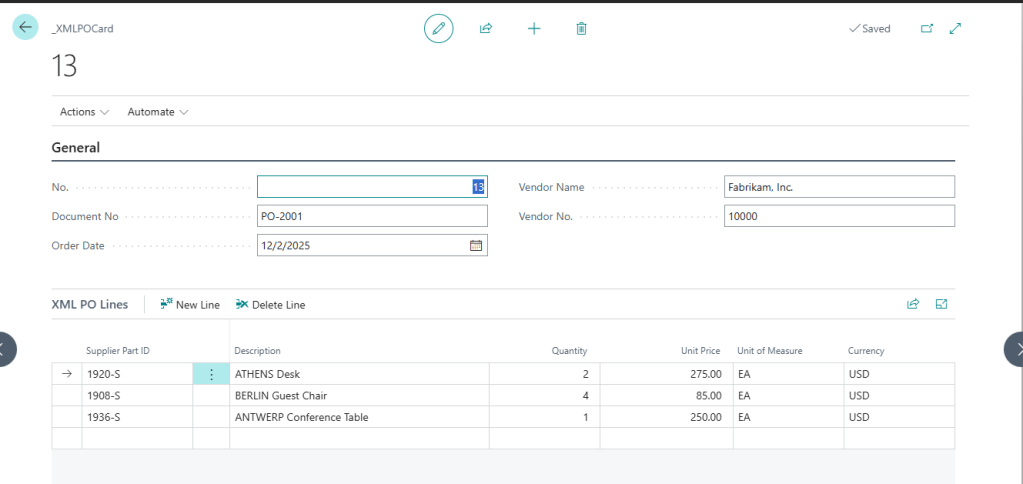
When everything is parsed, we are left with a record like this:
The Tables used to hold the temporary data can be found here: XML Parsing Tables
The pages where all the work takes place can be found here: XML Parsing Pages
I’ve got to come clean, after all this work to parse out a simple purchase order, I may have been seeing my XML / SOAP API history through rose colored glasses. This was a pain in the butt.
Let me know if you are still seeing XML Files out in the wild. Do you parse them by hand or are you using XML Ports for them?





Leave a comment