

BC AL Journey #21
In BC AL Journey #20 we dove deeper into the world of AL Triggers and specifically the Table Field triggers. This was a continuation of the BC AL Journey #10 where we introduced triggers. This time we are looking at Page triggers.
This topic is rather large; therefore, I’m going to break it down into several parts. This part will focus on triggers that happen as a page is being loaded. Record handling triggers will be discussed in Part 2.
As the name implies, Page triggers are focused on the Page and events that are page wide. Examples for these types of triggers are rather specific, so the examples here will be somewhat contrived. I’m also going to focus on examples for the most common triggers.
We saw that we can use table and table field triggers for data integrity and management, Page triggers focus more on user interactions. That isn’t to say that you can’t enforce data integrity at the page level, however you can have several pages interfacing the same table, which makes it easier to centralize all the data integrity and processing tasks at the table level. Page triggers should focus on the unique interactions at the User Interface level.
Page Triggers
When a page is opened there are two triggers that fire one after the other: OnInit and OnOpenPage.
The OnInit event fires first, this is as soon as the page variables are cleared, but before all the controls are ready for interaction. If you have a process requiring Page level variables, here is a good place to set all those variables to known values. If there is an error during OnInit, the page will close.
Immediately after the OnInit event we move into the OnOpenPage trigger. This is the point where we set field properties and perform initial calculations based on settings and configurations we can retrieve without the record specific data. If an error occurs during this trigger, the page will close.
Here is a simple example where a Boolean in a settings table dictates if the Territory Code fields should be visible on a Page showing Customer data.
namespace AardvarkLabs.BCJourney;
using Microsoft.Sales.Customer;

page 50005 ARD_TriggerHappy
{
    ApplicationArea = All;
    Caption = 'Trigger Happy';
    PageType = Card;
    SourceTable = Customer;

    layout
    {
        area(Content)
        {
            group(General)
            {
                Caption = 'General';

                field("No."; Rec."No.")
                {
                }
                field(Name; Rec.Name)
                {
                }
                field("No. Series"; Rec."No. Series")
                {
                }
                field("Territory Code"; Rec."Territory Code")
                {
                    Visible = ShowTerritoryCode;
                }
            }
        }
    }

    var
        Settings: Record ARD_Settings;
        ShowTerritoryCode: Boolean;

    trigger OnInit()
    begin
        Message('Card: OnInit: Rec: %1, XRec: %2', Rec."No.", XRec."No.");
        Settings.Get();
    end;

    trigger OnOpenPage()
    begin
        Message('Card: OnOpenPage: Rec: %1, XRec: %2', Rec."No.", XRec."No.");
        ShowTerritoryCode := Settings.ARD_ShowTerritory;
    end;

}
When the card opens, we see the following messages:
| Card: OnInit: Rec: , XRec: |
| Card: OnOpenPage: Rec: 50000, XRec: |
Note that the Settings record is loaded during the OnInit trigger, making it available for all future triggers to utilize the record. The OnPageOpen is then processed where we use the record to set the ShowTerritoryCode variable. The ShowTerritoryCode variable is then used to set the Visible property of the field.
The next two triggers are very similar but happen at slightly different times. The OnAfterGetRecord and OnAfterGetCurrRecord triggers. Both of these trigger’s fire as records are loaded and allow for decisions and calculations to be performed based on the data in the loaded record. They both bring in the Global Variable Rec as the current record loaded and XRec as the previous record loaded.
As a way to explore of the order of operations, I’ve added the following trigger to a List and a Card page of customers.
trigger OnAfterGetRecord()
begin
    Message('List: OnAfterGetRecord: Rec: %1, XRec: %2', Rec."No.", XRec."No.");
end;

trigger OnAfterGetCurrRecord()
begin
    Message('List: OnAfterGetCurrRecord: Rec: %1, XRec: %2', Rec."No.", XRec."No.");
end;
When I open the list page I see the following outputs:
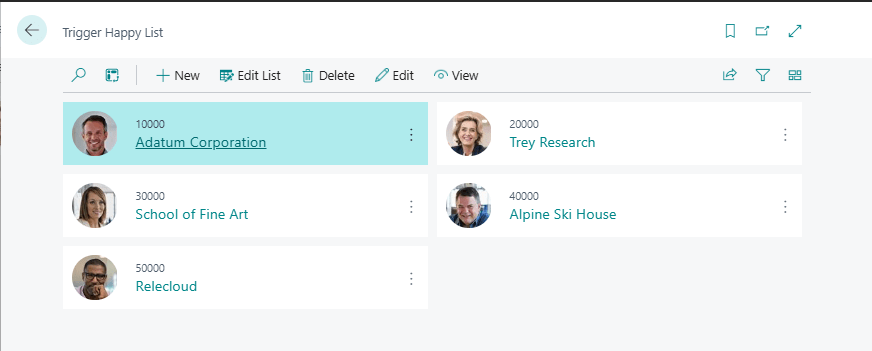
| List: OnAfterGetRecord: Rec: 10000, XRec: |
| List: OnAfterGetRecord: Rec: 20000, XRec: 10000 |
| List: OnAfterGetRecord: Rec: 30000, XRec: 20000 |
| List: OnAfterGetRecord: Rec: 40000, XRec: 30000 |
| List: OnAfterGetRecord: Rec: 50000, XRec: 40000 |
| List: OnAfterGetRecord: Rec: 10000, XRec: 50000 |
| List: OnAfterGetRecord: Rec: 10000, XRec: 10000 |
| List: OnAfterGetCurrRecord: Rec: 10000, XRec: |
We can see the system load each record in the list. If we had data validations we wanted to run on each record in the list view, the OnAfterGetRecord would be the proper place to do that work. If we were loading data in batches, it would trigger each time more data is loaded.
The OnAfterGetCurrRecord only runs on Rec 10000, the Customer record that is selected, aka the Current Record.
When I select another record in the list, for example 50000, we can see the OnAfterGetRecord firing twice as it moves from Record 10000 to Record 50000 and the OnAfterGetCurrRecord firing once as the system retrieves the Current Record.

| List: OnAfterGetRecord: Rec: 50000, XRec: 10000 |
| List: OnAfterGetRecord: Rec: 50000, XRec: 50000 |
| List: OnAfterGetCurrRecord: Rec: 50000, XRec: 10000 |
If I now open Record 50000 then we see the following events:
| Card: OnAfterGetRecord: Rec: 50000, XRec: |
| Card: OnAfterGetCurrRecord: Rec: 50000, XRec: |
The OnAfterGetRecord is trigged and immediately after the OnAfterGetCurrRecord. On a card page, both triggers operate about the same and are interchangeable. I would recommend utilizing the OnAfterGetRecord as it aligns with the use case functions for the list pages.
Both of these triggers allow for the calculation of values based on the data being loaded to the screen. Showing and hiding fields is one option here but so is performing calculations and data driven user alerts. We will explore this as we compare and contest technologies such as Flow Fields in future steps on our AL Journey.
This is a lot of trigger activity, and the record has just been loaded onto the screen! Next lesson we will explore the record handling triggers for New, Insert, Modify, and Delete record triggers.
Thanks for joining me on this Journey and I’ll see you next week.
This trigger exploration is available in GitHub here: AardvarkMan/BC-AL-Triggers





 Aardvark Labs
Leave a reply to Essential Triggers for Page Management in AL Programming – Part 2 – Aardvark Labs Cancel reply