

BC AL Journey #23
In BC AL Journey #22 we dove ever deeper into the world of AL Triggers and specifically the Page triggers. This was a continuation of the BC AL Journey #10 where we introduced triggers. This final part will look at a few of the lesser used triggers and wrap up the Page Triggers.
In order to demonstrate one of these triggers we are going to also take a sneak peek at the Page Field Triggers. Triggers triggering triggers! Let’s get into it!
Page Triggers
Have you ever wanted to change the way a lookup record works? There are cases where we need to display a filtered list with task specific details and capture the user’s selection? To accomplish this, there are two triggers, a Page Trigger and a Page Field Trigger.
I’ve created a List Page to show customers from which we will drive a user selection.
namespace AardvarkLabs.BCJourney;
using Microsoft.Sales.Customer;

page 50008 Ard_TriggerHappyQuery
{
    ApplicationArea = All;
    Caption = 'Trigger Happy Query';
    PageType = List;
    SourceTable = Customer;
    UsageCategory = None;

    layout
    {
        area(Content)
        {
            repeater(General)
            {
                field(Name; Rec.Name)
                {
                }
                field("Country/Region Code"; Rec."Country/Region Code")
                {
                }
            }
        }
    }

    trigger OnQueryClosePage(CloseAction: Action): Boolean
    begin
        Message('Query: OnQueryClosePage: Rec: %1, XRec: %2, CloseAction: %3', Rec."No.", XRec."No.", CloseAction);
    end;
}
The OnQueryClosePage Trigger fires when the user makes a selection from the list. This is commonly used to validate that the user has made a good selection. If you return False here, the page will not close.
Back on our Card Page we need something to utilize this list as a lookup. We can turn any field into a lookup by setting the Lookup flag to true and then incorporating the OnLookUp field trigger.
Here is the page field that populates a global VAR Text called CustomerLookup. This is the first time in the BC AL Journey that we have seen something that isn’t a table field as a page field, this will display the selected text but not save it to the table.
field(ARD_CustomerLookup; CustomerLookup)
{
    Caption = 'Customer Lookup';
    ToolTip = 'Lookup Customer';
    ApplicationArea = All;
    Lookup = true;


    trigger onlookup(var Text: Text): Boolean
    var
        CustomerRec: Record Customer;
    begin
        Message('Card Field: onlookup: Rec: %1, Text: %2', Rec."No.", Text);
        if Page.RunModal(Page::Ard_TriggerHappyQuery, CustomerRec) = Action::LookupOK then
        begin
            CustomerLookup := CustomerRec.Name;
        end;
    end;
}
When I view this card the “Customer Lookup” field has the tell tail “…” of a lookup field.
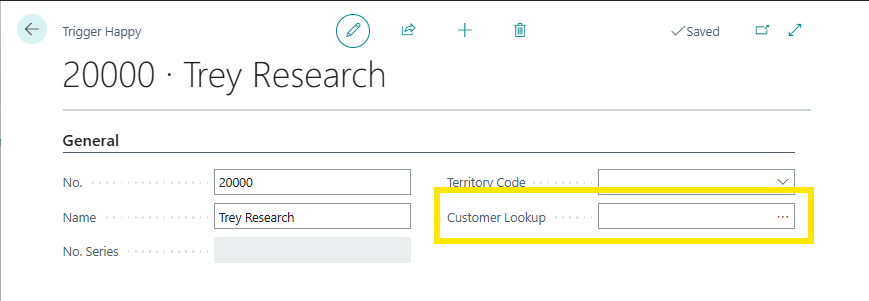
Clicking the “…” brings up the Ard_TriggerHappyQuery page.

When I select a record and Click “OK” we return to the previous card and the Customer name is populated into the text value that is displayed on the field.
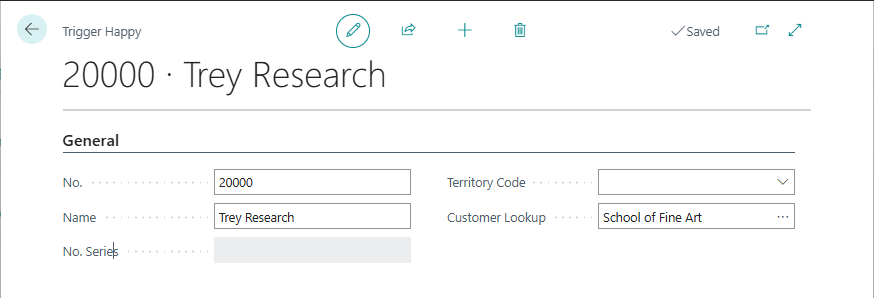
The events that fired during this process are:
| Card Field: onlookup: Rec: 20000, Text: |
| Query: OnQueryClosePage: Rec: 30000, XRec: 30000, CloseAction: LookupOK |
What we can see is that clicking on the “…” triggers the OnLookup event of the Page Field Trigger, where we can then display a list page for the user to make a selection. When our selection is complete and the page is attempting to close, the OnQueryClose page fires giving us an opportunity to validate the user selection and handle any issues.
The last trigger we are going to view in dept is the OnClosePage trigger. As the name implies, it fires when the page closes. When we close the page we are on, we get the following message.
| Card: OnClosePage: Rec: 20000, XRec: 20000 |
The other triggers available in the Page are:
OnNextRecord: Fires when you click the Left or Right arrows to switch records.
OnFindRecord: Triggers when the attempts to find the record to load and allows you to override which record is loaded.
OnPageBackgroundTaskComplete: Handles the event when a background task is completed. We will see this later when we work with background tasks in a furture AL Journey.
OnPageBackgroundTaskError: Triggers if there is an error in a background task.
These final triggers are very task specific, and we will see them in later discussions. The ones we have visited are what I would consider essential because I use them all the time.
The Business Central Page has a lot of triggers and allows for a lot of user interaction. Knowing where the user is, what records are loaded, and properly handling the events can help create a good user experience. Next week we will wrap up the page related triggers with the Page Field Triggers. Until then, have a great week.
This trigger exploration is available in GitHub here: AardvarkMan/BC-AL-Triggers




 Aardvark Labs
Leave a reply to Key Page Field Triggers for Business Central Users – Aardvark Labs Cancel reply