

Business Central 2025 Wave 1 Feature Exploration
One of the new features in Business Central 2025 Wave 1 is the introduction of the ToText() method on many of the variable types. This is not a replacement for the Format method but provides a quick way to format a value for display. At the time of writing this, ToText() doesn’t accept any formatting and uses a default for each data type. What I wanted to know is “what does that look like on the screen?” Let’s dive in and take a look.
To test what the outputs look like I created a Card Page and added variable of each type as well as a matching text variable. I populated each value with sample data, and the associated text variable with the ToText() output. I added each to the card as a field and here are the results.
The first thing to note in the data handling within Business Central, numbers are right justified while text is left justified. For the most part, the formatting matches the Format(value, 0,0).
The date and time-based variables will accept a true/false in the ToText() method. The default is false. Passing true switches the output to invariant formatting with is Format(value, 0,9).
Decimal
DecimalVal := 12345.6789;
DecimalText := DecimalVal.ToText();

The default configuration for the Decimal Field restricts it to two decimals. The ToText() will function across the full precision of the value.
Big Integer
BigIntVal := 9223372036854775807L;
BigIntText := BigIntVal.ToText();

Integer
IntVal := 1234567890;
IntText := IntVal.ToText();

Byte
ByteVal := 65;
ByteText := ByteVal.ToText();
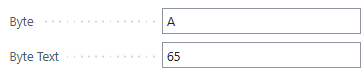
Interesting to note here is that they byte field, when used as a field value acts like an ASCII Character field. When the ToText() is called we get the integer value of the ASCII Character.
Boolean
BoolVal := true;
BoolText := BoolVal.ToText();

Date
DateVal := DT2Date(CurrentDateTime());
DateText := DateVal.ToText();

I found it interesting that the ToText() went with the two-digit expression of Month, Day, and Year.
The invariant formatted value:
DateVal := DT2Date(CurrentDateTime());
DateText := DateVal.ToText(true);

Time
TimeVal := DT2Time(CurrentDateTime());
TimeText := TimeVal.ToText();

The invariant formatted value:
TimeVal := DT2Time(CurrentDateTime());
TimeText := TimeVal.ToText(true);

Date Time
DateTimeVal := CurrentDateTime();
DateTimeText := DateTimeVal.ToText();

Similar to the Date field, we moved to explicit 2-digit expressions.
The invariant formatted value:
DateTimeVal := CurrentDateTime();
DateTimeText := DateTimeVal.ToText(true);

Duration
DateTime1 := CreateDateTime(19780206D, 080000T);
Datetime2 := CurrentDateTime();

DuratonVal := Datetime2 - DateTime1;
DuratonText := DuratonVal.ToText();

The invariant formatted value:
DateTime1 := CreateDateTime(19780206D, 080000T);
Datetime2 := CurrentDateTime();

DuratonVal := Datetime2 - DateTime1;
DuratonText := DuratonVal.ToText(true);

GUID
GuidVal := CreateGuid();
GuidText := GuidVal.ToText();

The GUID value drops the { and } when converting ToText().
Version
VersionVal := Version.Create(26,0,0,0);
VersionText := VersionVal.ToText();

I hope this help you decide if the ToText() method is right for your needs. I found several of the formatting outputs to be interesting. Let me know if the new ToText() is going to help you out, or if you are going to stick with the Format method.
Here is the source code to the page I created if you want to explore further in your own environment.
page 50000 ARD_ToTextExample
{
    ApplicationArea = All;
    Caption = 'To Text Example';
    PageType = Card;
    UsageCategory = Administration;

    layout
    {
        area(Content)
        {
            group(General)
            {
                Caption = 'General';

                field(BigIntVal; BigIntVal)
                {
                    ApplicationArea = All;
                    Caption = 'Big Integer';
                    ToolTip = 'BigIntVal';

                    trigger OnValidate()
                    begin
                        BigIntText := BigIntVal.ToText();
                    end;
                }
                field(BigIntText; BigIntText)
                {
                    ApplicationArea = All;
                    Caption = 'Big Integer Text';
                    ToolTip = 'BigIntText';
                    Editable = false;
                }
                field(BoolVal; BoolVal)
                {
                    ApplicationArea = All;
                    Caption = 'Boolean';
                    ToolTip = 'BoolVal';

                    trigger OnValidate()
                    begin
                        BoolText := BoolVal.ToText();
                    end;
                }
                field(BoolText; BoolText)
                {
                    ApplicationArea = All;
                    Caption = 'Boolean Text';
                    ToolTip = 'BoolText';
                    Editable = false;
                }
                field(ByteVal; ByteVal)
                {
                    ApplicationArea = All;
                    Caption = 'Byte';
                    ToolTip = 'ByteVal';

                    trigger OnValidate()
                    begin
                        ByteText := ByteVal.ToText();
                    end;
                }
                field(ByteText; ByteText)
                {
                    ApplicationArea = All;
                    Caption = 'Byte Text';
                    ToolTip = 'ByteText';
                    Editable = false;
                }
                field(DateVal; DateVal)
                {
                    ApplicationArea = All;
                    Caption = 'Date';
                    ToolTip = 'DateVal';
                    trigger OnValidate()
                    begin
                        DateText := DateVal.ToText();
                    end;
                }
                field(DateText; DateText)
                {
                    ApplicationArea = All;
                    Caption = 'Date Text';
                    ToolTip = 'DateText';
                    Editable = false;
                }
                field(DateTimeVal; DateTimeVal)
                {
                    ApplicationArea = All;
                    Caption = 'Date Time';
                    ToolTip = 'DateTimeVal';
                    trigger OnValidate()
                    begin
                        DateTimeText := DateTimeVal.ToText();
                    end;
                }
                field(DateTimeText; DateTimeText)
                {
                    ApplicationArea = All;
                    Caption = 'Date Time Text';
                    ToolTip = 'DateTimeText';
                    Editable = false;
                }
                field(DecimalVal; DecimalVal)
                {
                    ApplicationArea = All;
                    Caption = 'Decimal';
                    ToolTip = 'DecimalVal';
                    trigger OnValidate()
                    begin
                        DecimalText := DecimalVal.ToText();
                    end;
                }
                field(DecimalText; DecimalText)
                {
                    ApplicationArea = All;
                    Caption = 'Decimal Text';
                    ToolTip = 'DecimalText';
                    Editable = false;
                }
                field(DuratonVal; DuratonVal)
                {
                    ApplicationArea = All;
                    Caption = 'Duration';
                    ToolTip = 'DuratonVal';
                    Trigger OnValidate()
                    begin
                        DuratonText := DuratonVal.ToText();
                    end;
                }
                field(DuratonText; DuratonText)
                {
                    ApplicationArea = All;
                    Caption = 'Duration Text';
                    ToolTip = 'DuratonText';
                    Editable = false;
                }
                field(GuidVal; GuidVal)
                {
                    ApplicationArea = All;
                    Caption = 'GUID';
                    ToolTip = 'GuidVal';
                    trigger OnValidate()
                    begin
                        GuidText := GuidVal.ToText();
                    end;
                }
                field(GuidText; GuidText)
                {
                    ApplicationArea = All;
                    Caption = 'GUID Text';
                    ToolTip = 'GuidText';
                    Editable = false;
                }
                field(IntVal; IntVal)
                {
                    ApplicationArea = All;
                    Caption = 'Integer';
                    ToolTip = 'IntVal';
                    trigger OnValidate()
                    begin
                        IntText := IntVal.ToText();
                    end;
                }
                field(IntText; IntText)
                {
                    ApplicationArea = All;
                    Caption = 'Integer Text';
                    ToolTip = 'IntText';
                    Editable = false;
                }
                field(TimeVal; TimeVal)
                {
                    ApplicationArea = All;
                    Caption = 'Time';
                    ToolTip = 'TimeVal';

                    trigger OnValidate()
                    begin
                        TimeText := TimeVal.ToText();
                    end;
                }
                field(TimeText; TimeText)
                {
                    ApplicationArea = All;
                    Caption = 'Time Text';
                    ToolTip = 'TimeText';
                    Editable = false;
                }
                field(VersionText; VersionText)
                {
                    ApplicationArea = All;
                    Caption = 'Version Text';
                    ToolTip = 'VersionText';
                    Editable = false;
                }
            }
        }
    }

    var
        BigIntVal: BigInteger;
        BoolVal: Boolean;
        ByteVal: Byte;
        DateVal: Date;
        DateTimeVal: DateTime;
        DecimalVal: Decimal;
        DuratonVal: Duration;
        GuidVal: Guid;
        IntVal: Integer;
        TimeVal: Time;
        VersionVal: Version;

        BigIntText: Text;
        BoolText: Text;
        ByteText: Text;
        DateText: Text;
        DateTimeText: Text;
        DecimalText: Text;
        DuratonText: Text;
        GuidText: Text;
        IntText: Text;
        TimeText: Text;
        VersionText: Text;

    trigger OnOpenPage()
    var
        DateTime1: DateTime;
        DateTime2: DateTime;
    begin

        BigIntVal := 9223372036854775807L;
        BigIntText := BigIntVal.ToText();

        BoolVal := true;
        BoolText := BoolVal.ToText();

        ByteVal := 65;
        ByteText := ByteVal.ToText();

        DateVal := DT2Date(CurrentDateTime());
        DateText := DateVal.ToText(true);

        DateTimeVal := CurrentDateTime();
        DateTimeText := DateTimeVal.ToText(true);

        DecimalVal := 12345.6789;
        DecimalText := DecimalVal.ToText();


        DateTime1 := CreateDateTime(19780206D, 080000T);
        Datetime2 := CurrentDateTime();
        DuratonVal := Datetime2 - DateTime1;
        DuratonText := DuratonVal.ToText(true);

        GuidVal := CreateGuid();
        GuidText := GuidVal.ToText();

        IntVal := 1234567890;
        IntText := IntVal.ToText();

        TimeVal := DT2Time(CurrentDateTime());
        TimeText := TimeVal.ToText(true);

        VersionVal := Version.Create(26, 0, 0, 0);
        VersionText := VersionVal.ToText();
    end;
}




 Aardvark Labs
Leave a comment