

BC AL Journey #25
As you work with AI or anything else that deals with computer generated data likes APIs and other computer to computer data exchanges, we need a data structure that the computer understands. Business Central has the means to utilize JSON as a structure to handle this data communication.
JSON stands for JavaScript Object Notation. While we are not using JavaScript, the origin of the notation was the JavaScript development world. JSON is the data format used by REST and ODATA APIs.
REST APIs use JSON and are generally simpler, human readable, and leaner. SOAP APIs used XML and were more complex, had more rules, data validation methods and a lot more overhead. REST and JSON won API battle of the early 2000s. Cards on the table, I am a fan of SOAP/XML, then again, I had a Zune. That’s the history and where we are today.
When working with JSON the common elements are Values, Objects, and Arrays.
The Value is the simplest of the JSON elements. It is a name and a value.
"firstName":"Marcel"
Note the lower camel case for the name of the value. The name is always in quotes as are string values, numbers and Boolean do not require quotes.
An Object is really just a container, it allows us to group values and arrays together.
{
   "firstName":"Marcel",
   "lastName": "Chabot",
   "numberOfPets": 4
}
Here is an object with 2 string and 1 numeric values. Note the “{” and “}” denoting that this is an object. Also note the “,” between values.
An Array is a list of Objects or Values.
{
   "firstName":"Marcel",
   "lastName": "Chabot",
   "numberOfPets": 4,
   "petDetails": [
     {"type":"dog","name":"Anna","age":3},
     {"type":"dog","name":"Honor","age":9},
     {"type":"cat","name":"Leiah","age":9},
     {"type":"cat","name":"Moosh","age":12}
   ]
}
I’ve added petDetails is an array of objects. Note the “[” and “]” denoting the array. Each object in this array provides the type, name, and age of a pet.
Arrays can also be primitive data types as well. Here is a JSON array of prime numbers.
"primeNumbers":[2,3,5,7,11,13,17,19,23,29,31,37,41,43,47,53,59,61,67,71,73,79,83,89,97]
Now that we know the basic building blocks of a JSON dataset, we can take a look at what it takes to read and write JSON datasets with AL.
I’m going to create a series of tables and pages to handle our person and pet census data. We are going to focus on the file handling and JSON parsing components; all the code will be available in GitHub.
NOTE: This example depends on a rigid data structure for the JSON file. I am not including checks that the values exist or defaults when they don’t exist. This is a basic implementation, things can get more complicated, but let’s get the basics covered first.
We will do all the import work on the Pet Owners List Page. On the initial list page, we have an action to prompt for a file to import.
trigger OnAction()
var
    FileFilter: Text; // Defines the file filter for the upload dialog
    InStream: InStream; // Stream to read the uploaded file
    CurrentText: Text; // Temporary variable to hold the current line of text
    TextValue: TextBuilder; // TextBuilder to accumulate the file content
    FileText: Text; // Final text content of the uploaded file
begin
    // Set the file filter to allow all file types
    FileFilter := 'All Files (*.*)|*.*';

    // Open a dialog to upload a file and read its content into a stream
    if UploadIntoStream(FileFilter, InStream) then
        // Read the stream line by line until the end of the stream
        while InStream.EOS = false do
            // Append each line of text to the TextBuilder
            if InStream.ReadText(CurrentText) <> 0 then
                TextValue.AppendLine(CurrentText);

    // Convert the accumulated text into a single string
    FileText := TextValue.ToText();

    // Trim the text and pass it to the ParseJSON procedure for processing
    ParseJSON(FileText.Trim());
end;
We read the file line by line and build out a text variable using a TextBuilder object. In the end we have a variable named FileText containing all the JSON Text from within the file.
Now we can parse that text file as a JSON object.
procedure ParseJSON(FileText: Text)
var
    PetOwner: Record ARD_PetOwner; // Record for storing pet owner details
    Pet: Record ARD_Pet; // Record for storing pet details
    JsonToken: JsonToken; // Token used to iterate through JSON array
    JsonObject: JsonObject; // JSON object representing the root of the JSON structure
    JsonPetObject: JsonObject; // JSON object representing individual pet details
    JsonArray: JsonArray; // JSON array containing pet details
    FirstName: Text; // Variable to store the first name of the pet owner
    LastName: Text; // Variable to store the last name of the pet owner
    NumberOfPets: Integer; // Variable to store the number of pets
    PetType: Text; // Variable to store the type of the pet
    PetName: Text; // Variable to store the name of the pet
    PetAge: Integer; // Variable to store the age of the pet
begin
    // Read the text into a JSON Object and validate the format
    if JsonObject.ReadFrom(FileText) = false then
        Error('Invalid JSON format.');

    // Extract pet owner details from the JSON object
    FirstName := JsonObject.GetText('firstName');
    LastName := JsonObject.GetText('lastName');
    NumberOfPets := JsonObject.GetInteger('numberOfPets');

    // Initialize and insert a new record for the pet owner
    PetOwner.Init();
    PetOwner."ARD_No." := 0; // Auto-incremented field, set to 0 for new record
    PetOwner."ARD_FirstName" := CopyStr(FirstName, 1, 255); // Copy first name with max length 255
    PetOwner."ARD_LastName" := CopyStr(LastName, 1, 255); // Copy last name with max length 255
    PetOwner.ARD_NoOfPets := NumberOfPets; // Set the number of pets

    // Insert the pet owner record into the database
    if PetOwner.Insert() then begin
        // Extract the array of pet details from the JSON object
        JsonArray := JsonObject.GetArray('petDetails');
        foreach JsonToken in JsonArray do begin
            // Convert each token into a JSON object representing a pet
            JsonPetObject := JsonToken.AsObject();
            PetType := JsonPetObject.GetText('type'); // Extract pet type
            PetName := JsonPetObject.GetText('name'); // Extract pet name
            PetAge := JsonPetObject.GetInteger('age'); // Extract pet age

            // Initialize and insert a new record for the pet
            Pet.Init();
            Pet."ARD_No." := 0; // Auto-incremented field, set to 0 for new record
            Pet.ARD_OwnerNo := PetOwner."ARD_No."; // Link pet to the owner
            Pet.ARD_Type := CopyStr(PetType, 1, 50); // Copy pet type with max length 50
            Pet.ARD_Name := CopyStr(PetName, 1, 255); // Copy pet name with max length 255
            Pet.ARD_Age := PetAge; // Set pet age
            Pet.Insert(); // Insert the pet record into the database
        end;
    end;
end;
Line 17 takes the JSON Text and convert it into a JSON Object that we can work with in Business Central AL. Line 21-23 pull out the text and integer values for firstName, lastName, and numberOfPets. We then use those values to create a Pet Owner Record.
On line 35 we pull out the petDetails array of Objects into a JsonArray. We use a ForEach statement to walk through each JsonToken in the JsonArray. A JsonToken is what we use when we don’t know what the “thing” we are working with is. On line 38 we convert the JsonToken into a JsonObject and treat it much the same as we did earlier. We pull out the pet details, and insert a Pet record related to the Pet Owner record we created a moment ago.
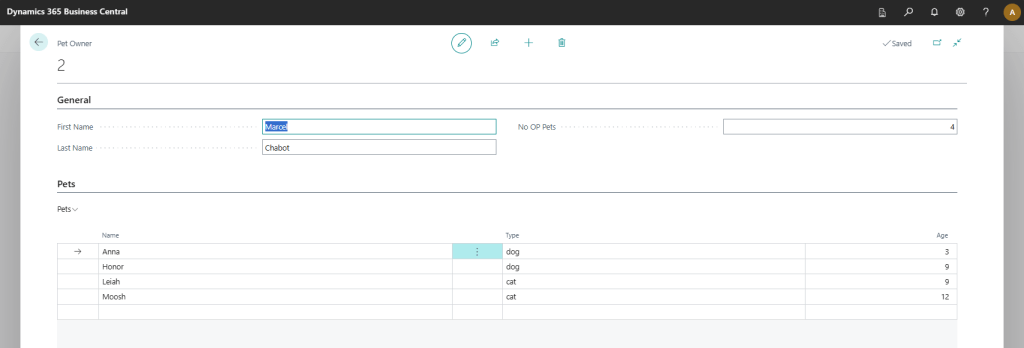
When we are done, we have a nice clean header/line style record of people and pets.
We can also go the other direction and take the data stored in a record set and generate JSON Text. Here is how we can create a JSON object from an existing record.
I’m going to add an action to the Pet Owner Card.
trigger OnAction()
var
    TempBLOB: Codeunit "Temp Blob"; // Temporary blob to store the JSON data
    JSONText: BigText; // BigText variable to hold the JSON text
    FileName: Text; // File name for the exported JSON file
    InStr: InStream; // Input stream for downloading the file
    OutStr: OutStream; // Output stream for writing the JSON data
begin
    // Generate the JSON text using the ExportPetOwner procedure
    JSONText.AddText(ExportPetOwner(Rec));

    // Construct the file name using the pet owner's first and last name
    FileName := 'PetOwner_' + Format(Rec.ARD_FirstName) + '_' + Format(Rec.ARD_LastName) + '.json';

    // Write the JSON text to the temporary blob
    TempBLOB.CreateOutStream(OutStr);
    JSONText.Write(OutStr);

    // Create an input stream from the temporary blob and download the file
    TempBLOB.CreateInStream(InStr);
    DownloadFromStream(Instr, '', '', '', FileName);
end;
}
This takes the return of our JSON text from an ExportPetOwner procedure and sends it to the web browser to download as a text file.
This is the ExportPetOwner procedure that generates the JSON Text.
procedure ExportPetOwner(var PetOwner: Record ARD_PetOwner): Text
var
    PetRec: Record ARD_Pet; // Record variable for accessing pet details
    FileText: Text; // Text variable to store the resulting JSON
    JsonObject: JsonObject; // JSON object to represent the pet owner data
    JsonPetObject: JsonObject; // JSON object to represent individual pet details
    JsonArray: JsonArray; // JSON array to hold the list of pets
begin
    // Add basic pet owner details to the JSON object
    JsonObject.add('firstName', PetOwner.ARD_FirstName);
    JsonObject.add('lastName', PetOwner.ARD_LastName);
    JsonObject.add('numberOfPets', PetOwner.ARD_NoOfPets);

    // Filter the pet records based on the owner number
    PetRec.SetFilter("ARD_OwnerNo", '%1', PetOwner."ARD_No.");
    if PetRec.FindSet() then begin
        repeat
            // Clear the JSON object for each pet and add pet details
            clear(JsonPetObject);
            JsonPetObject.Add('name', PetRec.ARD_Name);
            JsonPetObject.Add('type', PetRec.ARD_Type);
            JsonPetObject.Add('age', PetRec.ARD_Age);
            // Add the pet JSON object to the JSON array
            JsonArray.Add(JsonPetObject);
        until PetRec.Next() = 0;
        // Add the array of pet details to the main JSON object
        JsonObject.add('petDetails', JsonArray);
    end;

    // Write the JSON object to a text variable
    JsonObject.WriteTo(FileText);

    // Return the JSON text
    exit(FileText);
end;
This procedure is the exact opposite of the ParseJSON we created earlier. Line 10 starts adding our values to a JsonObject record. We then loop through the related Pet records starting on line 16. Each Pet record is another JsonObject record, which is added to the JsonArray on line 24. On line 27 the JsonArray is added to the JsonObject as petDetails. Lastly we write the JsonObject to the Text variable and return it for export.
Here it is in action.
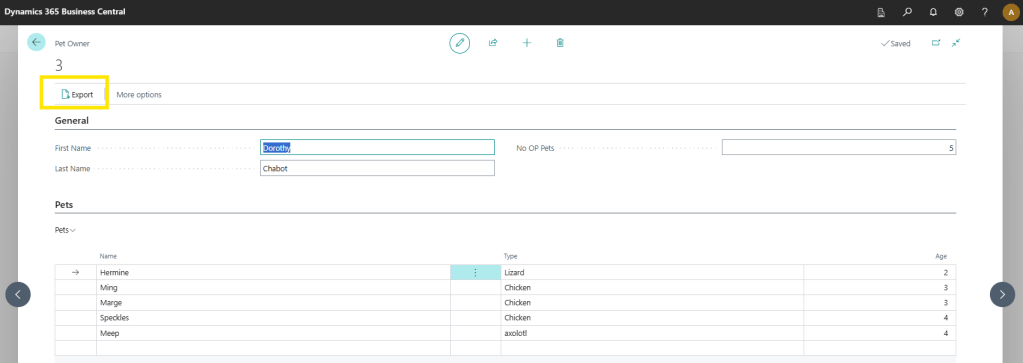
{
    "firstName": "Dorothy",
    "lastName": "Chabot",
    "numberOfPets": 5,
    "petDetails": [
        {"name": "Hermine","type": "Lizard","age": 2},
        {"name": "Ming","type": "Chicken","age": 3},
        {"name": "Marge","type": "Chicken","age": 3},
        {"name": "Speckles","type": "Chicken", "age": 4},
        {"name": "Meep","type": "axolotl","age": 4}
    ]
}
There you have it, a basic import/export process with JSON data files.
Working with JSON data is critically important as we progress into more complex AI and data integration systems. We will see these concepts come up over and over again. JSON provide an excellent means to transfer data into and out of Business Central where the consumer of that data is another computer system.
The entire project can be downloaded from GitHub.





Leave a comment