

If you have ever had to do address matching, you know the pain of matching addresses. All the different ways people can enter an address, rd, road, ln, lane, not to mention miss spellings! While we could implement a USPS CASS process to every address, we still may receive addresses from unmanaged sources. What we need is a way to match addresses using some kind of intelligence, an artificial intelligence.
I’ve tried a lot of different methods of Address Matching. One system incorporated USPS CASS with a Levenshtien Distance algorithm, a few open-source libraries and a lot of hard coded rules, and I was still only at a 70% accuracy.
The challenge I’m looking to specifically solve is that a lot of information can be associated with a Business Central Address record. Manually entering the address loses this additional data. Here is a standard Business Central Ship-To address:
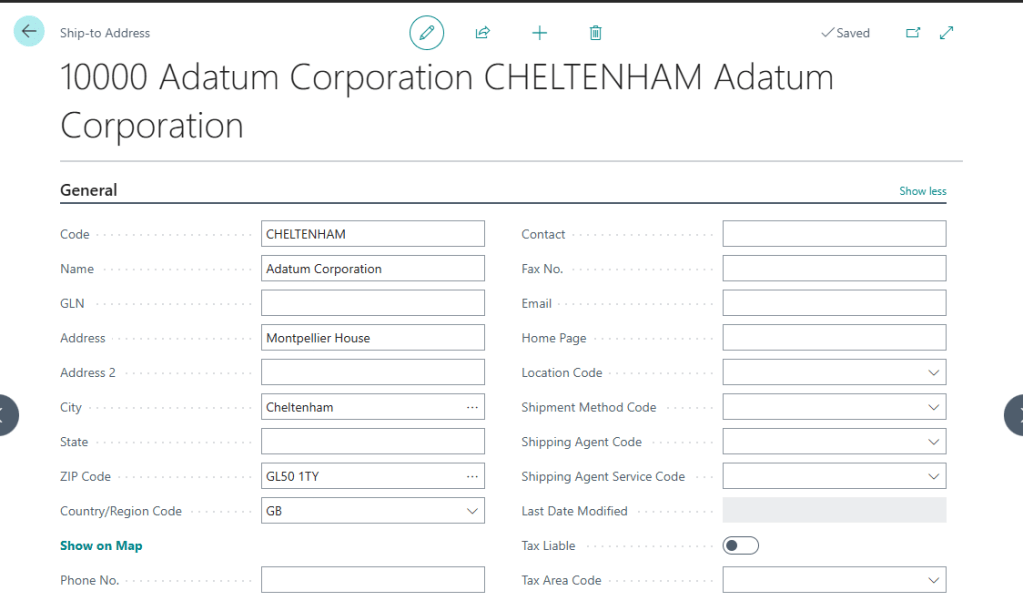
Many clients extend this data with salesperson or other regional details that are lost if we enter a free hand Ship-To address.
What I would like is a system that takes in an address and compares it to all the available addresses and returns the likelihood of a match. We can then replace the user entered address with the Business Central Address Code.
To solve this, we should take in the address from the user, then create a list of customer addresses and their Business Central Address Number. We can then feed this into a CoPilot/Azure OpenAI and ask it to tell us what the closes match is, as well as a percent certainty.
Before we get started, this will build on previous posts:
1. Integrating AI in Business Central: A Step-by-Step Guide
2. Creating Data Driven Text with AI in Business Central
3. Implementing a Multi-Step Process for AI Recommendations in Business Central
Take a moment to review those posts if you have not already.
This is a great time to send JSON data to Azure OpenAI. There really isn’t much for the user to do, we just want to see if a provided address is a match for an existing address related to the customer.
Here is an example of a Sales Quote to our good friends at Trey Research.
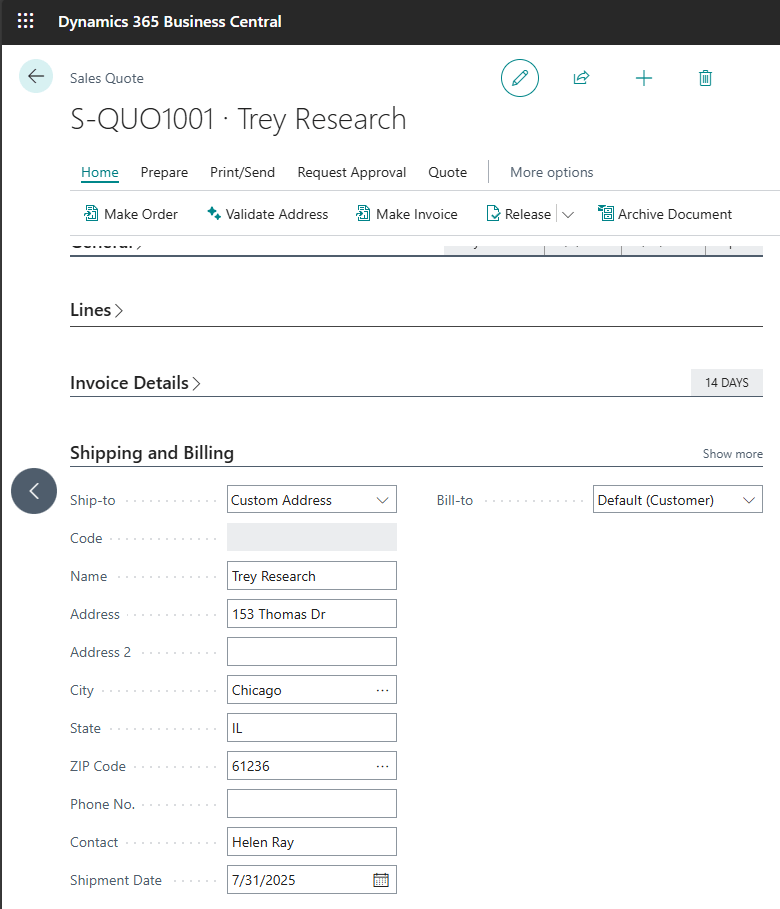
Someone has selected “Custom Address” and entered a complete address, but this one might be a match to a known address already in the system.
When we click the Validate Address button, we are presented with the CoPilot prompt dialog.
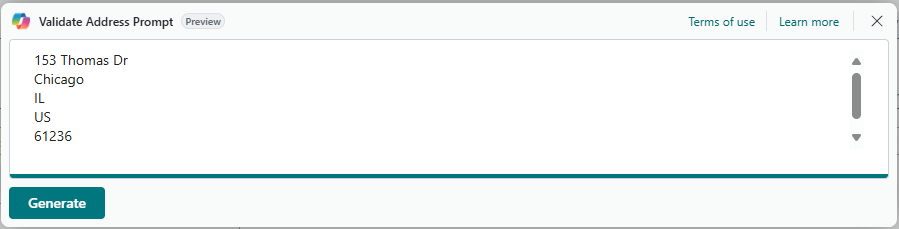
Everything gets interesting with we click the Generate button.
Here is the JSON Object we create to hold the user entered address as well as the other addresses we know about. As a human we can see that the user entered “address line 1” is almost identical to the Default Customer Sell-to address listed here as “Default”
{
    "addresses": [
        {
            "addressno": "user",
            "addressline1": "153 Thomas Dr",
            "addressline2": "",
            "city": "Chicago",
            "state": "IL",
            "country": "US",
            "postalcode": "61236"
        },
        {
            "addressno": "FLEET",
            "addressline1": "Beacon Hill Road",
            "addressline2": "",
            "city": "Fleet",
            "state": "",
            "country": "GB",
            "postalcode": "GU52 8DY"
        },
        {
            "addressno": "TWYCROSS",
            "addressline1": "Manor Park",
            "addressline2": "",
            "city": "Atherstone",
            "state": "",
            "country": "GB",
            "postalcode": "CV9 3QN"
        },
        {
            "addressno": "Default",
            "addressline1": "153 Thomas Drive",
            "addressline2": "",
            "city": "Chicago",
            "state": "IL",
            "country": "US",
            "postalcode": "61236"
        }
    ]
}
When we pass it through Azure OpenAI, what is the result, a value of 1 meaning 100% match to the default, just as we would have expected.
{
    "results": [
        {
            "addressno": "Default",
            "percentageMatch": 1
        },
        {
            "addressno": "FLEET",
            "percentageMatch": 0
        },
        {
            "addressno": "TWYCROSS",
            "percentageMatch": 0
        }
    ]
}
Let’s do something harder! Let’s give it two addresses one in Atlanta GA, and one in Atlanta TX.
{
    "addresses": [
        {
            "addressno": "user",
            "addressline1": "10 Deerfield Rd",
            "addressline2": "",
            "city": "Atlanta",
            "state": "Texas",
            "country": "US",
            "postalcode": "75551"
        },
        {
            "addressno": "Default",
            "addressline1": "10 Deerfield Road",
            "addressline2": "",
            "city": "Atlanta",
            "state": "GA",
            "country": "US",
            "postalcode": "31772"
        }
    ]
}
This should not generate a highly successful match. What does CoPilot have to say about it.
{
    "results": [
        {
            "addressno": "Default",
            "percentageMatch": 0.6
        }
    ]
}
That is a 60% match. I would like to see that driven lower, but it is below the point where I would accept it as a match, but high enough that I would flag it for validation. What is the likelihood that a company would have the same street address in two different states with the same city name?
From here, we could return the match value and address number that is the highest and do some AL Code to update the sourcing Quote document as needed. We have covered creating addresses in Business Central from AI in one of the previous examples I listed above.
At this point we have seen a lot of AI Code, and we know the secret sauce is the System Prompt. We need to provide clear instructions to the AI System. This is what I have used.
You are a professional postal worker.
A list of addresses will be provided, and your task is to find the address that best matches the address with addressno "user".
The matching criteria is based on the ability of the postal service to deliver mail to the user address.
Differences between abreviated and full forms of the address state should not be considered.
Differences between the abreviated and full forms of street desginations should not be considered.
Differences in the order of the address lines should not be considered.
Differences in states designations with matching postal codes should be considered highly not matching.
All the addresses will be in an JSON object with an array of JSON objects with the following fields:
addressno, addressline1, addressline2, city, state, country, postalCode.
The address with addressid = user will be the address provided by the user for which the best match is to be found.
You will return a JSON object named "results" with an array of JSON objects containing the addressno of each address in the array, except the address with addressno = user.
Each address in the array will have the following fields: addressno, percentageMatch.
The resultant JSON object should look like this:
{
    "results": [
        {
            "addressno": "address1",
            "percentageMatch": 0.95
        },
        {
            "addressno": "address2",
            "percentageMatch": 0.90
        }
    ]
}
The percentageMatch is a number between 0 and 1, where 1 is a perfect match and 0 is no match at all.
The address with the highest percentageMatch should be considered the best match.
The address with the highest percentageMatch should be returned first in the array.
This system prompt is getting a bit longer, and there is still quite a bit of tuning we can do. We are defining a lot of scope and rules. The amazing thing here is that we aren’t so much interested in a character-to-character match, but a match that MEANS the same location regardless of the text.
I hope this help you advance your AI tool set and help with any pesky address matching challenges you may have. Let me know if you have any questions or suggestions for challenges we might try to solve with CoPilot and Azure OpenAI.
The code is all available in GitHub.




 Aardvark Labs
Leave a reply to Using CoPilot to Upgrade Service Notes for Invoices in Business Central AL – Aardvark Labs Cancel reply