

Earlier in our Delimited File Import example we imported and parsed a simple file into Customer records. While useful, there are many cases where a Header and Line system is required, such as Sales Orders. We are going to use concepts from that earlier post, so please take a moment and review if needed.
There are two common structures for storing header and line data in a delimited file. I’m going to refer to them as Normalized and Denormalized, but I don’t want my database peeps to get too caught up in the definitions.
In the Normalized format we expect to see a header line, followed by the detail lines followed by another header line. There is some way to distinguish between the two data types. A Sales Order might look like this:
H|10000|3/1/2025|ORDERABC
D|1996-S|5|PCS
D|1896-S|10|PCS
H|40000|3/2/2025|ORDERZYX
D|1908-S|1|PCS
The H declare the line as a header line, and the values are Customer ID, Document Date and External Document Number. the D lines are the details, and they are Item Id, Quantity, and Unit of Measure Code.
The other common format, the Denormalized version would look like this:
10000|3/1/2025|ORDERABC|1996-S|5|PCS
10000|3/1/2025|ORDERABC|1896-S|10|PCS
40000|3/2/2025|ORDERZYX|1908-S|1|PCS
As we see in this format the headers and lines are merged into a single line. Reading this line, we can see the Customer ID, Documents Date, External Document Number, Item Id, Quantity, and Unit of Measure Code.
Now that we have our files defined, let’s get on with the parsing. Keeping with the best practices we defined earlier, we are going to parse into Staging tables. Previously we were able to use a single temporary table for our data, in this example we are going to need two tables, header and line, and we are going to go with persistent data as opposed to temporary. For sales and purchase documents I like to keep a longer-term record of the results.
Here is my staging header ARDSalesHeader.Table.al.
table 50004 ARD_SalesHeader
{
    Caption = 'Delimited Sales Header';
    DataClassification = CustomerContent;

    fields
    {
        field(1; "ARD_No."; Integer)
        {
            Caption = 'No.';
            ToolTip = 'Unique identifier for the sales header.';
            AutoIncrement = true;
        }
        field(2; "ARD_CustomerNo."; Text[20])
        {
            Caption = 'Customer No.';
            ToolTip = 'Unique identifier for the customer.';
        }
        field(3; ARD_DocumentDate; Date)
        {
            Caption = 'Document Date';
            ToolTip = 'Date of the document.';
        }
        field(4; "ARD_ExtDocNo."; Text[100])
        {
            Caption = 'Ext Doc No.';
            ToolTip = 'External document number.';
        }
        field(5; "ARD_SalesHeaderNo."; Code[20])
        {
            Caption = 'Sales Header No.';
            ToolTip = 'Unique identifier for the sales header.';
            TableRelation = "Sales Header"."No.";
        }
    }
    keys
    {
        key(PK; "ARD_No.")
        {
            Clustered = true;
        }
    }
}
The Details are stored in ARDSalesDetail.Table.al
table 50005 ARD_SalesDetail
{
    Caption = 'Delimited Sales Detail';
    DataClassification = CustomerContent;

    fields
    {
        field(1; "ARD_No."; Integer)
        {
            Caption = 'No.';
            ToolTip = 'Unique identifier for the sales detail.';
        }
        field(2; "ARD_HeaderNo."; Integer)
        {
            Caption = 'Header No.';
            ToolTip = 'Unique identifier for the sales header.';
            TableRelation = ARD_SalesHeader."ARD_No.";
        }
        field(3; "ARD_ItemNo."; Text[20])
        {
            Caption = 'Item No.';
            ToolTip = 'Unique identifier for the item.';
        }
        field(4; ARD_Quantity; Decimal)
        {
            Caption = 'Quantity';
            ToolTip = 'Quantity of the item.';
        }
        field(5; ARD_UoM; Text[20])
        {
            Caption = 'UoM';
            ToolTip = 'Unit of Measure.';
        }
        field(6; ARD_SalesLineNo; Integer)
        {
            Caption = 'Sales Line No.';
            ToolTip = 'Unique identifier for the sales line.';
        }
    }
    keys
    {
        key(PK; "ARD_No.", "ARD_HeaderNo.")
        {
            Clustered = true;
        }
    }
}
Nothing special in the tables.
I’m going to create a single page for both parsing examples with different actions and procedures. While the data looks drastically different, the processes are very similar.
We will be doing all the parsing in the ARDSalesImport.Page.al page.
Parsing Normalized Delimited Data
We are going to start with an Action to capture the import text. This is exactly the same as we had in our previous single record type example, except for the final procedure call.
action(ImportNormalized)
{
    ApplicationArea = All;
    Caption = 'Import Normalized';
    ToolTip = 'Import normalized sales data.';
    Image = Import;
    trigger OnAction()
    var
        FileFilter: Text; // Defines the file filter for the upload dialog
        InStream: InStream; // Stream to read the uploaded file
        CurrentText: Text; // Temporary variable to hold the current line of text
        TextValue: TextBuilder; // TextBuilder to accumulate the file content
    begin
        // Set the file filter to allow all file types
        FileFilter := 'All Files (*.txt)|*.txt';

        // Open a dialog to upload a file and read its content into a stream
        if UploadIntoStream(FileFilter, InStream) then
            // Read the stream line by line until the end of the stream
            while InStream.EOS = false do
                // Append each line of text to the TextBuilder
                if InStream.ReadText(CurrentText) <> 0 then
                    TextValue.AppendLine(CurrentText);

        // Convert the accumulated text into a single string
        ImportText := TextValue.ToText();
        // Parse the customer data from the imported text
        ParseNormalizedSalesData(ImportText);
    end;
}
We can see in the end we send the text into a Parse Normalized Sales Data procedure.
procedure ParseNormalizedSalesData(SalesTextText: Text)
var
    SalesHeader: Record "ARD_SalesHeader";
    SalesDetail: Record "ARD_SalesDetail";
    Lines: List of [Text];
    Line: Text;
    LineDetails: List of [Text];
    tempDate: Date;
    tempDecimal: Decimal;
    CRLF: Char;
    CurrentHeaderId: Integer;
begin
    CRLF := 10; // Define the line break character

    // Split the imported text into lines
    Lines := SalesTextText.Split(CRLF);

    // Process each line
    foreach Line in Lines do begin
        if StrLen(Line.Trim()) < 1 then
            continue; // Skip empty lines

        LineDetails := Line.Split('|'); // Split line into fields by delimiter

        // Check if the line is a header line
        if LineDetails.Get(1).ToLower() = 'h' then begin
            SalesHeader."ARD_No." := 0; // Initialize header record
            SalesHeader."ARD_CustomerNo." := CopyStr(LineDetails.Get(2), 1, 20); // Set customer number
            if Evaluate(tempDate, LineDetails.Get(3)) then
                SalesHeader.ARD_DocumentDate := tempDate; // Set document date
            SalesHeader."ARD_ExtDocNo." := CopyStr(LineDetails.Get(4), 1, 100); // Set external document number
            SalesHeader.Insert(); // Insert header record
            CurrentHeaderId := SalesHeader."ARD_No."; // Store header ID for details
        end else begin
            SalesDetail."ARD_No." := 0; // Initialize detail record
            SalesDetail."ARD_HeaderNo." := CurrentHeaderId; // Link to header
            SalesDetail."ARD_ItemNo." := CopyStr(LineDetails.Get(2), 1, 20); // Set item number
            if Evaluate(tempDecimal, LineDetails.Get(3)) then
                SalesDetail.ARD_Quantity := tempDecimal; // Set quantity
            SalesDetail.ARD_UoM := CopyStr(LineDetails.Get(4), 1, 10); // Set unit of measure
            SalesDetail.Insert(); // Insert detail record
        end;
    end;
end;
We can see on line 6 we identified if we are on a header or detail line by checking for an “h” character. If we are a header, we create a new header record and on line 33 we keep track of the ID for that header.
If the line is not a header, then it must be a detail, we parse out the details and assign it the header id from the previously created header. This allows us to create the details lines associated to the header just like our target sales header and sales lines will be.
It is important to note that I don’t have any data validation in this example. If the file is corrupted and there is no first header line, then things all fall apart.
Parsing Denormalized Delimited Data
We are going to start with an Action to capture the import text. This is exactly the same as we had in our previous example, except for the final procedure call. (Am I having DeJa’Vu?)
action(ImportDenormalized)
{
    ApplicationArea = All;
    Caption = 'Import Denormalized';
    ToolTip = 'Import denormalized sales data.';
    Image = Import;
    trigger OnAction()
    var
        FileFilter: Text; // Defines the file filter for the upload dialog
        InStream: InStream; // Stream to read the uploaded file
        CurrentText: Text; // Temporary variable to hold the current line of text
        TextValue: TextBuilder; // TextBuilder to accumulate the file content
    begin
        // Set the file filter to allow all file types
        FileFilter := 'All Files (*.txt)|*.txt';

        // Open a dialog to upload a file and read its content into a stream
        if UploadIntoStream(FileFilter, InStream) then
            // Read the stream line by line until the end of the stream
            while InStream.EOS = false do
                // Append each line of text to the TextBuilder
                if InStream.ReadText(CurrentText) <> 0 then
                    TextValue.AppendLine(CurrentText);

        // Convert the accumulated text into a single string
        ImportText := TextValue.ToText();
        // Parse the customer data from the imported text
        ParseDenormalizedSalesData(ImportText);
    end;
}
We can see in the end we send the text into a Parse Denormalized Sales Data procedure.
procedure ParseDenormalizedSalesData(SalesTextText: Text)
var
    SalesHeader: Record "ARD_SalesHeader";
    SalesDetail: Record "ARD_SalesDetail";
    Lines: List of [Text];
    Line: Text;
    LineDetails: List of [Text];
    tempDate: Date;
    tempDecimal: Decimal;
    CRLF: Char;
    CurrentHeaderId: Integer;
    CurrentExternalDocumentNo: Text[100];
    LastExternalDocumentNo: Text[100];
begin
    LastExternalDocumentNo := ''; // Initialize last external document number

    CRLF := 10; // Define the line break character

    // Split the imported text into lines
    Lines := SalesTextText.Split(CRLF);

    // Process each line
    foreach Line in Lines do begin
        if StrLen(Line.Trim()) < 1 then
            continue; // Skip empty lines

        LineDetails := Line.Split('|'); // Split line into fields by delimiter
        CurrentExternalDocumentNo := CopyStr(LineDetails.Get(3), 1, 100); // Get current external document number

        // If the external document number changes, create a new header
        if LastExternalDocumentNo <> CurrentExternalDocumentNo then begin
            SalesHeader."ARD_No." := 0; // Initialize header record
            SalesHeader."ARD_CustomerNo." := CopyStr(LineDetails.Get(1), 1, 20); // Set customer number
            // Set document date if valid
            if Evaluate(tempDate, LineDetails.Get(2)) then
                SalesHeader.ARD_DocumentDate := tempDate;
            SalesHeader."ARD_ExtDocNo." := CopyStr(LineDetails.Get(3), 1, 100); // Set external document number
            SalesHeader.Insert(); // Insert header record
            LastExternalDocumentNo := CurrentExternalDocumentNo; // Update last external document number
            CurrentHeaderId := SalesHeader."ARD_No."; // Store header ID for details
        end;

        SalesDetail."ARD_No." := 0; // Initialize detail record
        SalesDetail."ARD_HeaderNo." := CurrentHeaderId; // Link to header
        SalesDetail."ARD_ItemNo." := CopyStr(LineDetails.Get(4), 1, 20); // Set item number
                                                                            // Set quantity if valid
        if Evaluate(tempDecimal, LineDetails.Get(5)) then
            SalesDetail.ARD_Quantity := tempDecimal;
        SalesDetail.ARD_UoM := CopyStr(LineDetails.Get(6), 1, 10); // Set unit of measure
        SalesDetail.Insert(); // Insert detail record
    end;
end;
When dealing with a denormalized structure we must have something to anchor us. In this case the External Document Number will be our identifier. Every time the External Document Number changes, we need to create a new header.
We track this with the CurrentExternalDocumentNo and LastExternalDocumentNo variables. On line 28 we capture the current lines external document number as the CurrentExternalDocumentNo. We compare the current and last on line 31. We capture and store the LastExternalDocumentNo on line 39.
Lines 43 – 50 create the details lines. One important difference between the normalized and denormalized methods is that the normalized method creates either a header or a detail line, the denormalized might create a new header, but it always created a detail line.
There is an important assumption made here, the lines are grouped by their External Document Number. If the list was unordered, then we would need to perform additional validations and lookups to manage the header/detail association. I’ve never seen this in the wild, but who knows what evil lurks out there.
Pages and Outputs
I created a few pages to support this process. I’ll link to the GitHub sources for each with their screenshot and purpose.
This page supports the user interaction to manage the import with the Actions and Procedures we created to do all the work.
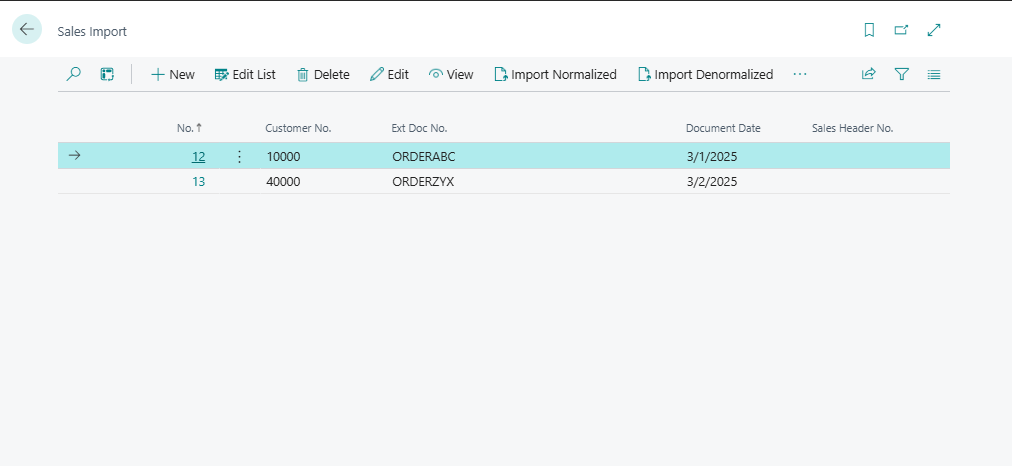
This is a detail view of the Sales Import with the lines for data review.
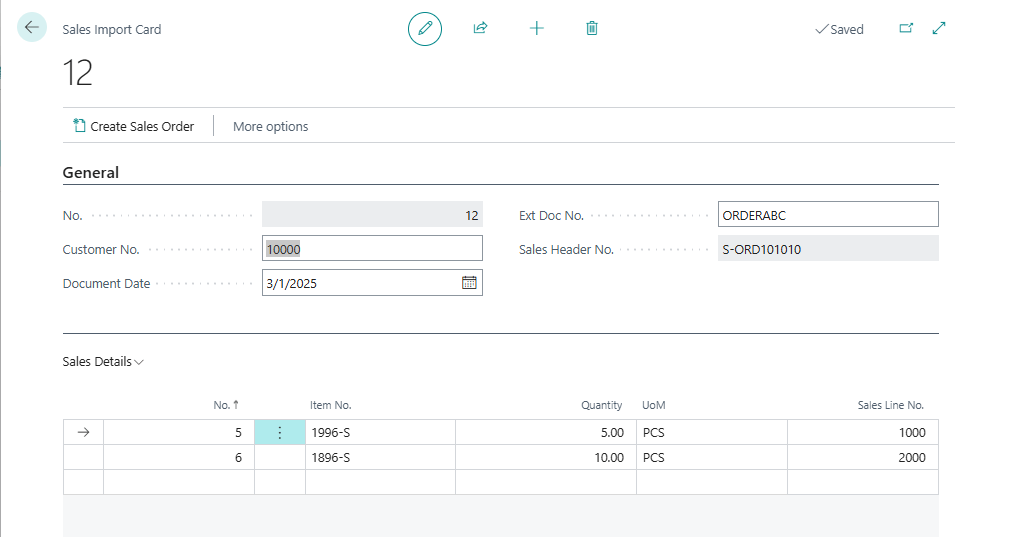
This is the list part shown in the Sales Import Card.

I’ve added a procedure to create a Sales Order record from the imported data. Note the Create Sales Order Button. Here is the procedure code, I created it in the ARDSalesHeader.Table.al as the code is the same regardless of which routine populated the table.
procedure CreateSalesOrder()
var
    SalesHeader: Record "Sales Header";
    SalesLine: Record "Sales Line";
    SalesDetail: Record ARD_SalesDetail;
    LineNo: Integer;
begin
    // Set Sales Header fields for a new sales order
    SalesHeader."Document Type" := Enum::"Sales Document Type"::Order;
    SalesHeader.InitInsert();
    SalesHeader.validate("Sell-to Customer No.", Rec."ARD_CustomerNo.");
    SalesHeader.validate("External Document No.", Rec."ARD_ExtDocNo.");
    SalesHeader.Validate("Document Date", Rec.ARD_DocumentDate);
    SalesHeader.Validate("Posting Date", Rec.ARD_DocumentDate);

    // Insert the Sales Header record
    if SalesHeader.Insert() then begin
        // Store the created Sales Header No. in the current record
        Rec."ARD_SalesHeaderNo." := SalesHeader."No.";

        // Filter Sales Detail lines for the current header
        SalesDetail.SetFilter("ARD_HeaderNo.", '%1', Rec."ARD_No.");
        LineNo := 1;

        // Loop through all Sales Detail lines and create Sales Lines
        if SalesDetail.findset() then
            repeat
                SalesLine.Init();
                SalesLine."Document Type" := Enum::"Sales Document Type"::Order;
                SalesLine."Document No." := SalesHeader."No.";
                SalesLine.Type := Enum::"Sales Line Type"::Item;
                SalesLine."Line No." := LineNo * 10000;
                SalesLine.Validate("No.", SalesDetail."ARD_ItemNo.");
                SalesLine.Validate(Quantity, SalesDetail.ARD_Quantity);
                SalesLine.Validate("Unit of Measure Code", SalesDetail.ARD_UoM);

                // Insert the Sales Line record
                if SalesLine.Insert() then begin
                    LineNo := LineNo + 1;
                    // Store the created Sales Line No. in the Sales Detail record
                    SalesDetail.ARD_SalesLineNo := SalesLine."Line No.";
                    SalesDetail.Modify();
                end;
            until SalesDetail.Next() = 0;
    end;
end;
Here is the resultant document:

As before, the creation of the sales document from the imported data could use a significant amount of validation. Does the customer exist? Do the Items exist? Do the items support the imported Unit of Measure? These are all checks that could be run and reported back on the Sales Import Card for the user to correct.
I hope this walk through provided you with some tools to help you handle header/detail text file imports. What kind of files have you seen in the wild. If you have any questions, please feel free to comment below.
The GitHub source for the all the file import examples can be found here: AardvarkMan/BC-File-Import-Examples: File Import and Parsing Examples for Business Central.





 Aardvark Labs
Leave a comment