

The use case for this AI Example is a client with a service team is creating invoices in Business Central. As a part of the service the technician enters notes about the services performed. The problem is that the notes are less than sufficient for a customer facing document. What we need is some means to take the service technician notes and “upgrade” them to something we can send to a client. Also, there are 100’s of these per day.
Sound like a perfect use case for CoPilot.
We are going to be building off the work we did earlier. If you have not already, you may want to review these posts.
Let’s define the Use Case for this application.
Use Case
Allow a Sales Invoice to include an indeterminate amount of comment lines. These lines are to be visible on the Sales Invoice card to be created, edited, and deleted.
Implement a CoPilot interface to accept the lines and extrapolate one or more sentences describing the task. The resultant sentences should be client facing and compiled into a single text output. This output should be stored for use in reporting and customer communication.
Implementation
- Create a Table to store the Resolution Notes from the Service Technician
- ID
- Sales Header No.
- Note up to 2048 characters
- Service Note Page Part
- Extend the Sales Header record to include the Result Text BLOB.
- Embed the Page Part on the Sales Invoice Card
- Display the Resultant Text on the Sales Invoice Card
Test Plan
- Enter several service notes
- Run the CoPilot process
- Review the resultant customer facing text
That sounds like a solid start. Let’s get some code written!
The resolution notes table is rather straight forward.
table 50001 ARD_ResolutionNotes
{
    Caption = 'Resolution Notes';
    DataClassification = CustomerContent;

    fields
    {
        field(1; "ARD_No."; Integer)
        {
            Caption = 'No.';
            ToolTip = 'Unique identifier for the Resolution Note.';
            AutoIncrement = true;
        }
        field(2; "ARD_SalesHeaderNo."; Code[20])
        {
            Caption = 'Sales Header No.';
            ToolTip = 'Unique identifier for the Sales Header.';
        }
        field(3; ARD_Note; Text[2048])
        {
            Caption = 'Note';
            ToolTip = 'Detailed description of the Resolution Note.';
        }
    }
    keys
    {
        key(PK; "ARD_No.", "ARD_SalesHeaderNo.")
        {
            Clustered = true;
        }
    }
}
We need only keep track of the record number, sales header number, and the note text. We use the record number and sales header number as the primary key. This is all setup to be embedded in a sales document as a list part.
The Sales Header Extension is also not very noteworthy.
tableextension 50000 ARD_SalesHeader extends "Sales Header"
{
    fields
    {
        field(50000; ARD_ResolutionNote; Blob)
        {
            Caption = 'Resolution Note';
            DataClassification = CustomerContent;
            ToolTip = 'Attach a resolution note to the sales order.';
        }
    }
}
We are even using the same CoPilot process we have before. What we know is that the real magic is in the prompt.
ARDCopilotResolutionSummary.Codeunit.AL
codeunit 50006 ARD_CopilotResolutionSummary
{
    trigger OnRun()
    begin
        GenerateInvoiceProposal();
    end;

    /// <summary>
    /// Sets the user prompt to be used for generating the resolution note.
    /// </summary>
    /// <param name="InputUserPrompt">The text input provided by the user.</param>
    /// <param name="CustomerName">The name of the customer.</param>
    procedure SetUserPrompt(InputUserPrompt: Text; CustomerName: Text)
    var
        UserPromptBuilder: TextBuilder;
    begin
        if InputUserPrompt <> '' then UserPromptBuilder.AppendLine(InputUserPrompt);
        UserPromptBuilder.AppendLine('Customer Name: ' + CustomerName);
        UserPrompt := UserPromptBuilder.ToText();
    end;

    /// <summary>
    /// Retrieves the completion result generated from the chat process.
    /// </summary>
    /// <returns>
    /// A text value representing the completion result.
    /// </returns>
    internal procedure GetCompletionResult(): Text
    begin
        exit(CompletionResult);
    end;

    /// <summary>
    /// Generates the resolution note by processing a user prompt and invoking the Chat procedure.
    /// The response is expected to be in text format and is stored in CompletionResult.
    /// </summary>
    /// <remarks>
    /// This method uses a chat function to generate a response based on a system prompt and user input.
    /// </remarks>
    /// <param name="GetSystemPrompt">A function that provides the system prompt for the chat.</param>
    /// <param name="UserPrompt">The user-provided input for generating the resolution note.</param>
    /// <returns>
    /// A formatted resolution note if available in the response, or a default message indicating no formatted resolution note was found.
    /// </returns>
    local procedure GenerateInvoiceProposal()
    var
    begin
        CompletionResult := '';
        CompletionResult := Chat(GetSystemPrompt(), UserPrompt);
    end;

    /// <summary>
    /// The Chat procedure interacts with Azure OpenAI to generate a chat completion based on the provided system and user prompts.
    /// It uses various helper codeunits to configure and manage the interaction, including setting up authorization,
    /// configuring chat parameters, and handling responses.
    /// </summary>
    /// <param name="ChatSystemPrompt">The system prompt to guide the chat completion.</param>
    /// <param name="ChatUserPrompt">The user prompt to provide input for the chat completion.</param>
    /// <returns>
    /// A text result containing the response generated by Azure OpenAI.
    /// If the operation fails, an error is raised with the corresponding error message.
    /// </returns>
    procedure Chat(ChatSystemPrompt: Text; ChatUserPrompt: Text): Text
    var
        AzureOpenAI: Codeunit "Azure OpenAI";
        EnvironmentInformation: Codeunit "Environment Information";
        AOAIOperationResponse: Codeunit "AOAI Operation Response";
        AOAIChatCompletionParams: Codeunit "AOAI Chat Completion Params";
        AOAIChatMessages: Codeunit "AOAI Chat Messages";
        AOAIDeployments: Codeunit "AOAI Deployments";
        IsolatedStorageWrapper: Codeunit ARD_IsolatedStorageWrapper;
        Result: Text;
        EntityTextModuleInfo: ModuleInfo;
    begin
        // Set up Azure OpenAI authorization using isolated storage values
        AzureOpenAI.SetManagedResourceAuthorization(Enum::"AOAI Model Type"::"Chat Completions", IsolatedStorageWrapper.GetAOAIAccountName(), IsolatedStorageWrapper.GetSecretKey(), AoaiDeployments.GetGPT41Latest());

        // Set the Copilot capability for customer detail processing
        AzureOpenAI.SetCopilotCapability(Enum::"Copilot Capability"::"Customer Detail");

        // Configure chat completion parameters
        AOAIChatCompletionParams.SetMaxTokens(2500); // Set maximum tokens for the response
        AOAIChatCompletionParams.SetTemperature(0.7); // Set temperature for deterministic responses
        AOAIChatCompletionParams.SetJsonMode(false); // Enable JSON mode for structured responses

        // Add system and user messages to the chat
        AOAIChatMessages.AddSystemMessage(ChatSystemPrompt); // Add the system prompt
        AOAIChatMessages.AddUserMessage(ChatUserPrompt); // Add the user prompt

        // Generate the chat completion using Azure OpenAI
        AzureOpenAI.GenerateChatCompletion(AOAIChatMessages, AOAIChatCompletionParams, AOAIOperationResponse);

        // Check if the operation was successful and return the result
        if AOAIOperationResponse.IsSuccess() then
            Result := AOAIChatMessages.GetLastMessage() // Retrieve the last message from the chat
        else
            Error(AOAIOperationResponse.GetError()); // Handle errors by raising an error with the response message

        exit(Result); // Return the result of the chat completion
    end;

    // Local procedure to provide the system prompt for the chat completion
    local procedure GetSystemPrompt() SystemPrompt: Text
    begin
        // Define the system prompt that instructs the AI on how to process the user's input
        SystemPrompt := @'You are a service manager tasked with communicating with the customer regarding their service invoice.
        You will be provided with details about the services performed by a technician, including the tasks completed, parts used, and the total cost of the service.
        Your goal is to create a clear and concise summary of the service provided, highlighting the key points that the customer should be aware of.
        The returned summary should be professional and easy to understand, avoiding technical jargon where possible.
        The response must be formatted in as HTML.';
    end;

    var
        UserPrompt: Text;
        CompletionResult: Text;
}
Let’s pull the prompt out so we can poke at it a little deeper.
SystemPrompt := @'You are a service manager tasked with communicating with the customer regarding their service invoice.
        You will be provided with details about the services performed by a technician, including the tasks completed, parts used, and the total cost of the service.
        Your goal is to create a clear and concise summary of the service provided, highlighting the key points that the customer should be aware of.
        The returned summary should be professional and easy to understand, avoiding technical jargon where possible.
        The response must be formatted in as HTML.'
The prompt is specifying a role as a service manager and a scope that they are communicating with customers regarding an invoice. We are setting a goal of providing a concise summary of the data and focusing on key points. We also state that it should be professional, easy to understand and avoid jargon. The last bit is that the response must be formatted in HTML so that it appears correctly in the Rich Text box we are using.
The List Part displays the technician notes, and allows for additions, edits, and deletes. We add an action to the Prompting area to bring up the Prompt. Before displaying the prompt, we send the notes to the prompt dialog for a final review. Lastly the results are saved into the BLOB we created on the Sales Header.
page 50006 ARD_ResolutionNotes
{
    ApplicationArea = All;
    Caption = 'Resolution Notes';
    PageType = ListPart;
    SourceTable = ARD_ResolutionNotes;

    layout
    {
        area(Content)
        {
            repeater(General)
            {
                field(ARD_Note; Rec.ARD_Note)
                {
                }
            }
        }
    }
    actions
    {
        area(Prompting)
        {
            action(GenerateNote)
            {
                ApplicationArea = All;
                Caption = 'Generate Note';
                ToolTip = 'Generate a resolution note using Dynamics 365 Copilot.';
                Image = Sparkle;

                trigger OnAction()
                var
                    Notes: Record ARD_ResolutionNotes;
                    SalesHeader: Record "Sales Header";
                    CopilotResolutionSummary: Codeunit ARD_CopilotResolutionSummary;
                    ResolutionNotePrompt: Page ARD_ResolutionNotesPrompt;
                    NoteText: Text;
                    oStream: OutStream;
                begin
                    // Find the related Sales Header record using the Sales Header No. from the Resolution Notes
                    if SalesHeader.Get(Enum::"Sales Document Type"::Invoice, Rec."ARD_SalesHeaderNo.") then begin
                        Notes.SetRange("ARD_SalesHeaderNo.", Rec."ARD_SalesHeaderNo.");
                        if Notes.FindSet() then
                            repeat
                                ResolutionNotePrompt.AddNotes(Notes.ARD_Note);
                            until Notes.Next() = 0;

                        ResolutionNotePrompt.SetCustomer(SalesHeader."Bill-to Customer No.");

                        // Show the resolution note prompt to the user
                        if ResolutionNotePrompt.RunModal() = Action::OK then begin
                            // If the user confirmed, generate the resolution note
                            NoteText := ResolutionNotePrompt.GetResult();
                            // The note is likely to be larger than 2048 characters, so we use a stream to write it to a BLOB field
                            SalesHeader.ARD_ResolutionNote.CreateOutStream(oStream, TextEncoding::UTF16);
                            oStream.WriteText(NoteText, StrLen(NoteText));
                            SalesHeader.Modify();
                        end;
                    end;
                end;
            }
        }
    }
}
Here is the Prompt Dialog.
ARDResolutionNotesPrompt.Page.AL
page 50007 ARD_ResolutionNotesPrompt
{
    ApplicationArea = All;
    Caption = 'Resolution Prompt';
    PageType = PromptDialog;
    IsPreview = true;
    Extensible = false;
    PromptMode = Generate;

    layout
    {
        area(prompt)
        {
            field(ChatRequest; ChatRequest)
            {
                ShowCaption = false;
                MultiLine = true;
                ApplicationArea = All;
                InstructionalText = 'Provide any additional details.';

                trigger OnValidate()
                begin
                    CurrPage.Update();
                end;
            }
        }
        area(Content)
        {
            field(ReminderText; ResolutionText)
            {
                Caption = 'Resolution Text';
                ApplicationArea = All;
                ToolTip = 'The generated resolution text.';
                ShowCaption = false;
                MultiLine = true;
                Editable = false;
                ExtendedDatatype = RichContent;
            }
        }
    }

    actions
    {
        area(SystemActions)
        {
            // You can have custom behaviour for the main system actions in a PromptDialog page, such as generating a suggestion with copilot, regenerate, or discard the
            // suggestion. When you develop a Copilot feature, remember: the user should always be in control (the user must confirm anything Copilot suggests before any
            // change is saved).
            // This is also the reason why you cannot have a physical SourceTable in a PromptDialog page (you either use a temporary table, or no table).
            systemaction(Generate)
            {
                Caption = 'Generate';
                ToolTip = 'Generate Item Substitutions proposal with Dynamics 365 Copilot.';

                trigger OnAction()
                begin
                    RunGeneration();
                end;
            }
            systemaction(OK)
            {
                Caption = 'Confirm';
                ToolTip = 'Add selected Items to Substitutions.';
            }
            systemaction(Cancel)
            {
                Caption = 'Discard';
                ToolTip = 'Discard Items proposed by Dynamics 365 Copilot.';
            }
            systemaction(Regenerate)
            {
                Caption = 'Regenerate';
                ToolTip = 'Regenerate Item Substitutions proposal with Dynamics 365 Copilot.';
                trigger OnAction()
                begin
                    RunGeneration();
                end;
            }
        }
    }

    var
        GenerateResolutionText: Codeunit ARD_CopilotResolutionSummary;
        ChatRequest: Text;
        ResolutionText: Text;
        CustomerNo: Code[20];
        NotesBuilder: TextBuilder;

    /// <summary>
    /// Executes the address generation process by interacting with the GenerateAddress object.
    /// Updates the page caption, sets the user prompt, and attempts to generate an address
    /// up to a maximum of 5 times. If successful, displays the result; otherwise, shows an error message.
    /// </summary>
    /// <remarks>
    /// The procedure uses a loop to retry the address generation process if the result is empty.
    /// It ensures that the process does not exceed 5 attempts to prevent infinite loops.
    /// </remarks>
    /// <exception cref="Error">
    /// Throws an error if the maximum number of attempts is reached without a successful result.
    /// </exception>
    local procedure RunGeneration()
    var
        InStr: InStream;
        Attempts: Integer;
        CustomerRec: Record Customer;
        CustomerLedgerEntry: Record "Cust. Ledger Entry";
        LastDocDate: Date;
    begin
        if CustomerNo = '' then
            Error('No Customer selected. Please select a Customer before generating a resolution note.');
        if not CustomerRec.Get(CustomerNo) then
            Error('Customer %1 not found.', CustomerNo);

        GenerateResolutionText.SetUserPrompt(ChatRequest, CustomerRec.Contact);
        ResolutionText := '';
        Attempts := 0;
        while (StrLen(ResolutionText) = 0) AND (Attempts < 5) do begin
            if GenerateResolutionText.Run() then
                ResolutionText := GenerateResolutionText.GetCompletionResult();
            Attempts += 1;
        end;

        if (Attempts < 5) then begin
            CurrPage.Update();
        end else
            Error('Something went wrong. Please try again. ' + GetLastErrorText());
    end;

    procedure SetCustomer(No: Code[20])
    begin
        CustomerNo := No;
    end;

    procedure AddNotes(Notes: Text)
    begin
        NotesBuilder.AppendLine(Notes);
        ChatRequest := NotesBuilder.ToText();
    end;

    procedure GetResult(): Text
    begin
        exit(ResolutionText);
    end;
}
This prompt dialog differs slightly from the ones we have used earlier. Line 8 states that the “Prompt Mode” is “generate”. We are feeding the CoPilot all the data it needs; I don’t need any additional data from the user. The “generate” prompt mode indicates that we can skip the prompt display and immediate generate and display the results and see if the user accepts them.
Last, but not least, we lay out the Sales Invoice Card.
pageextension 50003 ARD_SalesInvoice extends "Sales Invoice"
{
    layout
    {
        addafter(SalesLines)
        {
            part(ResolutionNotes; ARD_ResolutionNotes)
            {
                ApplicationArea = All;
                SubPageLink = "ARD_SalesHeaderNo." = field("No.");
                Visible = true;
            }

            group(ResolutionNotesGroup)
            {
                Caption = 'Resolution Notes';
                field(ResolutionNotes_Text; ResolutionNotes)
                {
                    ApplicationArea = All;
                    Caption = 'Resolution Notes';
                    ToolTip = 'The generated resolution notes for this invoice.';
                    Editable = true;
                    MultiLine = true;
                    ShowCaption = false;
                    ExtendedDatatype = RichContent;

                    Trigger OnValidate()
                    begin
                        SetRichText(ResolutionNotes);
                    end;
                }
            }
        }
    }

    var
        ResolutionNotes: Text;

    trigger OnAfterGetCurrRecord()
    begin
        ResolutionNotes := GetRichText();
    end;

    /// <summary>
    /// Retrieves the rich text value from the ARD_ResolutionNote BLOB field of the current record.
    /// </summary>
    /// <returns>
    /// The text content extracted from the ARD_ResolutionNote field, using UTF-16 encoding and line feed as separator.
    /// </returns>
    /// <remarks>
    /// Utilizes the "Type Helper" codeunit to read the BLOB as text and handle any field-specific errors.
    /// </remarks>
    procedure GetRichText(): Text
    var
        TypeHelper: Codeunit "Type Helper";
        TextValue: Text;
        istream: InStream;
    begin
        Rec.CalcFields(ARD_ResolutionNote);
        Rec.ARD_ResolutionNote.CreateInStream(istream, TextEncoding::UTF16);
        TextValue := TypeHelper.TryReadAsTextWithSepAndFieldErrMsg(istream, TypeHelper.LFSeparator(), Rec.FieldName(ARD_ResolutionNote));
        exit(TextValue);
    end;

    /// <summary>
    /// Sets the rich text value for the ARD_ResolutionNote field of the current record.
    /// </summary>
    /// <param name="NewValue">The new text value to be written as rich text.</param>
    /// <remarks>
    /// This procedure creates an OutStream for the ARD_ResolutionNote BLOB field using UTF-16 encoding,
    /// writes the provided text to the stream, and then modifies the record to save the changes.
    /// </remarks>
    procedure SetRichText(NewValue: Text)
    var
        oStream: OutStream;
    begin
        Rec.ARD_ResolutionNote.CreateOutStream(oStream, TextEncoding::UTF16);
        oStream.WriteText(NewValue, StrLen(NewValue));
        Rec.Modify();
    end;
}
With all the code aside, let’s see how it runs.
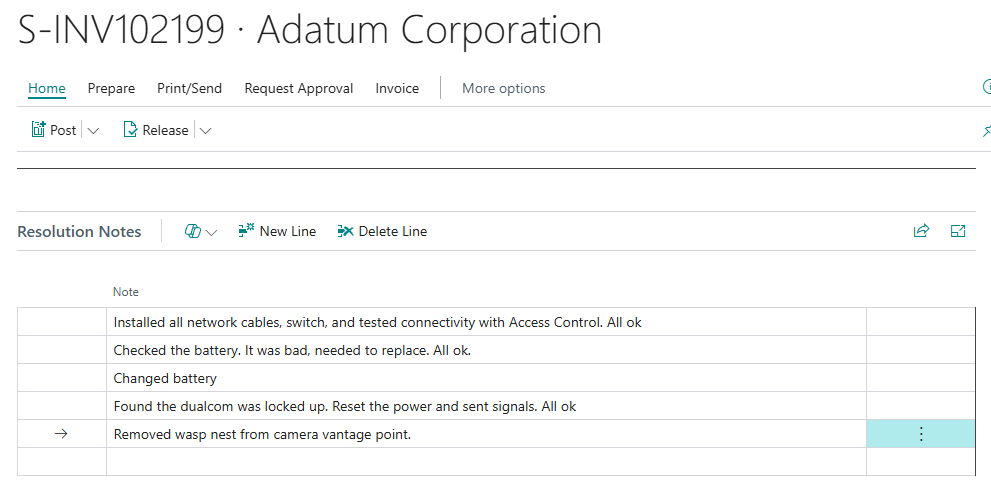
Here is our Sales Invoice with some resolution notes entered in.
When we click the CoPilot symbol we see our action.

Clicking the “Generate Note” button displays our CoPilot prompt with the results already generated.

Clicking Confirm saves the notes to the Sales Header and displays them on the Sales Invoice.

It looks great! There are some notable things that CoPilot did. Note line 2 and 3 are both the same, CoPilot summarized them into a single resolution line in the notes. The other notes all look great, clear, concise, and without jargon.
There we have it, a CoPilot solution to a problem that will save a client hours of manual work. The amazing thing is that the CoPilot solution isn’t overly complicated. Let me know if you have any similar challenges and if you feel like a bespoke agent could help you.
If you need help implementing the Rich Text boxes you see here check out Tonya Bricco-Meske’s post about it: Create a large Textbox in Business Central – BC Development Notebook. Also how to add that Rich Text to a report: BC23 Rich Text content on Reports – BC Development Notebook.
This code and the other CoPilot demos can be found in my GitHub here: AardvarkMan/BC-AL-Copilot: Business Central CoPilot implementation demo




 Aardvark Labs
Leave a comment