

BC AL Journey #33
There is a world of information and services available on the internet, we can find it all the time on search engines, and with the help of AI Agents like Copilot. What if we want to consume that information directly inside Business Central? For that we need to use an API.
API stands for Application Programming Interface, and in the classical world of IT we explain it by reordering the words; it is an interface that we can use to allow our application to access some service through programming.
We have explored the concept of an API a while back in reference to creating API’s to expose data from inside Business Central.
In this example we will go the opposite way and reach out from inside Business Central to gather some data.
We will also be parsing some JSON in this example. If you don’t know how to parse JSON in Business Central, you can learn about it here.
This example will be the easiest and most simple case to get us started. These are public, anonymous, free to use APIs that don’t require a body. We will revisit APIs again to explore more complex concepts.
The first question is; where can I find some APIs? Typically, you have a problem, and you search for a solution with the word API in the request. For example: “Email Validation API” in your search engine of choice should find several options from free to very expensive. The other option is you have a product that you are using or evaluating to use, you can check the documentation for that product to see if it has an API that supports your needs.
Also, here is a HUGE LIST of public APIs on GitHub: public-apis/public-apis: A collective list of free APIs
I’m going to implement two APIs in this example:
As is proper, we will start with Chuck Norris. The API returns a JSON data object with a Chuck Norris joke as well as some other meta data.
{
	"categories": [
		"sport"
	],
	"created_at": "2020-01-05 13:42:19.324003",
	"icon_url": "https://api.chucknorris.io/img/avatar/chuck-norris.png",
	"id": "sailwxzgqyiei0cv7r-yew",
	"updated_at": "2020-01-05 13:42:19.324003",
	"url": "https://api.chucknorris.io/jokes/sailwxzgqyiei0cv7r-yew",
	"value": "Chuck Norris can do a wheelie on a unicycle."
}
We will do all of our work in a Code Unit and return just the joke text.
ARDGetChuckNorrisJoke.Codeunit.al
    procedure SendRequest() ResponseText: Text
    var
        Client: HttpClient;
        HttpRequestMessage: HttpRequestMessage;
        RequestHeaders: HttpHeaders;
        RequestURI: Text;
        Content: HttpContent;
        ContentHeaders: HttpHeaders;
        HttpMethod: Text[6];

        IsSuccessful: Boolean;
        ResponseMessage: HttpResponseMessage;
        ServiceCallErr: Label 'Web service call failed.';
        ErrorInfoObject: ErrorInfo;

        Result: Text;
    begin
        HttpMethod := 'GET';
        RequestURI := 'https://api.chucknorris.io/jokes/random';

        // This shows how you can set or change HTTP content headers in your request
        Content.GetHeaders(ContentHeaders);
        if ContentHeaders.Contains('Content-Type') then ContentHeaders.Remove('Content-Type');
        ContentHeaders.Add('Content-Type', 'multipart/form-data;boundary=boundary');

        // This shows how you can set HTTP request headers in your request
        HttpRequestMessage.GetHeaders(RequestHeaders);
        RequestHeaders.Add('Accept', 'application/json');
        RequestHeaders.Add('Accept-Encoding', 'utf-8');
        RequestHeaders.Add('Connection', 'Keep-alive');

        HttpRequestMessage.SetRequestUri(RequestURI);
        HttpRequestMessage.Method(HttpMethod);

        IsSuccessful := Client.Send(HttpRequestMessage, ResponseMessage);

        if not IsSuccessful then begin
            ErrorInfoObject.DetailedMessage := 'Sorry, we could not retrieve the cat info right now.';
            ErrorInfoObject.Message := ServiceCallErr;
            Error(ErrorInfoObject);
        end;

        ResponseMessage.Content().ReadAs(Result);
        exit(ParseJoke(Result));
    end;

    procedure ParseJoke(ResponseText: Text): Text
    var
        JsonObject: JsonObject;
        JokeText: Text;
    begin
        JsonObject.ReadFrom(ResponseText);
        JokeText := JsonObject.GetText('value');
        exit(JokeText);
    end;
}
Now, HTTP Requests which is the core of how APIs work is a bit of the old magic. Why do I need to specify that the connection is keep-alive? In HTTP 1.0 it was required for the connection to stay open for multiple requests. In HTTP 1.1 it is implied that you want the connection kept alive. In Business Central it automatically uses persistent connections, but you can add the header just to be safe. There are lots of rabbit holes here, I’ll point out the important bits, and I’ll ask that you trust me about the rest.
Line 18 we set the type HTTP Method we are going to run. There are several GET, POST, PUT, DELETE and PATCH. We are making a request to retrieve data, so a GET is the method.
Like 19 has the URI of the API we are going to use. If you cut and paste that into your browser, you will get the JSON as text on the screen.
Line 28 sets the data type we are expecting to get back from this request. In this case it is a JSON object.
Line 35 sends the request out into the web and get a response back. If everything goes well, we get a JSON data object back. If things go wrong, we throw an exception.
Lastly, we parse the JSON to get the Joke out of it and send return it all the way back to the calling routine.
When we run the process for the first time, we get this message.
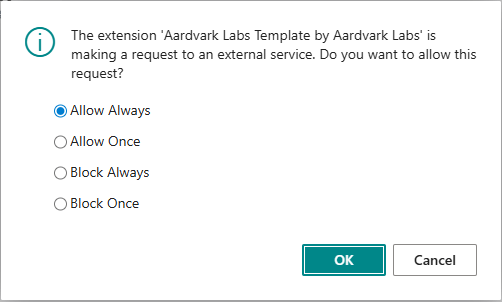
Business Central is asking if you are aware that this extension is about to make a request to an external service. This is very important, if you ever see this, and it is for an extension that you didn’t expect to go outside Business Central, DO NOT CLICK ALLOW. From a cyber security standpoint this is a means to exfiltrate data from your Business Central to another person’s servers.
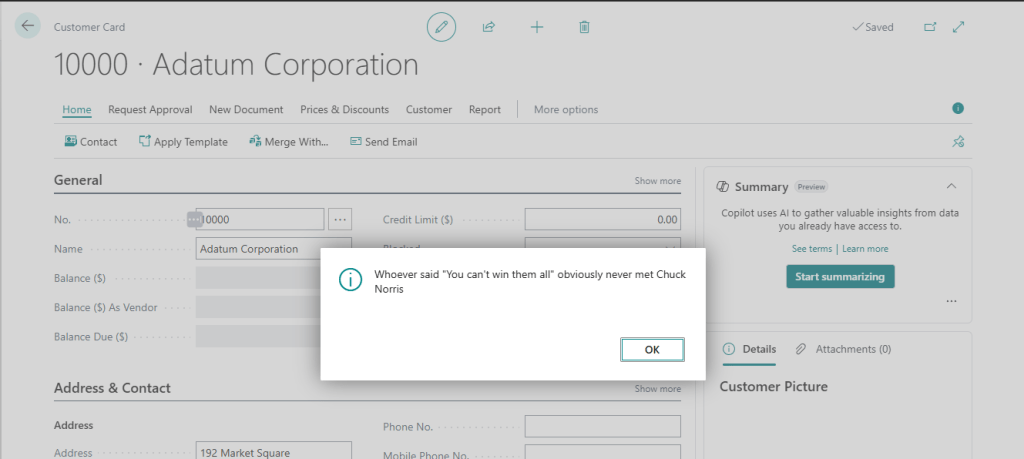
I added the call to OnOpenPage trigger of the Customer Card.
trigger OnOpenPage()
var
    ChuckNorrisJokeCodeunit: Codeunit "ARD_Get Chuck Norris Joke";
    ResponseText: Text;
begin
    ResponseText := ChuckNorrisJokeCodeunit.SendRequest();
    Message(ResponseText);
end;
Here is what happens when I open the Customer Card.
The second API we are going to explore is a free email address validation tool. We are going to use the same pattern as we did before with a code unit to handle most of the work.
    procedure SendRequest(EmailAddress: Text) ResponseText: Boolean
    var
        Client: HttpClient;
        HttpRequestMessage: HttpRequestMessage;
        RequestHeaders: HttpHeaders;
        RequestURI: Text;
        Content: HttpContent;
        ContentHeaders: HttpHeaders;
        HttpMethod: Text[6];

        IsSuccessful: Boolean;
        ResponseMessage: HttpResponseMessage;
        ServiceCallErr: Label 'Web service call failed.';
        ErrorInfoObject: ErrorInfo;

        Result: Text;
    begin
        HttpMethod := 'GET';
        RequestURI := 'https://www.disify.com/api/email/' + EmailAddress;

        // This shows how you can set or change HTTP content headers in your request
        Content.GetHeaders(ContentHeaders);
        if ContentHeaders.Contains('Content-Type') then ContentHeaders.Remove('Content-Type');
        ContentHeaders.Add('Content-Type', 'multipart/form-data;boundary=boundary');

        // This shows how you can set HTTP request headers in your request
        HttpRequestMessage.GetHeaders(RequestHeaders);
        RequestHeaders.Add('Accept', 'application/json');
        RequestHeaders.Add('Accept-Encoding', 'utf-8');
        RequestHeaders.Add('Connection', 'Keep-alive');

        HttpRequestMessage.SetRequestUri(RequestURI);
        HttpRequestMessage.Method(HttpMethod);

        IsSuccessful := Client.Send(HttpRequestMessage, ResponseMessage);

        if not IsSuccessful then begin
            ErrorInfoObject.DetailedMessage := 'Sorry, we could not retrieve the cat info right now.';
            ErrorInfoObject.Message := ServiceCallErr;
            Error(ErrorInfoObject);
        end;

        ResponseMessage.Content().ReadAs(Result);
        exit(ParseValidation(Result));
    end;

    procedure ParseValidation(ResponseText: Text): Boolean
    var
        JsonObject: JsonObject;
        format: Boolean;
        domain: Text;
        disposable: Boolean;
        dns: Boolean;
    begin
        JsonObject.ReadFrom(ResponseText);
        format := JsonObject.GetBoolean('format');
        domain := JsonObject.GetText('domain');
        disposable := JsonObject.GetBoolean('disposable');
        dns := JsonObject.GetBoolean('dns');

        if format and dns and not disposable then
            exit(true)
        else
            exit(false);

    end;
}
This example is different in that we need to pass an email address. We can see this in the parameters of the procedure.
Line 19 we concatenate the web service url with the email address we want to validate. Everything else runs exactly the same until it is time to parse the results.
As we had earlier, the results come in as a JSON object. This object contains a format as a Boolean, a domain as text, disposable as a Boolean and DNS as a Boolean. For our validation we care that the format is correct, the DNS is valid, and it is not a disposable email address.
I tied this to the OnBeforeValidate of the email field on the Customer Card.
trigger OnBeforeValidate()
            var
                ARDValidateEmailCodeunit: Codeunit "ARD_Validate Email";
                IsValidEmail: Boolean;
            begin
                IsValidEmail := ARDValidateEmailCodeunit.SendRequest(Rec."E-Mail");
                if not IsValidEmail then
                    Error('The email address %1 is not valid.', Rec."E-Mail");
            end;
If I enter an address that isn’t valid we get an error message.
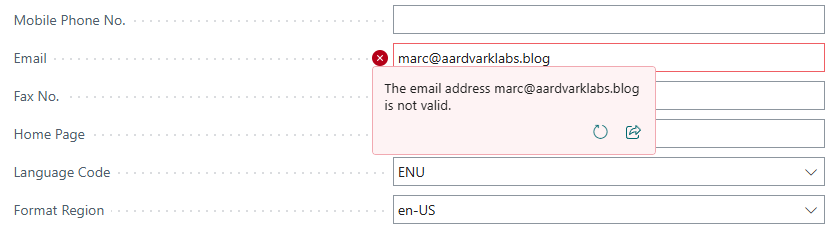
That email address, while functional, is a temporary email address. Because it is temporary, it doesn’t pass our validation criteria.
The full source code can be found in GitHub.
More information can be found at Microsoft Learn: Call external services with the HttpClient data type – Business Central | Microsoft Learn
We will be diving deeper into more complex API scenarios as well as the concepts of authentication and access control. Until then what types of scenarios are you interested in? Are there APIs you have been using or want to use? Let me know in the comments.




 Aardvark Labs
Leave a comment