

UPDATE 5/17/2026
Due to security concerns, Microsoft has decided to remove the native FTP interface from Business Central.
Jesper Shultz via GitHub Comment
Unfortunately, we will not be able to support the SFTP module after all…
Due to ongoing platform hardening efforts, supporting this module going forward would require a fundamental rewrite of both the implementation and how it connects to SFTP servers. The scope of that work has been evaluated as too large relative to the value the module currently provides.
Given that, we have decided to remove the module again, either by pulling the plug on it, or by deprecating it.
I regret that this was not identified earlier in the process, prior to releasing the module – that’s on me and I’m sorry for the inconvenience that causes. Going forward, connecting to SFTP will need to be done via alternatives such as Azure Functions again.
I apologize for missing this critical update to the SFTP implementation. I had written several posts in advance of Directions and DynamicsCon and scheduled their release.
The remainder of the post will remain as written in hopes that Microsoft will rethink their decision and reinstate this feature. I will be posting a “how to” implement FTP with an Azure Function in a future post.
The Original Post:
A new feature has been added to Business Central 28, the ability to handle SFTP servers natively in Business Central AL code. This is a huge new feature for those of us that need to communicate with external systems via SFTP. Asynchronous integrations via FTP are still very common, which makes this a very powerful feature.
This is all made possible through a new code unit call “SFTP Client”, which has the id of 9762.
We need a place to test; here is a list of Free Public SFTP Servers – SFTP.net
I’m going to use FileZilla to check if the server is running and capture the fingerprint. That will be critical later.
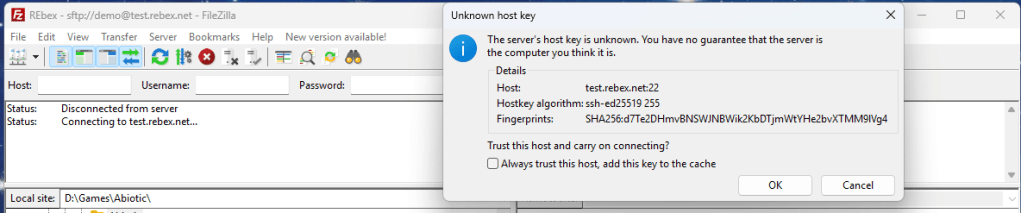
We need to store FTP access information somewhere safe. For this example, I’m going to use Isolated Storage.
Here is a refresher on handling secure data in Business Central.
ARDSFTPServerSettings.CodeUnit.AL
namespace AardvarkLabs.FileParsingExamples;

codeunit 50000 ARD_SFTPServerSettings
{
    Access = Internal;

    var
        FTPServerUserNameLbl: Label 'FTPServerUserNAme';
        FTPServerPasswordLbl: Label 'FTPServerPassword';
        FTPServerHostLbl: Label 'FTPServerHost';
        FTPServerPortLbl: Label 'FTPServerPort';
        FTPServerFingerPrintLbl: Label 'FTPServerFingerPrint';

    procedure GetServerUserName():Text
    var
        value: Text;
    begin
        IsolatedStorage.get(FTPServerUserNameLbl, value);
        exit(value);
    end;

    procedure SetServerUserName(value: Text)
    begin
        IsolatedStorage.set(FTPServerUserNameLbl, value);
    end;

    procedure GetServerPassword():SecretText
    var
        value: SecretText;
    begin
        if NOT IsolatedStorage.get(FTPServerPasswordLbl, value) then value := SecretStrSubstNo('');
        exit(value);
    end;

    procedure SetServerPassword(value: SecretText)
    begin
        IsolatedStorage.set(FTPServerPasswordLbl, value);
    end;

    procedure GetServerHost():Text
    var
        value: Text;
    begin
        IsolatedStorage.get(FTPServerHostLbl, value);
        exit(value);
    end;

    procedure SetServerHost(value: Text)
    begin
        IsolatedStorage.set(FTPServerHostLbl, value);
    end;

    procedure GetServerPort():Integer
    var
        value: Integer;
        TextValue: Text;
    begin
        IsolatedStorage.get(FTPServerPortLbl, TextValue);
        if TextValue = '' then
            value := 0
        else
            Evaluate(Value, TextValue);
        exit(value);
    end;

    procedure SetServerPort(value: Integer)
    var
        TextValue: Text;
    begin
        TextValue := Format(value);
        IsolatedStorage.set(FTPServerPortLbl, TextValue);
    end;

    procedure GetServerFingerPrint():text
    var
        value: text;
    begin
        if NOT IsolatedStorage.get(FTPServerFingerPrintLbl, value) then value := '';
        exit(value);
    end;

    procedure SetServerFingerPrint(value: text)
    begin
        IsolatedStorage.set(FTPServerFingerPrintLbl, value);
    end;
}
Here we see the common pattern of storing critical information in the Isolated Storage system.
Now we need a page for the settings. I created ARDFTPHandler.Page.al to hold and manage the settings.
namespace AardvarkLabs.FileParsingExamples;

using System.Utilities;

page 50012 ARD_FTPHandler
{
    ApplicationArea = All;
    Caption = 'FTP Handler';
    PageType = Card;
    SourceTable = "Integer";
    DataCaptionExpression = 'FTP Server Settings';
    UsageCategory = Administration;

    layout
    {
        area(Content)
        {
            group(General)
            {
                Caption = 'Server Settings';
                field(ServerHost; ServerHost)
                {
                    Caption = 'Server Host';
                    ToolTip = 'The hostname or IP address of the FTP server.';
                    ApplicationArea = All;

                    trigger onvalidatE()
                    begin
                        ServerSettings.SetServerHost(ServerHost);
                    end;
                }
                field(ServerPort; ServerPort)
                {
                    Caption = 'Server Port';
                    ToolTip = 'The port number of the FTP server.';
                    ApplicationArea = All;
                    trigger OnValidate()
                    begin
                        ServerSettings.SetServerPort(ServerPort);
                    end;
                }
                field(ServerFingerPrint; ServerFingerPrint)
                {
                    ApplicationArea = All;
                    Caption = 'Server FingerPrint';
                    ToolTip = 'The SSH Fingerprint of the FTP server.';
                    MaskType = Concealed;
                    trigger OnValidate()
                    begin
                        ServerSettings.SetServerFingerPrint(ServerFingerPrint);
                    end;
                }
                field(UserName; UserName)
                {
                    ApplicationArea = All;
                    Caption = 'Server User Name';
                    ToolTip = 'The username for the FTP server.';
                    trigger OnValidate()
                    begin
                        ServerSettings.SetServerUserName(UserName);
                    end;

                }
                field(ServerPassword; ServerPassword)
                {
                    ApplicationArea = All;
                    Caption = 'Server Password';
                    ToolTip = 'The password for the FTP server.';
                    MaskType = Concealed;
                    trigger OnValidate()
                    begin
                        ServerSettings.SetServerPassword(ServerPassword);
                    end;
                }
            }
            group(Files)
            {
                part(FileList; ARD_FTPFileList)
                {
                    ApplicationArea = All;
                }
            }
        }
    }

    var
        ServerSettings: Codeunit ARD_SFTPServerSettings;
        UserName: Text;
        ServerHost: Text;
        ServerPort: Integer;
        ServerFingerPrint: text;
        ServerPassword: text;

    trigger OnOpenPage()
    begin
        //Load the current server settings from the Isolated Storage when opening the page.
        ServerHost := ServerSettings.GetServerHost();
        ServerPort := ServerSettings.GetServerPort();
        ServerFingerPrint := ServerSettings.GetServerFingerPrint();
        UserName := ServerSettings.GetServerUserName();
    end;
}
This page handles the loading and saving of the FTP Settings. Note that the server fingerprint and password has the MaskType value set to Concealed to hide the password from people peeping. It would be better if this was a Secret Text, but the FTP CodeUnit doesn’t allow for Secret Text.
There is a Part in the page, which is where all the FTP handling actually happens.
The file list part is ARDFTPFileList.Page.al
namespace AardvarkLabs.FileParsingExamples;

using System.SFTPClient;

page 50013 ARD_FTPFileList
{
    ApplicationArea = All;
    Caption = 'FTP File List';
    PageType = ListPart;
    SourceTable = "SFTP Folder Content";
    InsertAllowed = true;

    layout
    {
        area(Content)
        {
            repeater(General)
            {
                field(Name; Rec.Name)
                {
                }
                field("Full Name"; Rec."Full Name")
                {
                    trigger OnDrillDown()
                    begin
                        if Rec."Is Directory" then begin
                            case Rec.Name of
                                '.': //return to the root
                                    currentPath := '';
                                '..': //go up one level
                                    currentPath := CopyStr(currentPath, 1, currentPath.lastindexof('/') - 1);
                                else //go down one level
                                    currentPath := Rec."Full Name";

                            end;

                            //List the files at the new level
                            ListFTPFiles();
                        end else
                            DownloadFTPFile(Rec."Full Name"); //Download the file that was clicked on
                    end;
                }
                field(Length; Rec.Length)
                {
                }
                field("Is Directory"; Rec."Is Directory")
                {
                }
                field("Last Write Time"; Rec."Last Write Time")
                {
                }
            }

            group(Upload)
            {
                Caption = 'Upload File';
                field(UploadFileName; UploadFileName)
                {
                    ApplicationArea = All;
                    Caption = 'File Name';
                    ToolTip = 'The name of the file to be uploaded to the FTP server.';

                    trigger OnValidate()
                    begin
                        UploadFTPFile(UploadFileName);
                    end;
                }
            }
        }
    }
    actions
    {
        area(Processing)
        {
            action(ListFiles)
            {
                ApplicationArea = All;
                Caption = 'List Files';
                ToolTip = 'Lists the files in the root directory of the FTP server.';
                image = View;
                trigger OnAction()
                begin
                    ListFTPFiles();
                end;
            }
            action(DeleteFile)
            {
                ApplicationArea = All;
                Caption = 'Delete File';
                ToolTip = 'Deletes a file called data.txt from the root directory of the FTP server.';
                image = Delete;
                Scope = Repeater;

                trigger OnAction()
                begin
                    if (NOT Rec."Is Directory") and (Rec."Full Name" <> '') then
                        if Confirm('Are you sure you want to delete ' + Rec.Name + '?', false) then
                            DeleteFTPFile(Rec."Full Name");
                end;
            }
        }
    }

    var
        ServerSettings: Codeunit ARD_SFTPServerSettings;
        currentPath: Text;
        UploadFileName: Text;

    trigger OnOpenPage()
    begin
        currentPath := '';
    end;

    procedure ListFTPFiles()
    var
        TempFileList: Record "SFTP Folder Content" temporary;
        SFTPClient: Codeunit "SFTP Client";
    begin
        Rec.DeleteAll();

        //Setting up the client from the values in the Isolated Storage.
        SFTPClient.AddFingerPrintSHA256(ServerSettings.GetServerFingerPrint());
        SFTPClient.Initialize(ServerSettings.GetServerHost(), ServerSettings.GetServerPort(), ServerSettings.GetServerUserName(), ServerSettings.GetServerPassword());

        //Disconnect when complete or if there is an error.
        SFTPClient.ListFiles(currentPath, TempFileList);

        //Insert the files from the temporary record into the page's record to display them in the list.
        if TempFileList.FindSet() then
            repeat
                Rec := TempFileList;
                Rec.Insert();
            until TempFileList.Next() = 0
        else
            Message('No files found in the root directory of the FTP server.');

        CurrPage.Update(false);

        //Disconnect when complete or if there is an error.
        SFTPClient.Disconnect();
    end;

    procedure UploadFTPFile(FileName: Text)
    var
        SFTPClient: Codeunit "SFTP Client";
        InStream: InStream;
    begin
        if UploadIntoStream('', InStream) then begin
            //Setting up the client from the values in the Isolated Storage.
            SFTPClient.AddFingerPrintSHA256(ServerSettings.GetServerFingerPrint());
            SFTPClient.Initialize(ServerSettings.GetServerHost(), ServerSettings.GetServerPort(), ServerSettings.GetServerUserName(), ServerSettings.GetServerPassword());

            //Upload the file to the FTP server using the provided filename and filestream.
            SFTPClient.PutFileStream(FileName, InStream);
            //Disconnect when complete or if there is an error.
            SFTPClient.Disconnect();
        end else
            Message('File upload cancelled.');
    end;

    procedure DownloadFTPFile(FullFileName: Text)
    var
        SFTPClient: Codeunit "SFTP Client";
        InStream: InStream;
        FileContent: TextBuilder;
        CurrentText: Text;
    begin
        //Setting up the client from the values in the Isolated Storage.
        SFTPClient.AddFingerPrintSHA256(ServerSettings.GetServerFingerPrint());
        SFTPClient.Initialize(ServerSettings.GetServerHost(), ServerSettings.GetServerPort(), ServerSettings.GetServerUserName(), ServerSettings.GetServerPassword());

        //Download the file from the FTP server into a filestream.
        SFTPClient.GetFileAsStream(FullFileName, InStream);
        //Disconnect when complete or if there is an error.
        SFTPClient.Disconnect();

        while InStream.EOS = false do
            // Append each line of text to the TextBuilder
            if InStream.ReadText(CurrentText) <> 0 then
                FileContent.AppendLine(CurrentText);

        Dialog.Message(FileContent.ToText());
    end;

    procedure DeleteFTPFile(FullFileName: Text)
    var
        SFTPClient: Codeunit "SFTP Client";
    begin
        //Setting up the client from the values in the Isolated Storage.
        SFTPClient.AddFingerPrintSHA256(ServerSettings.GetServerFingerPrint());
        SFTPClient.Initialize(ServerSettings.GetServerHost(), ServerSettings.GetServerPort(), ServerSettings.GetServerUserName(), ServerSettings.GetServerPassword());

        //Delete the file from the FTP server using the provided filename.
        SFTPClient.DeleteFile(FullFileName);
        //Disconnect when complete or if there is an error.
        SFTPClient.Disconnect();
    end;
}
The FTP system only supports 4 commands. List Files, Upload File, Download File, and Delete File. Everything else has to be done as a series of actions based on these commands.
Each action follows the same pattern: Add the fingerprint to the SFTP Client, Initialize the client with Host URL, Port, Username, and Password. You then transact against the SFTP Server. Last step is to Disconnect.
Here it is in action:
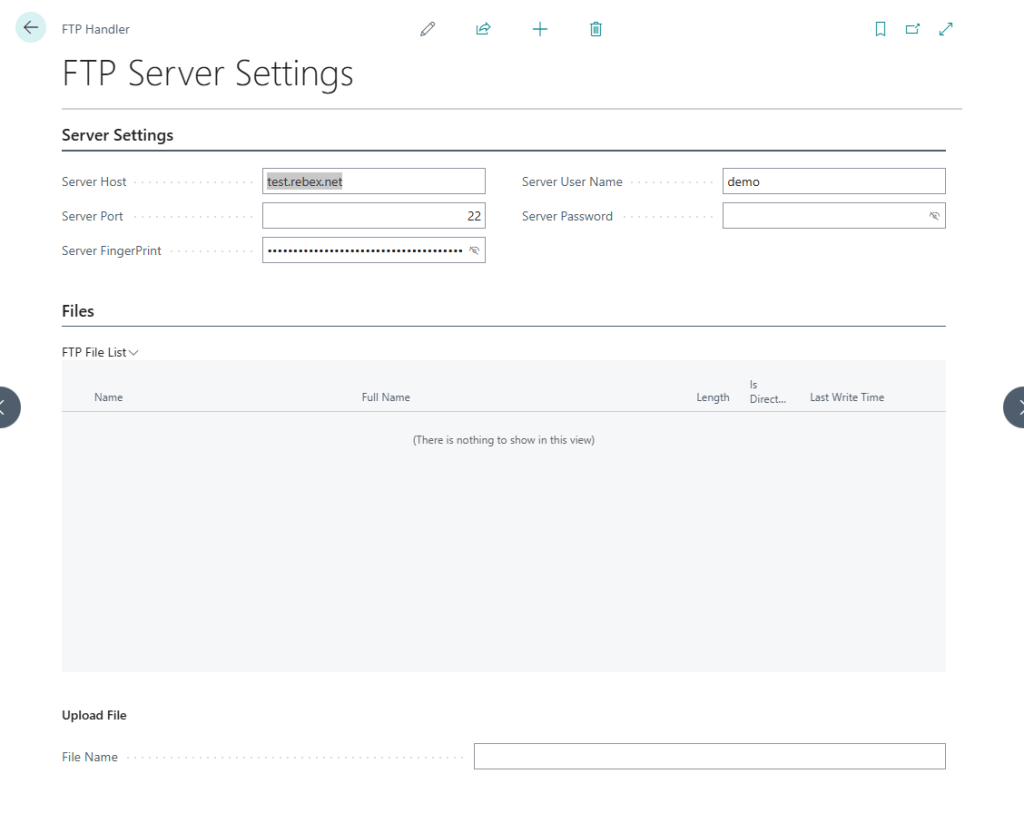
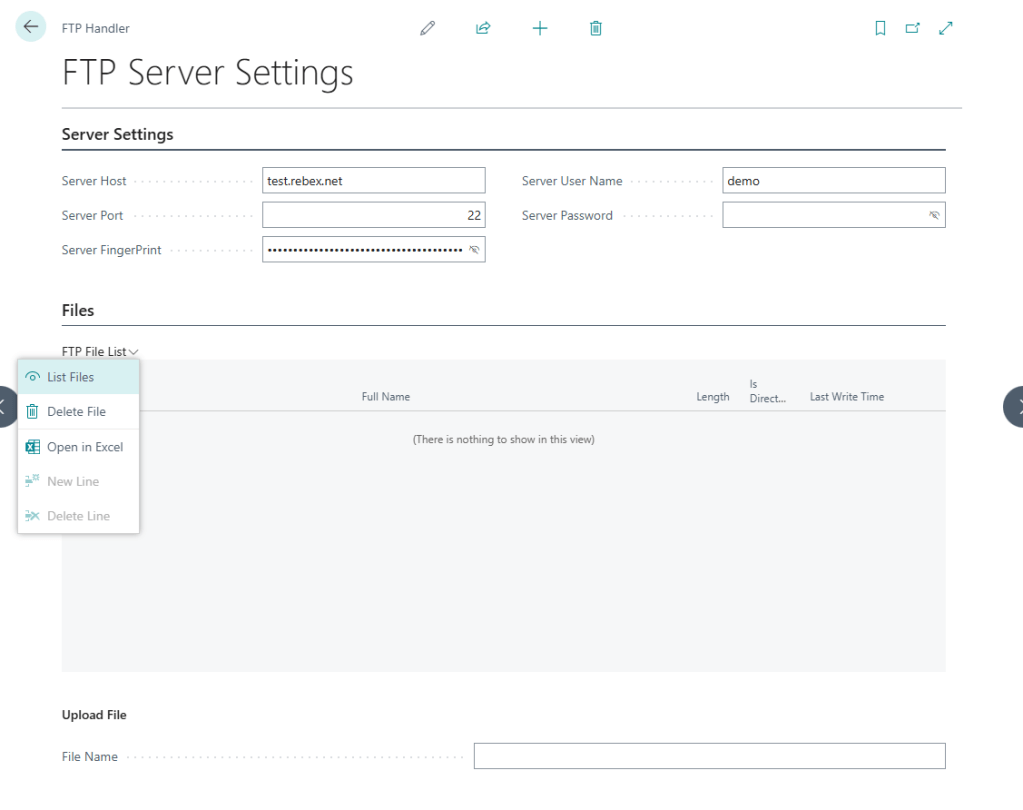
I’ve filled out the test FTP server settings. I can use the menu in the FTP File List part to list out the files.
I can now navigate around the list part and work with the files in the server.
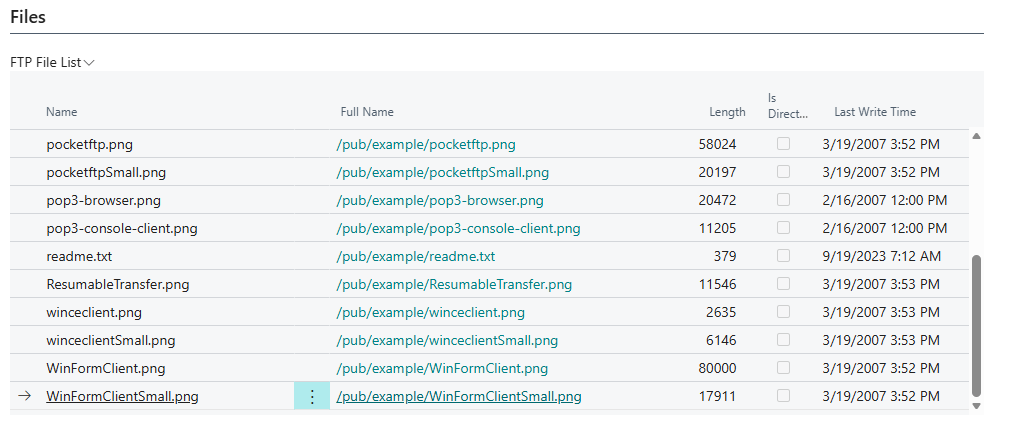
This simple example is all wired up to chat with your favorite FTP Server. Go ahead and give it a try, let me know if you have any questions in the comments section.
Microsoft provided example and further details here: BCApps/src/System Application/App/SFTP Client at main · microsoft/BCApps
As always, source code in AardvarkLabs GitHub.








Leave a comment