
There’s a special category of Business Central codeunits I’ve always thought of as infrastructure magic: the pieces of the platform that quietly do enormous amounts of work, rarely get talked about, and almost never get the spotlight they deserve. They aren’t flashy. They don’t ship new features. But they make the entire product feel polished, consistent, and globally aware.
Codeunit 365 — Format Address
Every time Business Central prints a customer address on an invoice, renders a vendor label, formats a shipping document, or exposes a contact through an API, the Format Address Codeunit and applies a surprisingly sophisticated set of rules. It knows how different countries structure their postal lines. It knows when to include the region, when to uppercase the city, and how to gracefully fall back when data is missing. It’s the kind of codeunit that developers rely on constantly without ever stopping to ask: How does this actually work?
This week, we’re giving Format Address the spotlight it deserves.
We’ll break down how it’s architected, how it handles global formatting logic, and how you can extend it in your own solutions. And because Aardvark Labs is all about practical engineering, we’ll also build a small extension that hooks into Format Address to apply custom rules, the kind of thing you might use for region‑specific compliance, branding, or workflow automation.
At first glance you may think of Codeunit 365 – Format Address as a simple utility: you pass in a Customer, Vendor, or Contact, and you get back a neat little array of 8 address lines. But under the hood, Format Address is one of the most architecturally thoughtful supporting codeunits in the platform. It’s built to handle global postal rules, inconsistent data, multiple record types, and dozens of formatting permutations, all without forcing developers to write country‑specific logic themselves.
Instead of embedding country logic directly in AL, Format Address reads formatting instructions from the Country Region table (9). This makes the behavior configurable, extensible, safe for localization, and predictable across upgrades.
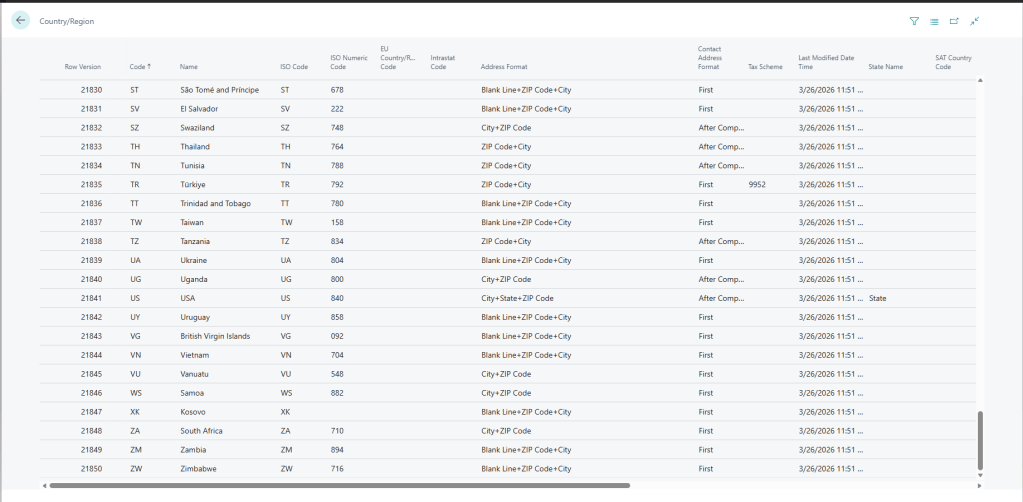
Here you can see the US formatting as City+State+Zip Code.
The actual codeunit is HUGE, which speaks to its complexity. The procedure FormatAddr is the workhorse here and is referenced internally to the procedure 72 times. Each address bearing record has a procedure to retrieve the pertinent address data.
This is also a very extensible codeunit. Every record specific implementation has an OnBefore integration event. This allows you to review, and even handle the address work yourself based on a record type.
Here is the Customer procedure:
    /// <summary>
    /// Formats customer name and address information.
    /// </summary>
    /// <param name="AddrArray">Array that will hold formatted name and address. </param>
    /// <param name="Cust">Source customer record. </param>
    procedure Customer(var AddrArray: array[8] of Text[100]; var Cust: Record Customer)
    var
        Handled: Boolean;
    begin
        OnBeforeCustomer(AddrArray, Cust, Handled);
        if Handled then
            exit;

        FormatAddr(
            AddrArray, Cust.Name, Cust."Name 2", Cust.Contact, Cust.Address, Cust."Address 2",
            Cust.City, Cust."Post Code", Cust.County, Cust."Country/Region Code");
    end;
We can see on Line 10 a call to OnBeforeCustomer. This would be a good point to review the data in the Customer record and make any changes you feel necessary.
Let’s do a little example.
Let’s say that you have a customer migrating from Dynamics GP. During the customer import they mistakenly assume that Name 2 is like the Short Name (SHRTNAME) or Statement Name (STMTNAME) in GP (RM00101 IYKYK). Now all of a sudden, they have the customer’s name appearing twice on everything. You could go an edit all the reports or use the integration event.
Let’s create a codeunit that checks if the Name and Name 2 are the same, then removes Name 2 on a match.
codeunit 50006 ARD_FormatAddress
{
    [EventSubscriber(ObjectType::Codeunit, Codeunit::"Format Address", OnBeforeCustomer, '', false, false)]
    local procedure "Format Address_OnBeforeCustomer"(var AddrArray: array[8] of Text[100]; var Cust: Record Customer; var Handled: Boolean)
    begin
        if Cust.Name = Cust."Name 2" then
            Cust."Name 2" := '';
    end;

}
Thing to note, because a Modify is never called on the customer record, changes here are never committed to the database. In this case the clearing of Name 2 doesn’t impact the Customer record.
If you are not going to use the IsHandled flag and perform the address array population yourself, don’t do anything with the array. When the data is sent to FormatAddr the array is cleared. If you want to manipulate the address array you can get to it from the integration events in FormatAddr.
The 8th element in the address array is empty specifically for extensions to utilize. Let’s say we want to add a note about the location from the sales header. We could do something like this.
    [EventSubscriber(ObjectType::Codeunit, Codeunit::"Format Address", OnBeforeSalesHeaderSellTo, '', false, false)]
    local procedure "Format Address_OnBeforeSalesHeaderSellTo"(var AddrArray: array[8] of Text[100]; var SalesHeader: Record "Sales Header"; var Handled: Boolean)
    var
        FormatAddress: Codeunit "Format Address";
        Location: Record Location;
    begin
        FormatAddress.FormatAddr(
                AddrArray, SalesHeader."Sell-to Customer Name", SalesHeader."Sell-to Customer Name 2", SalesHeader."Sell-to Contact", SalesHeader."Sell-to Address", SalesHeader."Sell-to Address 2",
                SalesHeader."Sell-to City", SalesHeader."Sell-to Post Code", SalesHeader."Sell-to County", SalesHeader."Sell-to Country/Region Code");

        if Location.Get(SalesHeader."Location Code") then begin
            AddrArray[8] := 'Sold From: ' + Location.Name;
        end;

        Handled := true;
    end;
In this case we do all the work in the event. We call the FormatAddr procedure like the stock process would, but after we grab the Sales Header Location and add the text “Sold From:” and the location name to AddrArray element 8.
An odd note, in General Ledger Setup there is a local address format field. Addresses without country codes will use this setting. This can cause HUGE confusion if it is setup to a different format then expected, ask me how I know. Why is this in General Ledger Setup? I don’t know.
I hope this sheds some light on one of the most underappreciated codeunits in Business Central. Addresses and the proper formatting tools are something we take advantage of all the time, but spend little time thinking about them, as long as they are working as expected.



 Aardvark Labs
Leave a comment