

When designing modular software, we often need different components to follow the same rules even if they implement those rules in different ways. For example, if I’m building multiple API parsers, each parser might store data differently or perform its work internally in its own way, but they all still need to expose the same operations such as Download, Upload, and Parse.
This is exactly what an interface provides: a contract that defines what must exist, without dictating how it must be implemented.
We have used Interfaces before back in 2024; you can read about that here:
Interfaces have been available in AL for years, but they came with a major limitation: once an interface was deployed, adding a new required procedure would immediately break every implementation. The interface contract is strict, if you change the rules, all existing implementations become non‑compliant.
Business Central 29.0 (2026 Wave 2) introduces Default Interface Methods, which solve this problem and reduce duplicate code. A default method lets the interface provide a full implementation that codeunits may override if needed.
This gives us two kinds of interface members:
- Abstract: Contains the procedure signature only and must be implemented in the implementation.
- Default: Contains a complete procedure that can be overridden in the procedure or will execute as a default.
To see how this works in practice, let’s imagine we’re tracking guests at a restaurant. Every guest has basic demographic information, and we also want to determine whether they can legally drink alcohol.
The demographic procedures are mandatory; every implementation must provide them.
But the drinking‑age rule varies by country, so this is a perfect use case for a default method that can be overridden.
Here is the interface ARDDinnerGuest.Interface.al
namespace AardvarkLabs;

interface ARD_DinnerGuest
{
    //Abstract methods to be implemented by the codeunits that implement this interface
    procedure SetFirstName(firstName: Text[30]);
    Procedure SetLastName(lastName: Text[30]);
    Procedure GetFullName(): Text[61];
    Procedure SetBirthDate(birthDate: Date);
    Procedure GetBirthDate(): Date;


    //Default Implementation of the CanDrinkAlcohol method, which can be overridden by the implementing codeunits
    Procedure CanDrinkAlcohol(): Boolean
    var
        Age: Integer;
        TodayDate: Date;
        GuestBirthDate: Date;
    begin
        GuestBirthDate := GetBirthDate();
        TodayDate := Today();

        if GuestBirthDate = 0D then
            exit(false); // If the birth date is not set, return false

        Age := Date2DMY(TodayDate, 3) - Date2DMY(GuestBirthDate, 3);
        if (Date2DMY(TodayDate, 2) < Date2DMY(GuestBirthDate, 2)) or
            ((Date2DMY(TodayDate, 2) = Date2DMY(GuestBirthDate, 2)) and
              (Date2DMY(TodayDate, 1) < Date2DMY(GuestBirthDate, 1)))
        then
            Age -= 1;

        if Age >= 21 then
            exit(true)
        else
            exit(false);
    end;
}
Lines 6–10 define the abstract demographic procedures — these must be implemented by any codeunit that uses the interface.
Lines 14–34 define the default CanDrinkAlcohol method. This logic will run automatically unless an implementation chooses to override it.
American Implementation
The American guest implementation provides all required demographic procedures but does not override CanDrinkAlcohol, so it inherits the default rule (21+).
namespace AardvarkLabs;

codeunit 50000 ARD_AmericanGuest Implements ARD_DinnerGuest
{
    var
        GuestFirstName: Text[30];
        GuestLastName: Text[30];
        GuestBirthDate: Date;

    procedure SetFirstName(firstName: Text[30])
    begin
        GuestFirstName := firstName;
    end;

    procedure SetLastName(lastName: Text[30])
    begin
        GuestLastName := lastName;
    end;

    procedure GetFullName(): Text[61]
    begin
        exit(GuestFirstName + ' ' + GuestLastName);
    end;

    procedure SetBirthDate(birthDate: Date)
    begin
        GuestBirthDate := birthDate;
    end;

    procedure GetBirthDate(): Date
    begin
        exit(GuestBirthDate);
    end;
}
In this implementation I implemented all the mandatory data, but did not override the default CanDrinkAlcohol procedure. Note that this code unit does not contain the procedure CanDrinkAlcohol. This is very important and we will discuss why later.
Canadian Implementation
The Canadian guest implementation is almost identical, but it overrides CanDrinkAlcohol to use a drinking age of 18 instead of 21.
namespace AardvarkLabs;

codeunit 50001 ARD_CanadianGuest Implements ARD_DinnerGuest
{
    var
        GuestFirstName: Text[30];
        GuestLastName: Text[30];
        GuestBirthDate: Date;

    procedure SetFirstName(firstName: Text[30])
    begin
        GuestFirstName := firstName;
    end;

    procedure SetLastName(lastName: Text[30])
    begin
        GuestLastName := lastName;
    end;

    procedure GetFullName(): Text[61]
    begin
        exit(GuestFirstName + ' ' + GuestLastName);
    end;

    procedure SetBirthDate(birthDate: Date)
    begin
        GuestBirthDate := birthDate;
    end;

    procedure GetBirthDate(): Date
    begin
        exit(GuestBirthDate);
    end;

    Procedure CanDrinkAlcohol(): Boolean
    var
        Age: Integer;
        TodayDate: Date;
    begin
        GuestBirthDate := GetBirthDate();
        TodayDate := Today();

        if GuestBirthDate = 0D then
            exit(false); // If the birth date is not set, return false

        Age := Date2DMY(TodayDate, 3) - Date2DMY(GuestBirthDate, 3);
        if (Date2DMY(TodayDate, 2) < Date2DMY(GuestBirthDate, 2)) or
            ((Date2DMY(TodayDate, 2) = Date2DMY(GuestBirthDate, 2)) and
              (Date2DMY(TodayDate, 1) < Date2DMY(GuestBirthDate, 1)))
        then
            Age -= 1;

        if Age >= 18 then
            exit(true)
        else
            exit(false);
    end;
}
Almost identical to the previous implementation, except we overrode the default with a slightly altered calculation.
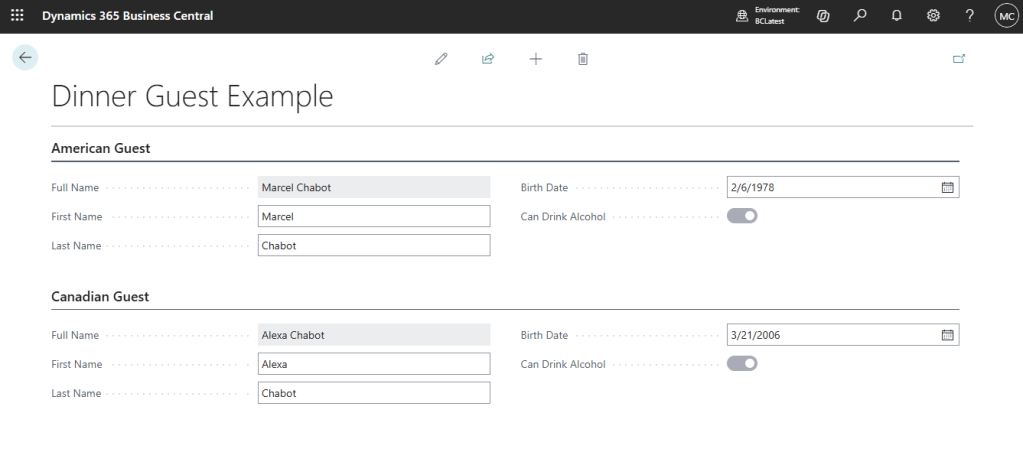
Let’s get these values onto a page and see how it all works. The example page is ARDDinnerGuestExample.Page.al
namespace AardvarkLabs;

page 50000 ARD_DinnerGuestExample
{
    ApplicationArea = All;
    Caption = 'Dinner Guest Example';
    PageType = Card;

    layout
    {
        area(Content)
        {
            group(AmericanGuestGroup)
            {
                Caption = 'American Guest';
                field(P1FullName; AmericanDinnerGuestInterface.GetFullName())
                {
                    ApplicationArea = All;
                    Caption = 'Full Name';
                    tooltip = 'Displays the full name of the American guest.';
                }
                field(P1FirstName; AmericanGuestFirstName)
                {
                    ApplicationArea = All;
                    Caption = 'First Name';
                    tooltip = 'Enter the first name of the American guest.';

                    trigger onValidate()
                    begin
                        AmericanDinnerGuestInterface.SetFirstName(AmericanGuestFirstName);
                    end;
                }
                field(P1LastName; AmericanGuestLastName)
                {
                    ApplicationArea = All;
                    Caption = 'Last Name';
                    tooltip = 'Enter the last name of the American guest.';

                    trigger onValidate()
                    begin
                        AmericanDinnerGuestInterface.SetLastName(AmericanGuestLastName);
                    end;
                }
                field(P1BirthDate; AmericanGuestBirthDate)
                {
                    ApplicationArea = All;
                    Caption = 'Birth Date';
                    tooltip = 'Enter the birth date of the American guest.';

                    trigger onValidate()
                    begin
                        AmericanDinnerGuestInterface.SetBirthDate(AmericanGuestBirthDate);
                    end;
                }
                field(P1CanDrinkAlcohol; AmericanDinnerGuestInterface.CanDrinkAlcohol())
                {
                    ApplicationArea = All;
                    Caption = 'Can Drink Alcohol';
                    tooltip = 'Indicates whether the American guest can legally drink alcohol based on their birth date.';
                }
            }
            group(CanadianGuestGroup)
            {
                Caption = 'Canadian Guest';

                field(P2FullName; CanadianDinnerGuestInterface.GetFullName())
                {
                    ApplicationArea = All;
                    Caption = 'Full Name';
                    tooltip = 'Displays the full name of the Canadian guest.';
                }
                field(P2FirstName; CanadianGuestFirstName)
                {
                    ApplicationArea = All;
                    Caption = 'First Name';
                    tooltip = 'Enter the first name of the Canadian guest.';

                    trigger onValidate()
                    begin
                        CanadianDinnerGuestInterface.SetFirstName(CanadianGuestFirstName);
                    end;
                }
                field(P2LastName; CanadianGuestLastName)
                {
                    ApplicationArea = All;
                    Caption = 'Last Name';
                    tooltip = 'Enter the last name of the Canadian guest.';

                    trigger onValidate()
                    begin
                        CanadianDinnerGuestInterface.SetLastName(CanadianGuestLastName);
                    end;
                }
                field(P2BirthDate; CanadianGuestBirthDate)
                {
                    ApplicationArea = All;
                    Caption = 'Birth Date';
                    tooltip = 'Enter the birth date of the Canadian guest.';

                    trigger onValidate()
                    begin
                        CanadianDinnerGuestInterface.SetBirthDate(CanadianGuestBirthDate);
                    end;
                }
                field(P2CanDrinkAlcohol; CanadianDinnerGuestInterface.CanDrinkAlcohol())
                {
                    ApplicationArea = All;
                    Caption = 'Can Drink Alcohol';
                    tooltip = 'Indicates whether the Canadian guest can legally drink alcohol based on their birth date.';
                }
            }
        }
    }

    var
        //Implementations of the ARD_DinnerGuest interface for American and Canadian guests
        AmericanGuest: CodeUnit ARD_AmericanGuest;
        CanadianGuest: CodeUnit ARD_CanadianGuest;

        //Interface references to the ARD_DinnerGuest interface for American and Canadian guests
        AmericanDinnerGuestInterface: Interface ARD_DinnerGuest;
        CanadianDinnerGuestInterface: Interface ARD_DinnerGuest;

        AmericanGuestFirstName: Text[30];
        AmericanGuestLastName: Text[30];
        AmericanGuestBirthDate: Date;

        CanadianGuestFirstName: Text[30];
        CanadianGuestLastName: Text[30];
        CanadianGuestBirthDate: Date;

    trigger OnOpenPage()
    begin
        // Assign the interface references to the respective codeunit instances
        // This allows us to call the interface methods on the codeunit instances
        AmericanDinnerGuestInterface := AmericanGuest;
        CanadianDinnerGuestInterface := CanadianGuest;

        // Initialize the guest information
        AmericanGuestFirstName := '';
        AmericanGuestLastName := '';
        AmericanGuestBirthDate := 0D;

        CanadianGuestFirstName := '';
        CanadianGuestLastName := '';
        CanadianGuestBirthDate := 0D;
    end;
}
One important change when using default interface methods:
To access default implementations, you must call the interface variable not the code unit directly.
The interface enforces the contract at compile time, ensuring the codeunit implements all required members. At runtime, the codeunit behaves normally, but if you want to treat it as the interface, you must reference it through an interface variable.
In this example, AmericanGuest.CanDrinkAlcohol() is not valid. The code unit ARD_AmericanGuest doesn’t have a procedure named CanDrinkAlcohol. The Interface does, so we create an instance of the interface and set it equal to the implementing code unit AmericanGuest, and reference that in our code. You can see the abstraction in the highlighted lines.
The other use case for the default implementation in an interface is to provide a means to implement new abstract procedures and give developers time to implement the procedures. Remember, if you add an abstract procedure to an interface, it MUST be implemented.
Let’s say we have a Bill Payment Interface and it looks like this.
namespace AardvarkLabs;

interface ARD_BillPayment
{
    procedure SetBillAmount(billAmount: Decimal);
    procedure GetBillAmount(): Decimal;
}
I would like to add a Tip to this, but implementing that as an abstract procedure would break any code units using this interface. However, I do what everyone to implement a Tip calculator. The concept here is to temporarily add a defaulted procedure to give implementors time to implement the change.
Step 1: Implement the new procedure.
namespace AardvarkLabs;

interface ARD_BillPayment
{
    procedure SetBillAmount(billAmount: Decimal);
    procedure GetBillAmount(): Decimal;

    procedure GetTipAmount(): Decimal
    begin
        // Default implementation: simply store the tip amount
        exit(GetBillAmount() * 0.20); // Default tip is 20% of the bill amount
    end;
}
Everything will work as expected and the default tipping calculation will be used while implementors create their own.
Step 2: Mark as Required Pending
namespace AardvarkLabs;

interface ARD_BillPayment
{
    procedure SetBillAmount(billAmount: Decimal);
    procedure GetBillAmount(): Decimal;

    [RequiredPending('This method must be implemented by the codeunit that implements this interface.', '30.0')]
    procedure GetTipAmount(): Decimal
    begin
        // Default implementation: simply store the tip amount
        exit(GetBillAmount() * 0.20); // Default tip is 20% of the bill amount
    end;
}
The highlighted line triggers a warning on the implementors systems that this procedure is going to become mandatory soon. They need to implement it before it becomes an error.
Step 3: Remove the default body.
namespace AardvarkLabs;

interface ARD_BillPayment
{
    procedure SetBillAmount(billAmount: Decimal);
    procedure GetBillAmount(): Decimal;
    procedure GetTipAmount(): Decimal;
}
If the implementors have not implemented a GetTipAmount at this point they will receive an error.
Default Interface Methods make interfaces far more flexible and reduce the risk of breaking existing implementations when requirements evolve. They also help eliminate duplicated logic by allowing shared behavior to live directly in the interface.
Interfaces also make AI code generation cheaper, cleaner, and more accurate because they give the model a strict contract to follow. When an interface defines the required methods and their signatures, the AI doesn’t have to “guess” structure or invent patterns; it simply fills in the implementation behind a known shape. That reduces token usage because the model doesn’t need to repeatedly restate or infer the architecture, and it reduces errors because the interface eliminates ambiguity about what must exist, what types are expected, and how components interact. In practice, this means AI can generate AL code that is more consistent, more aligned with your architecture, and less prone to subtle bugs or mismatched method signatures.
Whether you’re building API parsers, domain models, or modular business logic, this feature gives you a cleaner, safer way to evolve your architecture over time.
You can download this example at the AardvarkMan GitHub: AardvarkMan/Business-Central-Interface-Example
More details available on the Microsoft Learn artical: Interfaces in AL – Business Central | Microsoft Learn




Leave a Reply