

Like many developers, I’ve started using AI agents throughout my software development process. I have agents helping with design, documentation, coding, testing, and research, and the productivity gains have been significant.
The challenge isn’t creating agents anymore. It’s managing them.
When several agents are working simultaneously in GitHub Copilot and VS Code, it becomes surprisingly difficult to see who is actively working, who is blocked, and who needs your attention. To solve that problem, I built a tool I call the Middle Management Simulator.
Like a flock of interns (I’m pretty sure interns move in flocks, right?) the agents have many questions. This is great, my designs even include points where they should stop and give me a chance to review the code before moving forward. The problem is, with multiple agents running in GitHub Copilot and VS Code, it can be difficult to know all their statuses at a glance, and identify who has a question.
Let me introduce to you my Middle Management Simulator.
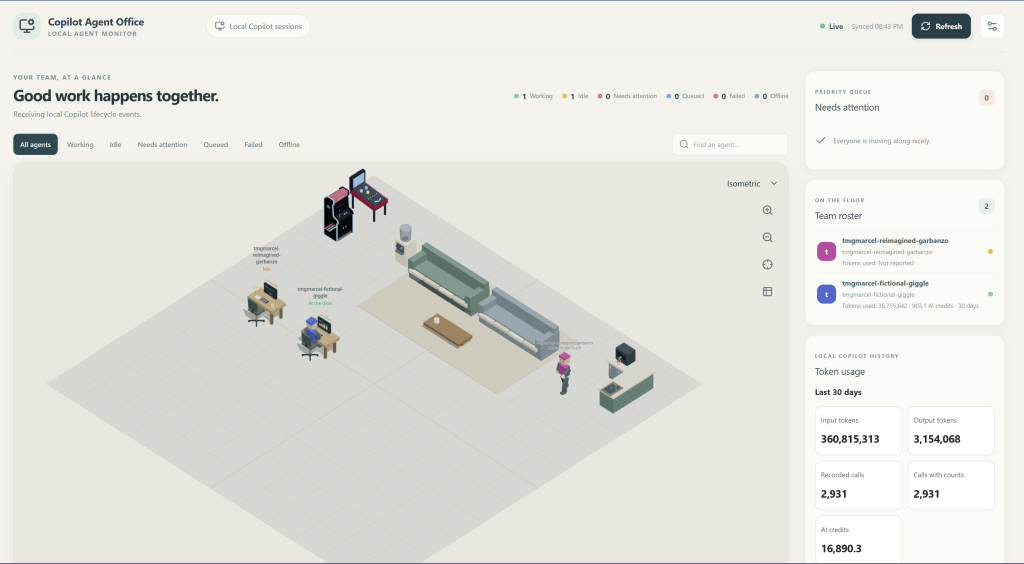
The application reads local Copilot workspace data to track agent activity and visualize status in real time. It uses that information to animate an avatar for each agent. When working, each agent occupies a desk, the screen represents that type of task the agent is doing. When they have a question, they raise their hand. The text above the agent directs me to the appropriate window.
This was all well and good, but then what should they do when they are finished? I gave them a couch to sit on and wait for the next assignment. Then, I was afraid they would get bored, so I gave them an arcade and pinball machine, and a coffee maker.
Beyond the novelty factor, the dashboard makes it easier to identify blocked agents, monitor token consumption, track task progress, and quickly find conversations that require human input.
Has it gotten out of hand? Maybe a little. When I added a celebration mode when a Pull Request is accepted, I thought I should call it complete.
I really enjoy that this is a useful tool that sits somewhere between a progress dashboard and the Johnny Castaway screensaver.
How are you managing multiple AI agents today? Are you relying on the Copilot interface alone, external dashboards, or something completely custom? I’d love to hear what’s working for you. Let me know in the comments below.
Download and install your own virtual office here: TMC-Global-Open-Source/Agent-Office



Leave a Reply