
BC AL Journey #37
User controls are the way that users interact with the system. Business Central has the basics, text, switches, drop down lists, and grids. That is all good, but sometimes we need more expressive controls.
This is where User Controls come into play. These are small HTML and JavaScript components we can create to add user interfaces to Business Central. These are multi-discipline, you will need to work with CSS, JavaScript, and AL code all at the same time.
For this example, let’s create a control to give a Vendor a “Star Rating”.
Let’s start with the finished product so that you can visualize where we are going.
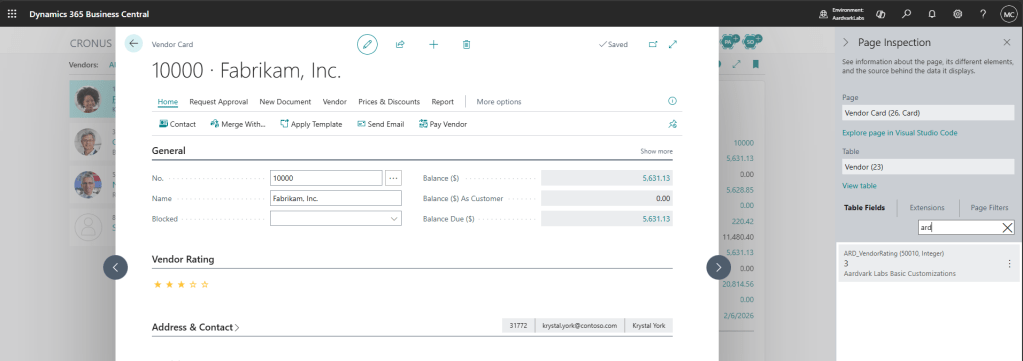
Note the 3-star vendor rating. If we select a different number of stars, then the rating reflects that and the value is reloaded when I view this vendor. Note that the value is stored in the Vendor Table Extension as ARD_VendorRating.
Let’s start with the Control Addin. This is the bridge between the AL world and the JavaScript world. This file is ARDVendoprRating.ControlAddin.al
/// <summary>
/// Vendor Rating Control Add-In
/// Provides a 1-5 star rating UI control for use on pages.
/// Events: OnControlReady (fired when the control is initialized), OnRatingChanged (fired when user clicks a star)
/// Procedures: SetRating (set rating value), SetMaxStars (set maximum star count)
/// </summary>
controladdin "ARDVendorRatingControl"
{
    RequestedWidth = 200;
    RequestedHeight = 36;
    Scripts = './js/ARDVendorRating.js';
    StartupScript = './js/ARDVendorRatingStartup.js';
    StyleSheets = './css/ARDVendorRating.css';

    // Event that identifies that the control is ready to receive data from AL
    event OnControlReady();
    // Event that is fired when the user clicks a star to change the rating
    event OnRatingChanged(Rating: integer);
    // Procedure that AL can call to set the current rating on the control
    procedure SetRating(Rating: integer);
    // Procedure that AL can call to set the maximum number of stars on the control (default is 5)
    procedure SetMaxStars(MaxStars: integer);
}
We start with some basic page setup, a width and a height. This allows BC to reserve enough space for the control.
Next is a list of scripts, in this case only one. This is the primary script the does the work. You can include several scripts, and they are all loaded into the DOM with the control.
The Startup Script is the script it will run first. This should initialize the control and when complete call the “OnControlReady” event so BC can start interacting with the control.
Lastly as have the Style Sheets, which is a list of CSS files.
Further down, we declare what Events we are going to make available to Business Central. We can call these events from inside the JavaScript and trigger procedures in AL. We also declare procedures that will feed data into the JavaScript.
The startup script is only concerned with getting the control ready and signaling that status through the OnControlReady event. Thie file is ARDVendorRatingStartup.js
(function () {
    var container = document.getElementById('controlAddIn') || document.currentScript.parentElement;
    if (!container) return;

    // Ensure container styles
    container.style.overflow = 'hidden';
    container.style.height = '100%';

    // Initialize rating control within container
    if (window.ARDVendorRating && typeof window.ARDVendorRating.initialize === 'function') {
        window.ARDVendorRating.initialize(container);
    }

    // Signal that the control is ready
    if (Microsoft && Microsoft.Dynamics && Microsoft.Dynamics.NAV && Microsoft.Dynamics.NAV.InvokeExtensibilityMethod) {
        Microsoft.Dynamics.NAV.InvokeExtensibilityMethod('OnControlReady', []);
    }
})();
Note on line 16 it uses the Microsoft.Dynamics.NAV.InvokeExtensibilityMethod(‘OnControlReady’,[]); this is how we call the OnControlReady event that we declared in the AL file.
Next up is the core of the stars control JavaScript in ARDVendorRating.js.
(function () {
    var ratingContainer;
    var currentRating = 0;
    var maxStars = 5;

    // Render the star rating UI based on the current rating
    function renderStars(rating) {
        if (!ratingContainer) {
            return;
        }

        ratingContainer.innerHTML = '';
        for (var i = 1; i <= maxStars; i++) {
            var star = document.createElement('span');
            star.className = 'ard-rating-star';
            star.innerText = i <= rating ? '★' : '☆';
            star.dataset.value = i;
            star.style.cursor = 'pointer';

            // Store the rating value in data attribute for event delegation
            star.dataset.starValue = i;

            ratingContainer.appendChild(star);
        }
    }

    // Use event delegation to handle click, hover, and leave events on the container
    function attachEventListeners() {
        if (!ratingContainer) {
            return;
        }

        // Remove old listeners to avoid duplicates
        ratingContainer.removeEventListener('click', onStarClick);
        ratingContainer.removeEventListener('mouseenter', onStarHover);
        ratingContainer.removeEventListener('mouseleave', onStarMouseLeave);

        // Attach delegated event listeners
        ratingContainer.addEventListener('click', onStarClick);
        ratingContainer.addEventListener('mouseenter', onStarHover);
        ratingContainer.addEventListener('mouseleave', onStarMouseLeave);
    }

    // Handle click on a star: update rating and notify AL
    function onStarClick(event) {
        var star = event.target;
        if (star.classList && star.classList.contains('ard-rating-star')) {
            var value = parseInt(star.dataset.starValue, 10);
            currentRating = value;
            renderStars(currentRating);
            notifyRatingChanged(currentRating);
        }
    }

    // Handle hover over a star: preview the rating
    function onStarHover(event) {
        var star = event.target;
        if (star.classList && star.classList.contains('ard-rating-star')) {
            var value = parseInt(star.dataset.starValue, 10);
            renderStars(value);
        }
    }

    // Handle mouse leaving the container: revert to current rating
    function onStarMouseLeave(event) {
        renderStars(currentRating);
    }

    // Notify AL that the rating has changed via InvokeExtensibilityMethod
    function notifyRatingChanged(rating) {
        try {
            if (typeof Microsoft !== 'undefined' &&
                Microsoft.Dynamics &&
                Microsoft.Dynamics.NAV &&
                Microsoft.Dynamics.NAV.InvokeExtensibilityMethod) {
                Microsoft.Dynamics.NAV.InvokeExtensibilityMethod('OnRatingChanged', [rating]);
                return;
            }
        } catch (e) {
            // Fall back to window.external.notify if available
        }

        try {
            if (window.external && window.external.notify) {
                window.external.notify('rating:' + rating);
                return;
            }
        } catch (e) {
            // No fallback available
        }
    }

    // Set the current rating value (called from AL via CurrPage.VendorRatingControl.SetRating)
    function setRating(rating) {
        if (typeof rating === 'number') {
            currentRating = rating;
            renderStars(currentRating);
            attachEventListeners();
        }
    }

    // Set the maximum number of stars (called from AL via CurrPage.VendorRatingControl.SetMaxStars)
    function setMaxStars(stars) {
        if (typeof stars === 'number' && stars > 0) {
            maxStars = stars;
            renderStars(currentRating);
            attachEventListeners();
        }
    }

    // Public interface for the control
    window.ARDVendorRating = {
        initialize: function (container) {
            ratingContainer = container || document.getElementById('ard-rating');
            if (!ratingContainer) {
                // Create container if not provided
                var host = (container || document.body);
                ratingContainer = document.createElement('div');
                ratingContainer.id = 'ard-rating';
                ratingContainer.className = 'ard-rating';
                host.appendChild(ratingContainer);
            }
            renderStars(currentRating);
            attachEventListeners();
        },
        setRating: setRating,
        setMaxStars: setMaxStars
    };
})();

// Expose global functions so AL can call control methods directly
window.SetRating = function (rating) {
    var r = parseInt(rating, 10);
    if (!isNaN(r) && window.ARDVendorRating) {
        window.ARDVendorRating.setRating(r);
    }
};

window.SetMaxStars = function (stars) {
    var s = parseInt(stars, 10);
    if (!isNaN(s) && window.ARDVendorRating) {
        window.ARDVendorRating.setMaxStars(s);
    }
};
There is a lot of JavaScript here, but 90% of it is just creating the star rating control. Line 76 is where we take the users input changing the star rating and raise and event notifying AL that the value changed.
Lines 132 and 139 are there for us to push data from AL into the control.
The Vendor Card is updated with ARDVendorCard.PageExt.al
namespace AardvarkLabs;

using Microsoft.Purchases.Vendor;

/// <summary>
/// Vendor Card Page Extension
/// Adds a vendor rating control to the Vendor Card page.
/// The rating is stored in the ARD_VendorRating field on the Vendor table.
/// </summary>
pageextension 50011 ARDVendorCard extends "Vendor Card"
{
    layout
    {
        addafter(General)
        {
            group(ARDVendorRatingGroup)
            {
                Caption = 'Vendor Rating';
                usercontrol(VendorRatingControl; ARDVendorRatingControl)
                {
                    ApplicationArea = All;

                    trigger OnControlReady()
                    begin
                        FormIsReady := true;
                        SendDataToForm();
                    end;

                    trigger OnRatingChanged(Rating: Integer)
                    begin
                        // Prevent recursion when updating control from AL
                        UpdatingFromForm := true;
                        Rec.Validate(ARD_VendorRating, Rating);
                        Rec.Modify(true);
                        CurrPage.Update(false);
                        UpdatingFromForm := false;
                    end;
                }
            }
        }
    }

    var
        FormIsReady: Boolean;
        UpdatingFromForm: Boolean;

    trigger OnAfterGetCurrRecord()
    begin
        if FormIsReady and not UpdatingFromForm then
            SendDataToForm();
    end;

    local procedure SendDataToForm()
    begin
        if not FormIsReady then
            exit;

        if UpdatingFromForm then
            exit;

        UpdatingFromForm := true;
        CurrPage.VendorRatingControl.SetRating(Rec.ARD_VendorRating);
        UpdatingFromForm := false;
    end;
}
Adding a control is very similar to adding a listpart or cardpart to a page. On line 23 you can see where the OnControlReady event is finally handled by AL. We set a flag indicating that the control is ready, we also call a procedure to send data to the form.
Looking at the SandDataToForm procedure, we can see how data is sent from AL to JavaScript. We check that the form is ready, we then check if we are currently updating the form in another process. If everthing is good, we set the flag indicating that this procedure is updating the JavaScript, we then find the user control on the current page, and call the SetRating procedure with the value from the Record. Once that is done, we clear the Updating flag.
The final bit of interesting code is in the User Control there is a trigger of OnRatingChanged which passes an integer. We then perform our update checks, update the Vendor Record with the new rating value, and update the form, then clear the updating flag.
This is a simple example to get you going, but a User Control can go far beyond a star rating. You can create entire bespoke interface systems to meet specific data entry needs. This allows us to go from the basic control available, to an amazing user experience.
Let me know if you think you’ll be using user controls.
As always, code available in GitHub.





Leave a comment