

It is a rare occasion where I can apply my Maker skills to by Business Central development tasks. I’ve been asked to create a proof of concept for a low-cost RFID scan-in/scan-out system. Let the Mad Science begin!
Here is the use case for the proof:
The user would like to be able to scan an RFID card or tag at a machine when they arrive and scan again when they leave. The results of these scans are to create a Scan-In and Scan-Out time for resource management. These scans are to be stored in Business Central.
There is an edge case where a user scans-in to one location, forgets to scan-out, and scans-in on another location. The previous scan-in is to be automatically set with a scan-out time and flagged for review.
Sounds like fun!
Now this isn’t my first rodeo with RFID systems. I created the RFID system at my local Makerspace, which is more of a lockout/access control system than scan-in/out, but the principals are similar.
First off lets create a data flow that works well. One of the challenges is that the scanning hardware cannot easily authenticate with Business Central. OAUTH 2.0 in IoT level hardware is not easy, and while I have uploaded SSL Certs to an ESP32 before, I’m still in therapy from the experience.
You know what the ‘S’ stands for in IoT? Security.
We are going to want a layer that allows for easy authentication, and some process automation capabilities. Power Automate has an HTTP data trigger that should do the trick.
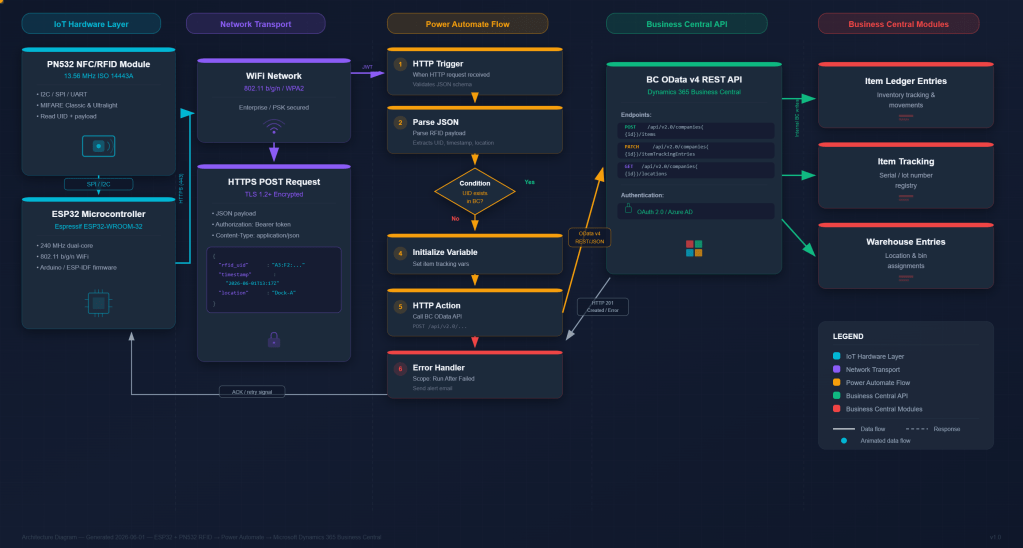
Let’s start with the hardware build and work our way to Power Automation and finally to Business Central.
For the Microcontroller I went with the ESP32 DEVKIT V1.
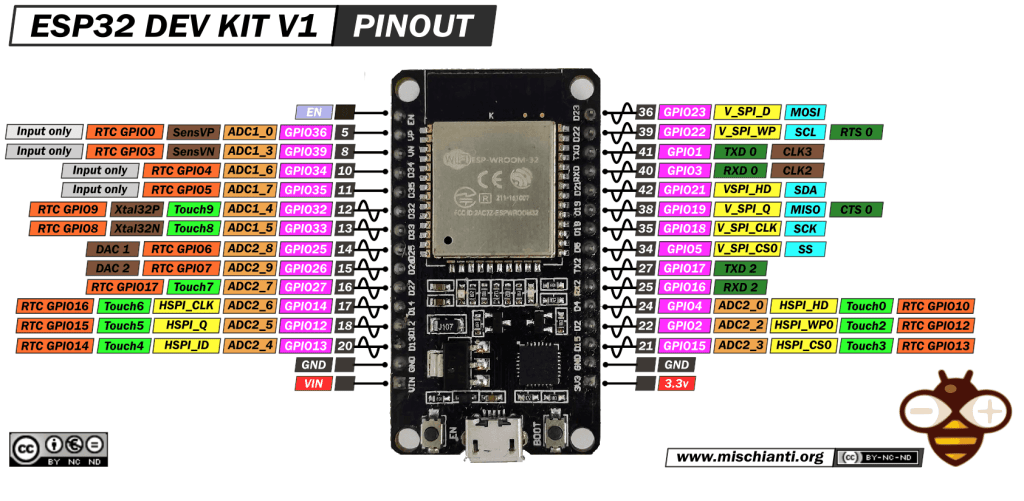
The ESP32 hardware line is inexpensive, small, powerful, and well supported. I’ve done lots of projects with them. The Pi Pico W 2 would have also been a solid option if you wanted to do this project in Python as opposed to C++. I’m old school so C++ is my go-to base language. C++ breaks when you’re careless; Python breaks when you’re confident.
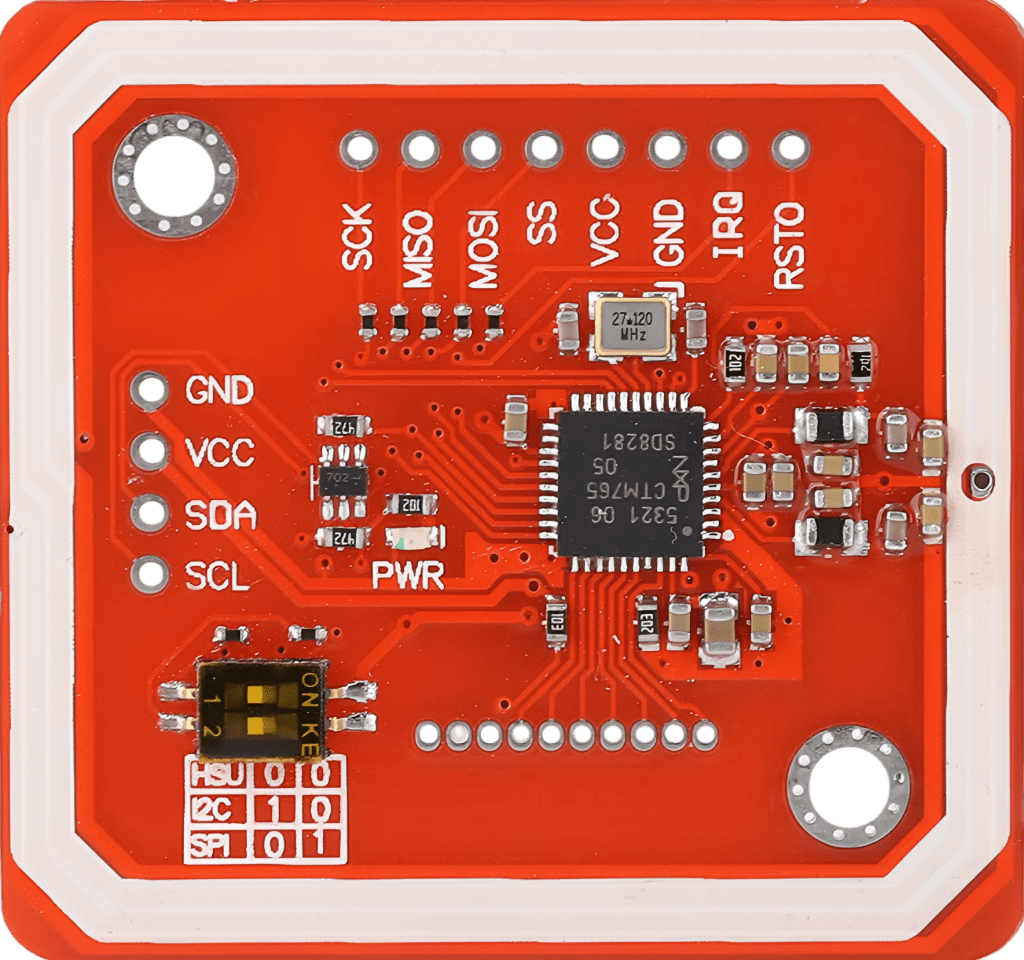
The RFID Scanner is a PN532 device that I have wired using the I2C Bus.
I’ll wire these together on an ElectroCookie solderable breadboard. Yeah, I made it look like a little bug. The strange layout is because the ElectroCookie required the ESP32 to be lengthwise, and I wanted access to the USB plug. This orientation put the Wi-Fi antenna right next to the RFID antenna, and it was causing issues. The ElectroCookie backplane provides just enough separation that this orientation works for my testing.
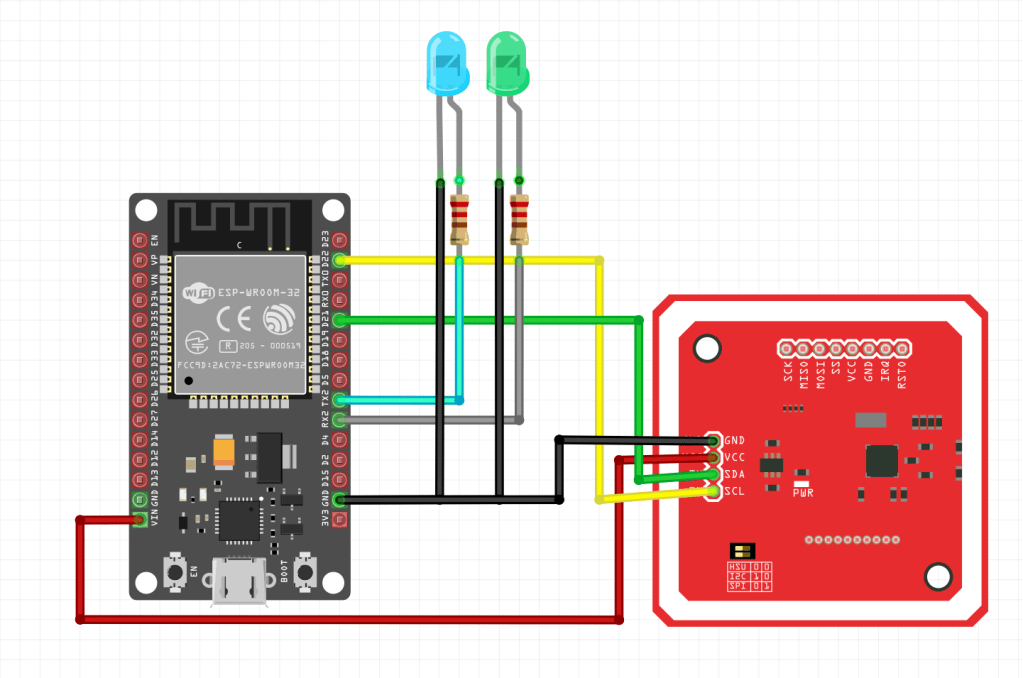
No making fun of my soldering joints, I ran out of flux.
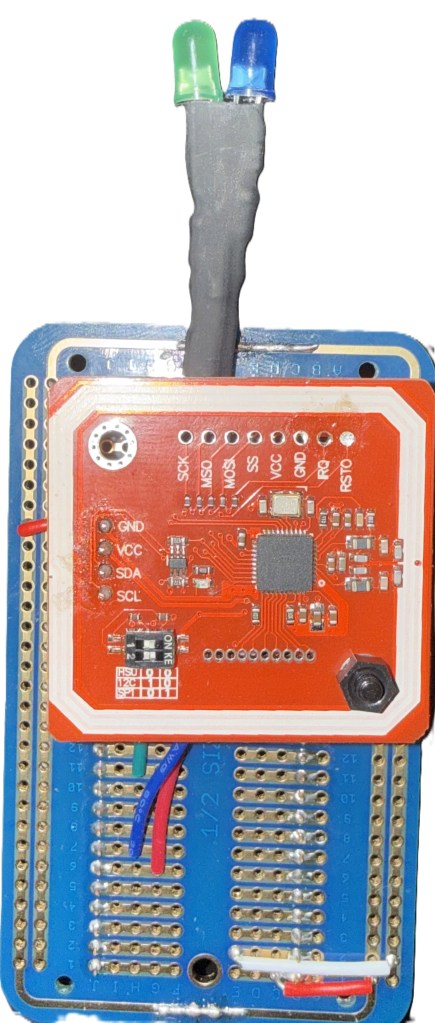
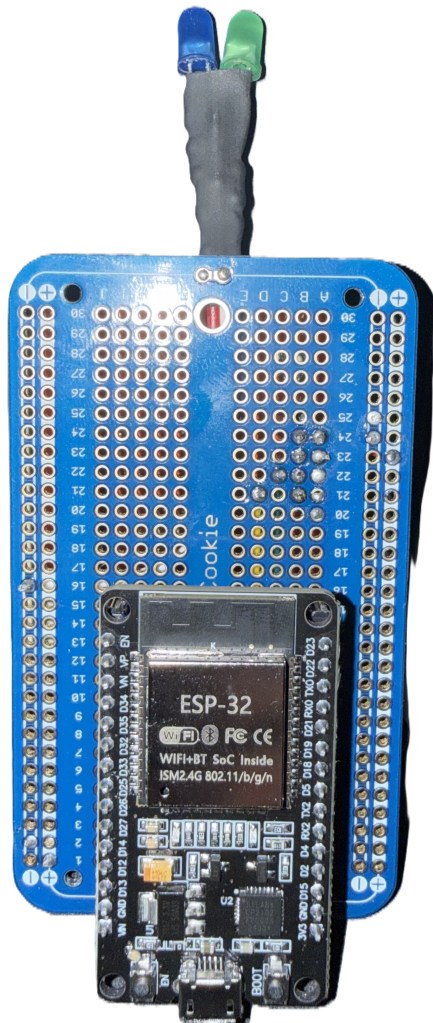
Here is the source code in the Arduino IDE.
/******************************************************************************************
 * ESP32 NFC Scanner → Power Automate Webhook
 * ------------------------------------------------
 * Features:
 *  - Reads NFC tags using PN532 (I2C)
 *  - Buffers scans locally (up to 50)
 *  - Sends JSON array to a Power Automate HTTP trigger
 *  - Includes IotWebConf WiFi + configuration portal
 *  - LED indicators for READY and SUCCESS
 *  - NTP time sync for timestamped scans
 *
 * Author: Marcel Chabot
 ******************************************************************************************/

#include <Wire.h>
#include <Adafruit_PN532.h>
#include <WiFi.h>
#include <HTTPClient.h>
#include <IotWebConf.h>
#include <IotWebConfUsing.h>
#include <IotWebConfParameter.h>
#include <DNSServer.h>
#include <WebServer.h>
#include <time.h>

/* --------------------------------------------------------------------------
 *  PN532 NFC Reader (I2C)
 * -------------------------------------------------------------------------- */
#define SDA_PIN 21
#define SCL_PIN 22
Adafruit_PN532 nfc(SDA_PIN, SCL_PIN);
bool nfcAvailable = false;

/* --------------------------------------------------------------------------
 *  LED Indicators
 * -------------------------------------------------------------------------- */
#define READY_LED_PIN   16   // ON when scanning
#define SUCCESS_LED_PIN 17   // Blinks when a tag is accepted

/* --------------------------------------------------------------------------
 *  Boot / Config Mode Control
 * -------------------------------------------------------------------------- */
unsigned long bootTimeMs;
bool configAccessed = false;

/* --------------------------------------------------------------------------
 *  IotWebConf Setup
 * -------------------------------------------------------------------------- */
const char thingName[] = "NFCReader";
const char wifiInitialApPassword[] = "12345678";
#define CONFIG_VERSION "dev1"

DNSServer dnsServer;
WebServer server(80);

// Custom config fields
#define LocationLen 32
#define URLLen 350

char locationName[LocationLen];
char powerAutomateUrl[URLLen] =
  "https://YOUR-POWER-AUTOMATE-URL-HERE";

IotWebConf iotWebConf(thingName, &dnsServer, &server, wifiInitialApPassword, CONFIG_VERSION);
IotWebConfParameterGroup group1("Connections", "");

IotWebConfTextParameter locationParam(
  "Location Name", "locationParam", locationName, LocationLen);

IotWebConfTextParameter paUrlParam(
  "Power Automate URL", "paUrlParam", powerAutomateUrl, URLLen);

/* --------------------------------------------------------------------------
 *  Scan Buffer
 * -------------------------------------------------------------------------- */
struct ScanEntry {
  String tag;
  String datetime;
};

ScanEntry scanBuffer[50];
int scanCount = 0;

String lastTag = "";
unsigned long lastTagTime = 0;
const unsigned long tagDebounceMs = 1000;

/* --------------------------------------------------------------------------
 *  Forward Declarations
 * -------------------------------------------------------------------------- */
void handleRoot();
void configSaved();
bool validateUrl(const char* value);
void addScan(const String& uid);
void tryUpload();
String getCurrentDateTime();

/* --------------------------------------------------------------------------
 *  Setup
 * -------------------------------------------------------------------------- */
void setup() {
  Serial.begin(115200);
  delay(300);
  Serial.println("\nBooting NFC Reader...");

  pinMode(READY_LED_PIN, OUTPUT);
  pinMode(SUCCESS_LED_PIN, OUTPUT);
  digitalWrite(READY_LED_PIN, LOW);
  digitalWrite(SUCCESS_LED_PIN, LOW);

  /* ---------------- IotWebConf ---------------- */
  iotWebConf.setStatusPin(LED_BUILTIN);
  group1.addItem(&locationParam);
  group1.addItem(&paUrlParam);
  iotWebConf.addParameterGroup(&group1);
  iotWebConf.setConfigSavedCallback(&configSaved);
  iotWebConf.init();

  server.on("/", handleRoot);
  server.on("/config", [] {
    Serial.println("Config Portal Accessed — NFC scanning disabled.");
    configAccessed = true;
    iotWebConf.handleConfig();
  });
  server.onNotFound([] { iotWebConf.handleNotFound(); });

  /* ---------------- PN532 Init ---------------- */
  Wire.begin(SDA_PIN, SCL_PIN);
  nfc.begin();

  uint32_t versiondata = nfc.getFirmwareVersion();
  if (!versiondata) {
    Serial.println("ERROR: PN532 not detected. Check wiring.");
    nfcAvailable = false;
  } else {
    nfcAvailable = true;
    Serial.printf("PN532 Firmware: %02X.%02X\n",
                  (versiondata >> 24) & 0xFF,
                  (versiondata >> 16) & 0xFF);

    nfc.SAMConfig();
    Serial.println("PN532 ready. Waiting for NFC tags...");
  }

  /* ---------------- NTP Time ---------------- */
  configTime(-5 * 3600, 3600, "pool.ntp.org", "time.nist.gov");
  Serial.println("NTP time sync requested.");

  bootTimeMs = millis();
}

/* --------------------------------------------------------------------------
 *  Config Window: First 45 seconds block scanning
 * -------------------------------------------------------------------------- */
bool inConfigWindow() {
  return (millis() - bootTimeMs) < 45000;
}

/* --------------------------------------------------------------------------
 *  Main Loop
 * -------------------------------------------------------------------------- */
void loop() {
  iotWebConf.doLoop();

  // Block scanning during config window
  if (inConfigWindow()) {
    digitalWrite(READY_LED_PIN, LOW);
    return;
  }

  // Block scanning if config portal was accessed
  if (configAccessed) {
    digitalWrite(READY_LED_PIN, LOW);
    return;
  }

  // If no NFC reader, just try uploading buffered scans
  if (!nfcAvailable) {
    digitalWrite(READY_LED_PIN, LOW);
    tryUpload();
    return;
  }

  /* ---------------- NFC Scan ---------------- */
  digitalWrite(READY_LED_PIN, HIGH);

  uint8_t uid[7];
  uint8_t uidLength;
  bool found = nfc.readPassiveTargetID(PN532_MIFARE_ISO14443A, uid, &uidLength);

  if (found) {
    Serial.println("[NFC] Tag detected!");

    // Convert UID to hex string
    String tag = "";
    for (uint8_t i = 0; i < uidLength; i++) {
      if (uid[i] < 0x10) tag += "0";
      tag += String(uid[i], HEX);
    }
    tag.toUpperCase();

    Serial.printf("[NFC] UID: %s\n", tag.c_str());

    // Debounce repeated scans
    unsigned long nowMs = millis();
    if (tag != lastTag || (nowMs - lastTagTime) > tagDebounceMs) {
      digitalWrite(SUCCESS_LED_PIN, HIGH);
      delay(150);
      digitalWrite(SUCCESS_LED_PIN, LOW);

      lastTag = tag;
      lastTagTime = nowMs;
      addScan(tag);
    } else {
      Serial.println("[NFC] Duplicate ignored.");
    }
  }

  delay(5);
  tryUpload();
}

/* --------------------------------------------------------------------------
 *  Web Root Handler
 * -------------------------------------------------------------------------- */
void handleRoot() {
  configAccessed = true;
  if (iotWebConf.handleCaptivePortal()) return;

  String s = "<html><body><h1>NFC Reader</h1>";
  s += "<p>Location: " + String(locationName) + "</p>";
  s += "<p>Power Automate URL: " + String(powerAutomateUrl) + "</p>";
  s += "<p>Stored scans: " + String(scanCount) + "</p>";
  s += "<p><a href='config'>Configuration</a></p>";
  s += "</body></html>";

  server.send(200, "text/html", s);
}

/* --------------------------------------------------------------------------
 *  Config Saved → Reboot
 * -------------------------------------------------------------------------- */
void configSaved() {
  Serial.println("Configuration updated. Rebooting...");
  delay(1000);
  ESP.restart();
}

/* --------------------------------------------------------------------------
 *  URL Validation
 * -------------------------------------------------------------------------- */
bool validateUrl(const char* value) {
  return (value && strlen(value) > 10 && strncmp(value, "https://", 8) == 0);
}

/* --------------------------------------------------------------------------
 *  Timestamp Helper
 * -------------------------------------------------------------------------- */
String getCurrentDateTime() {
  time_t now;
  time(&now);

  if (now < 100000) return "1970-01-01 00:00:00";

  struct tm timeInfo;
  localtime_r(&now, &timeInfo);

  char buffer[20];
  strftime(buffer, sizeof(buffer), "%Y-%m-%d %H:%M:%S", &timeInfo);
  return String(buffer);
}

/* --------------------------------------------------------------------------
 *  Add Scan to Buffer
 * -------------------------------------------------------------------------- */
void addScan(const String& uid) {
  if (scanCount >= 50) {
    // Shift buffer left
    for (int i = 1; i < 50; i++) scanBuffer[i - 1] = scanBuffer[i];
    scanCount = 49;
  }

  scanBuffer[scanCount].tag = uid;
  scanBuffer[scanCount].datetime = getCurrentDateTime();
  scanCount++;

  Serial.printf("Stored scan %s @ %s\n",
                uid.c_str(),
                scanBuffer[scanCount - 1].datetime.c_str());
}

/* --------------------------------------------------------------------------
 *  Upload Buffered Scans to Power Automate
 * -------------------------------------------------------------------------- */
void tryUpload() {
  if (scanCount == 0) return;
  if (WiFi.status() != WL_CONNECTED) return;

  if (!validateUrl(powerAutomateUrl)) {
    Serial.println("Invalid Power Automate URL.");
    return;
  }

  HTTPClient http;
  if (!http.begin(powerAutomateUrl)) {
    Serial.println("HTTP begin() failed.");
    return;
  }

  http.addHeader("Content-Type", "application/json");

  // Build JSON array
  String json = "[";
  for (int i = 0; i < scanCount; i++) {
    json += "{";
    json += "\"Tag\":\"" + scanBuffer[i].tag + "\",";
    json += "\"DT\":\"" + scanBuffer[i].datetime + "\",";
    json += "\"Location\":\"" + String(locationName) + "\"";
    json += "}";
    if (i < scanCount - 1) json += ",";
  }
  json += "]";

  Serial.println("Uploading JSON:");
  Serial.println(json);

  int code = http.POST(json);
  Serial.printf("HTTP POST result: %d\n", code);

  if (code >= 200 && code < 300) {
    Serial.println("Upload successful. Clearing buffer.");
    scanCount = 0;
  } else {
    Serial.println("Upload failed. Buffer retained.");
  }

  http.end();
}
When the system boots up, the user gets a 30 second window to connect to the devices Wi-Fi Access Point and access the settings window. In the settings window they can configure Wi-Fi access, Device Location, and Power Automate HTTP End Point.
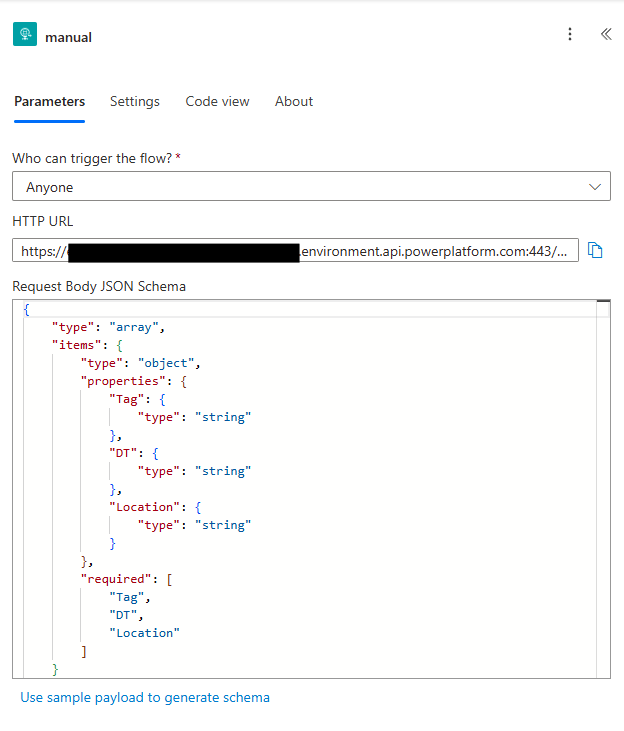
If the configuration system is not accessed in the first 30 seconds, the system logs onto the Wi-Fi and is ready for scans. RFID Scans are stored in an array of 50, incase Wi-Fi is down. If Wi-Fi is accessible, the values are sent in a JSON array of values.
[
  {
     "Tag": "2322311232",
     "DT": "01012026 10:30:00z",
     "Location": "Aardvark Labs"
  }
]
This sends everything off to the Power Automate to handle the communication with Business Central.
Here is the Power Automate block view.
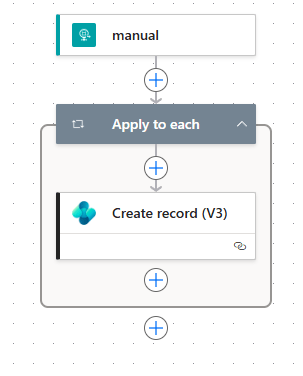
The HTTP block listens to an HTTP address for a JSON body. It parses it into the three values we are sending.
For each of the JSON objects in the array, we call Business Central and send the data over to an API to handle the scan.
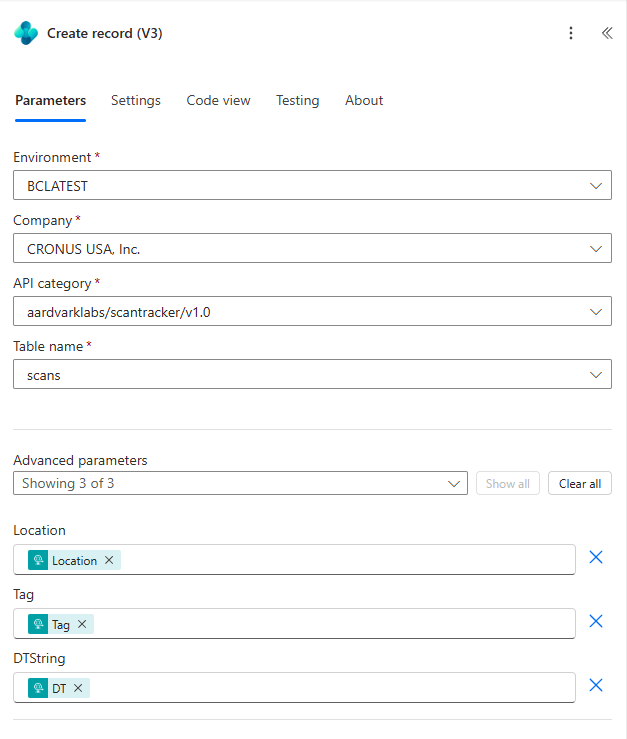
We could add a lot to this Power Automate. The inclusion of a pre-shared key for security would be prudent. We can also add more workflow from here if needed, but this is a simple example.
Now for the Business Central. I went with two tables, a Raw Scan table and a Scan-in/out tracker table and page system.
I started with a table to hold the raw scan data. This is the location, tag and date time string. ARDScans.Table.al
namespace ScannerApp;
table 50001 ARD_Scans
{
    Caption = 'Scans';
    DataClassification = ToBeClassified;

    fields
    {
        field(1; "ARD_No."; Integer)
        {
            Caption = 'No.';
            ToolTip = 'Unique number for each scan record.';
            AutoIncrement = true;
        }
        field(2; ARD_Location; Text[255])
        {
            Caption = 'Location';
            toolTip = 'The location of the scan.';
        }
        field(3; ARD_Tag; Text[255])
        {
            Caption = 'Tag';
            toolTip = 'The tag scanned.';
        }
        field(4; ARD_DTString; Text[255])
        {
            Caption = 'DTString';
            tooltip = 'The date and time of the scan as a string.';
        }
    }
    keys
    {
        key(PK; "ARD_No.")
        {
            Clustered = true;
        }
    }

    trigger onInsert()
    begin
        ProcessScan();
    end;

    procedure ProcessScan()
    var
        ScanTrackerRecord: Record ARD_ScanTracker;
        ScanTime: DateTime;
    begin
        if Rec.ARD_Tag = '' then exit;
        if Rec.ARD_Location = '' then exit;
        if Rec.ARD_DTString = '' then exit;

        if not evaluate(ScanTime, Rec.ARD_DTString) then exit;

        //Check if the user has already scanned into a location
        ScanTrackerRecord.SetFilter(ARD_LocationCode, '%1', Rec.ARD_Location);
        ScanTrackerRecord.SetFilter(ARD_ScanInDateTime, '<>%1', 0DT);
        ScanTrackerRecord.SetFilter(ARD_ScanOutDateTime, '%1', 0DT);
        if ScanTrackerRecord.FindFirst() then begin
            //If they have, update the existing record with the scan out information
            ScanTrackerRecord.ARD_ScanOutDateTime := ScanTime;
            ScanTrackerRecord.ARD_ScanOutAssumed := false;
            ScanTrackerRecord.Modify();
        end
        else begin
            //If they haven't, create a new record with the scan in information
            ScanTrackerRecord."ARD_No." := 0;
            ScanTrackerRecord.ARD_LocationCode := copystr(Rec.ARD_Location, 1, 2048);
            ScanTrackerRecord.ARD_ScanCode := copystr(Rec.ARD_Tag, 1, 2048);
            ScanTrackerRecord.ARD_ScanInDateTime := ScanTime;
            ScanTrackerRecord.ARD_ScanOutDateTime := 0DT;
            ScanTrackerRecord.ARD_ScanOutAssumed := false;
            ScanTrackerRecord.Insert();
        end;

        //Assume any existing scans that haven't been scanned out are now scanned out
        ScanTrackerRecord.SetFilter(ARD_LocationCode, '<>%1', Rec.ARD_Location);
        ScanTrackerRecord.SetFilter(ARD_ScanInDateTime, '<>%1', 0DT);
        ScanTrackerRecord.SetFilter(ARD_ScanOutDateTime, '%1', 0DT);
        if not ScanTrackerRecord.IsEmpty() then begin
            ScanTrackerRecord.ModifyAll(ARD_ScanOutDateTime, ScanTime);
            ScanTrackerRecord.ModifyAll(ARD_ScanOutAssumed, true);
        end;
    end;
}
The table logic has an OnInsert trigger that performs the scan in/out logic. First we check to see if this tag has a scan-in, but no scan-out at the target location; if it does, then we edit that record with a scan-out time. If we don’t find an open scan, then we create a new record with a scan-in date time.
After that logic, we see if that tag can a scan-in, but no scan-out at a different location. If that is the case, then we add a scan-out time and set the Scan Out Assumed flag to true.
All this goes into a table in ARDScanTracker.Table.al
namespace ScannerApp;
table 50000 ARD_ScanTracker
{
    Caption = 'Scan Tracker';
    DataClassification = CustomerContent;

    fields
    {
        field(1; "ARD_No."; Integer)
        {
            Caption = 'No.';
            ToolTip = 'Unique number for each scan record.';
            AutoIncrement = true;
        }
        field(2; ARD_LocationCode; Text[2048])
        {
            Caption = 'Location Code';
            ToolTip = 'The code representing the location of the scan.';
        }
        field(3; ARD_ScanCode; Text[2048])
        {
            Caption = 'Scan Code';
            ToolTip = 'The code scanned for this record.';
        }
        field(4; ARD_ScanInDateTime; DateTime)
        {
            Caption = 'Scan In Date Time';
            ToolTip = 'The date and time when the item was scanned in.';
        }
        field(5; ARD_ScanOutDateTime; DateTime)
        {
            Caption = 'Scan Out Date Time';
            ToolTip = 'The date and time when the item was scanned out.';
        }
        field(6; ARD_ScanOutAssumed; Boolean)
        {
            Caption = 'Scan Out Assumed';
            ToolTip = 'Indicates if the scan out was assumed.';
        }
    }
    keys
    {
        key(PK; "ARD_No.")
        {
            Clustered = true;
        }
    }
}
There is a Raw Scans page for debugging. ARDRawScans.Page.al.
namespace AardvarkLabs.BCScanAndGo;

using ScannerApp;

page 50002 ARD_RawScans
{
    ApplicationArea = All;
    Caption = 'Raw Scans';
    PageType = List;
    SourceTable = ARD_Scans;
    UsageCategory = Lists;

    layout
    {
        area(Content)
        {
            repeater(General)
            {
                field("ARD_No."; Rec."ARD_No.")
                {
                }
                field(ARD_Tag; Rec.ARD_Tag)
                {
                }
                field(ARD_Location; Rec.ARD_Location)
                {
                }
                field(ARD_DTString; Rec.ARD_DTString)
                {
                }
            }
        }
    }
}
A scan tracker page for the scan-in/out view of things in ARDScanTracker.Page.al.
namespace ScannerApp;
page 50000 ARD_ScanTracker
{
    ApplicationArea = All;
    Caption = 'Scan Tracker';
    PageType = List;
    SourceTable = ARD_ScanTracker;
    UsageCategory = Lists;

    layout
    {
        area(Content)
        {
            repeater(General)
            {
                field("ARD_No."; Rec."ARD_No.")
                {
                    Editable = false;
                }
                field(ARD_LocationCode; Rec.ARD_LocationCode)
                {
                }
                field(ARD_ScanCode; Rec.ARD_ScanCode)
                {
                    Editable = false;
                }
                field(ARD_ScanInDateTime; Rec.ARD_ScanInDateTime)
                {
                    Editable = false;
                }
                field(ARD_ScanOutAssumed; Rec.ARD_ScanOutAssumed)
                {
                }
                field(ARD_ScanOutDateTime; Rec.ARD_ScanOutDateTime)
                {
                }
            }
        }
    }
}
Last, but not least, the ARDScanTrackerAPI.Page.al, which is the page the Power Automate feeds data into, which is the ARDScans table.
namespace ScannerApp;
page 50001 ARD_ScanTrackerAPI
{
    APIGroup = 'scantracker';
    APIPublisher = 'aardvarklabs';
    APIVersion = 'v1.0';
    ApplicationArea = All;
    Caption = 'ardScanTrackerAPI';
    DelayedInsert = true;
    EntityName = 'scan';
    EntitySetName = 'scans';
    PageType = API;
    SourceTable = ARD_Scans;

    layout
    {
        area(Content)
        {
            repeater(General)
            {
                field(ardLocationCode; Rec.ARD_Location)
                {
                }
                field(ardScanCode; Rec.ARD_Tag)
                {
                }
                field(ardScanTime; Rec.ARD_DTString)
                {
                }
            }
        }
    }
}
What a cute little API!
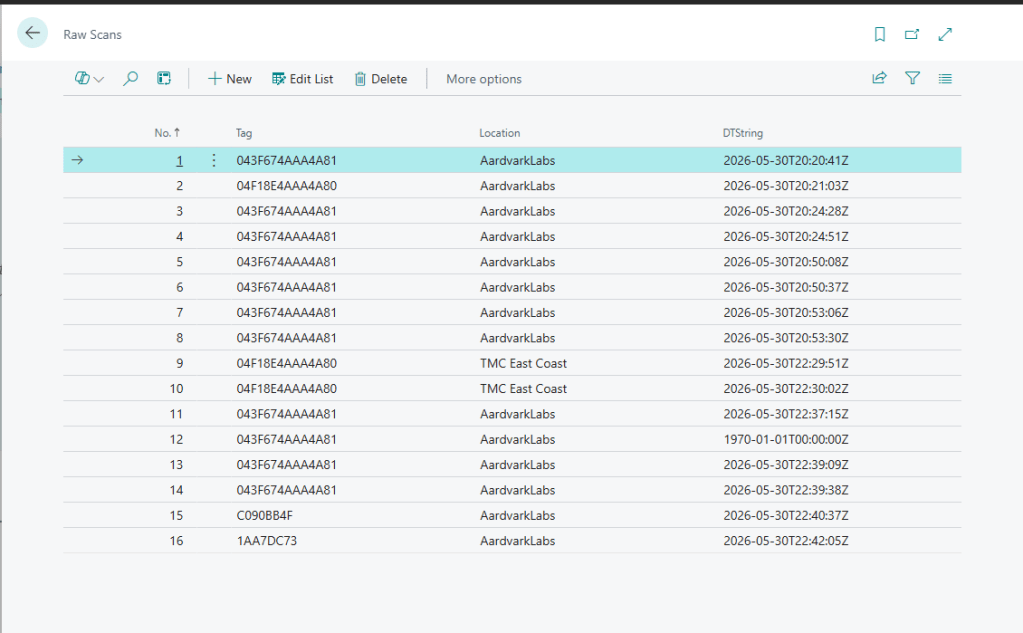
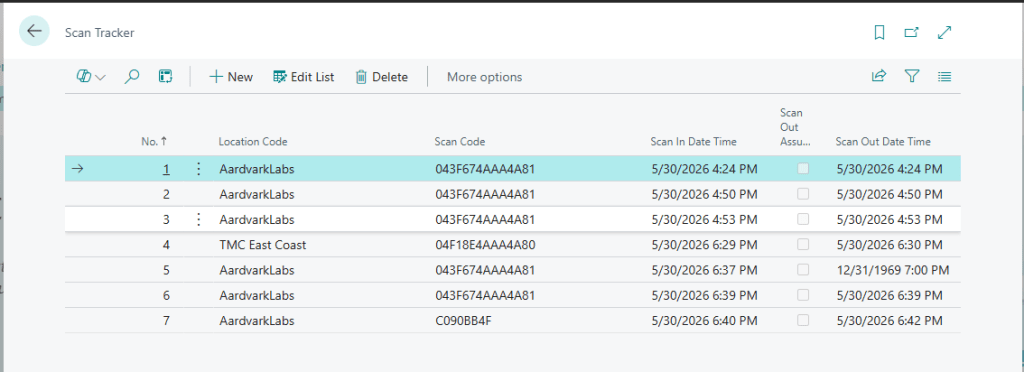
Here is what we see in Business Central after a few scans.
Raw Scans:
Processed Scan-In/Out logs:
From this design the possibilities really open up. We can associate the RFID Tags with resources and track labor, or machine use time. We could feed back data to Power Automate to answer back to the ESP32 about the status of the machine. We could drive emails, Teams messages, AI agents off the Power Automate or Business Central processes.
I’ve made two, and hand soldered them all to ElectroCookie prototyping boards. If I had to make more, I would create a PCB Layout and use JLBPCB or PCBWay and have either the entire system created on a single board or a simple backplane so I wouldn’t need to solder wires.
This is just another example of how Business Central and the Power Platform enable you to do so much more with the amazing Microsoft Dynamics ecosystem.
Source code available in GitHub: https://github.com/AardvarkMan/BC-Scan-and-Go
Hardware links:
ESP 32 from Amazon
PN532 RFID Reader from Amazon
ElectroCookie Prototype board




Leave a Reply