

For years, the Web Services page has been the default place to discover integrations in Business Central. It listed SOAP endpoints, OData feeds, and anything manually published for external consumption. It worked… but it was never designed for the API‑first world Business Central has evolved into.
With the introduction of the API Overview, Business Central finally provides a modern, unified way to see all API pages exposed in your environment; Microsoft’s, ISVs’, and your own custom AL‑defined APIs. This page is the future, and it’s slowly replacing the legacy Web Services list we’ve been relying on for over a decade.
Why This Matters
Business Central’s API model has matured significantly. We now have:
- Versioned APIs (v1.0, v2.0, etc.)
- Publisher/Group/Version hierarchy
- AL‑first publishing (no manual toggles)
- Consistent naming and discoverability
- A clear roadmap away from SOAP and legacy OData
The new API Overview is the UI reflection of that shift. Instead of hunting through AL objects or documentation, you now have a single authoritative list of every API page available in your tenant.
Navigation
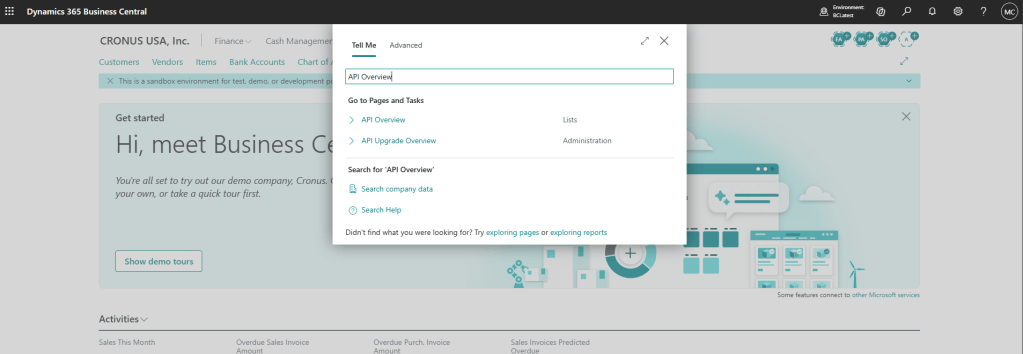
You can find the new page by searching for API Overview in Tell Me. It opens a system page that enumerates all API pages published in the environment, regardless of source
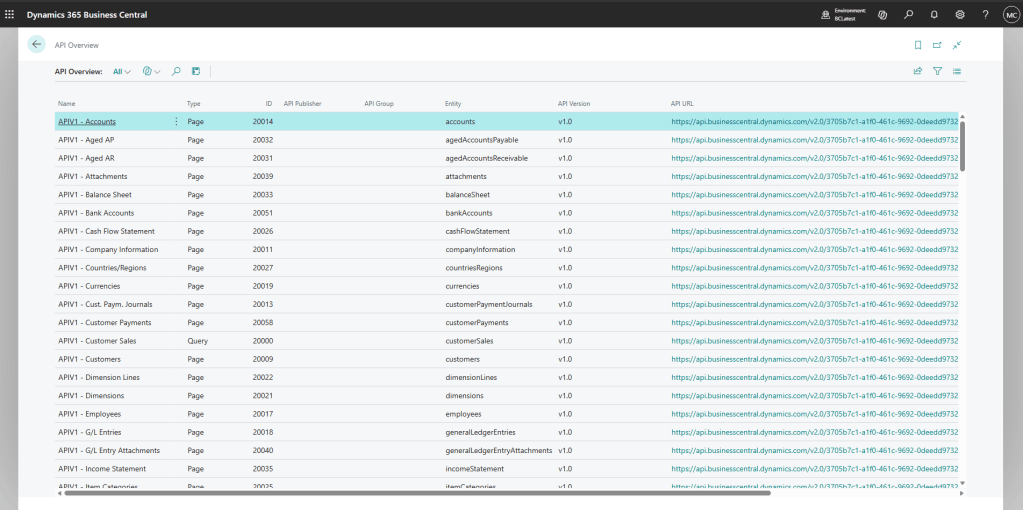
The API Overview gives you a structured, modern look at your API surface. Each row represents an API page, with metadata such as:
- Entity Name
- Publisher / Group / Version
- Page ID
- Caption
- OData URL
- Enabled/Disabled state (depending on your BC version)
This is the first time Business Central has provided a complete, discoverable list of API endpoints without requiring manual publishing or external documentation.
How It Compares to the Web Services Page
| Web Services Page | API Overview |
|---|---|
| SOAP + OData V4 | Pure API (V1.0+) |
| Manual publishing | AL-driven publishing |
| No versioning | Full versioning support |
| No grouping | Publisher/Gorup/Version hierarchy |
| Legacy | Future-proof |
What This Means for Developers
1. Discoverability
You can finally see every API page in one place; no more digging through AL or guessing which versions exist.
2. Version Clarity
The page makes it obvious which API versions are available and which one you should target.
3. Better Onboarding
New developers can immediately understand the API landscape without needing tribal knowledge.
4. Alignment with Microsoft’s Direction
SOAP is deprecated. OData is legacy. AL‑defined APIs are the future. This page is part of that transition.
The new API Overview is a small addition with a big impact. It modernizes how we discover and manage API endpoints, aligns with Microsoft’s long‑term integration strategy, and finally gives developers and admins a clean, authoritative view of the API surface.
If you’ve been relying on the Web Services page for years, it’s time to start shifting your workflow. The future of integrations in Business Central lives in the API Overview.



Leave a Reply